GUI- 003 Knowledge Base- Resetting your Redback Inverter
Audience: Home owner Installer .
Version 1.0 - 27/07/2018 - Page 14 of 16
17.
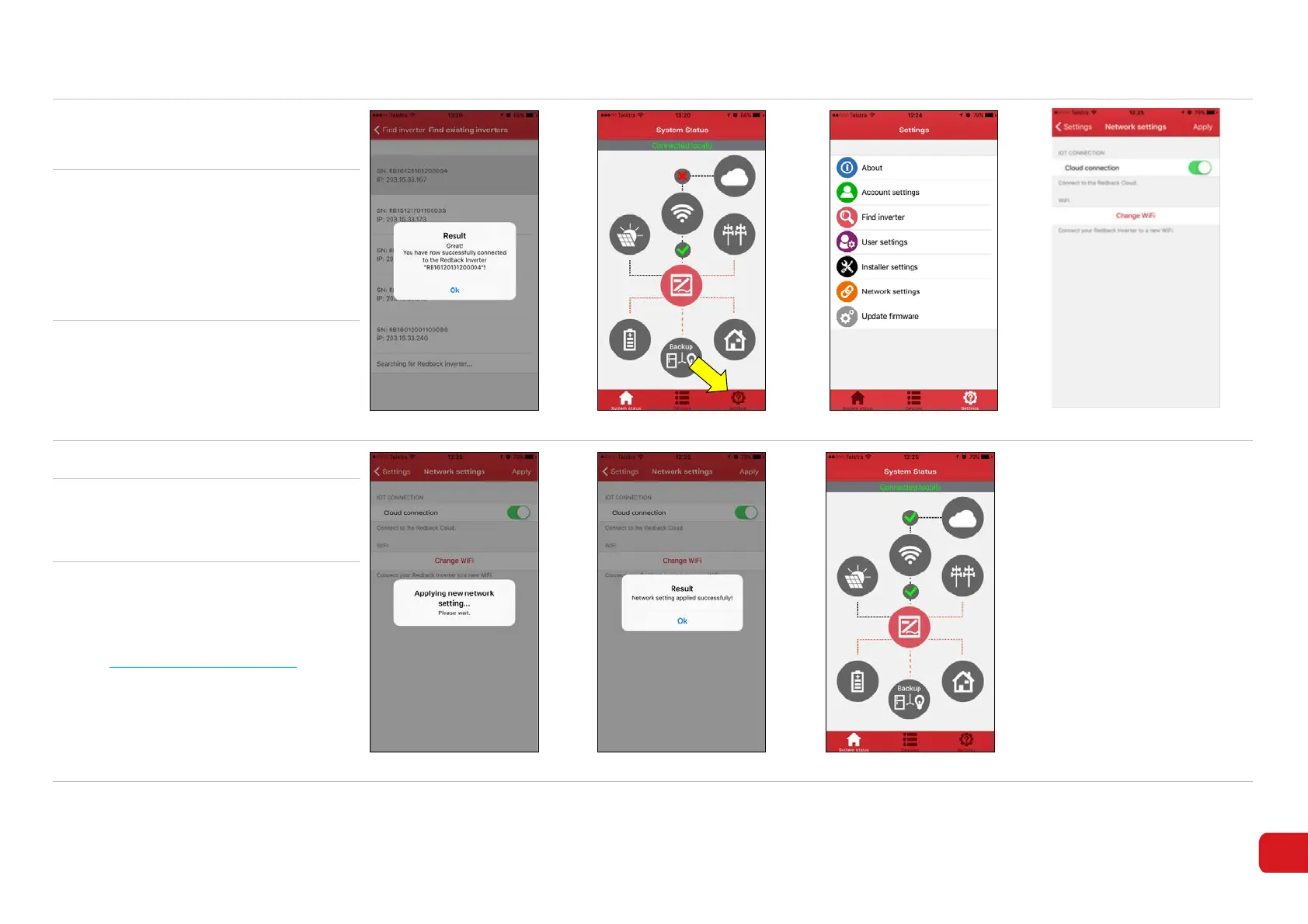
Once you tap on your inverter, a
success message will appear (8-20).
Touch OK to continue.
Figure 8-20
Figure 8-21
Figure 8-22
Figure 8-23
18. Go to the System Status page (8-21).
between the Inverter and Wi-Fi
indicates the system is connected to
the home network.
between Wi-Fi and Cloud indicates
the Cloud Connection is disabled.
19. To enable the Cloud Connection
• Touch App Settings (8-21)
• Touch Network Settings (8-22)
• Slide Cloud Connection ON (8-23)
• Touch Apply to save
20. A pop-up indicates status (8-24).
Figure 8-24 Figure 8-25 Figure 8-26
21.
Touch OK to acknowledge the
success message (8-25).
Return to System Status page
22.
between the Wi-Fi and Cloud
indicates the system is connected to
the internet (8-26).
Login to the Redback Portal at
https://portal.redbacktech.com.
Your inverter should have status
“Online”.



 To Next Page