
EasyManua.ls Logo

RedLeaf RD3019Pro - User Manual

RedLeaf RD3019Pro
42 pages
Print Icon
To Next Page IconTo Next Page
Loading...
Instruction Manual
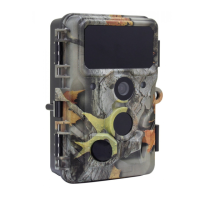
WiFi Wildlife Camera
30 Megapixel
IPS TFT-LCD
Waterproof
120° total
PIR angleTrigger time
0.3S
2.4”
30.0
VIDEO
4K Full HD
Video function

Questions and Answers

  • V
    Victor GarrettAug 17, 2025
    What to do if my RedLeaf Security Camera does not take images or record videos?
    • G
      Gregory GrantAug 17, 2025
      If your RedLeaf Security Camera isn't recording, it might be due to a full or improperly formatted SD card. If the SD card is full, transfer the files to your computer or delete some in Replay Mode. If the SD card is not formatted properly, format it again or use a new one.
  • M
    Matthew TorresAug 19, 2025
    What to do if my RedLeaf RD3019Pro shows “SD card Error”?
    • R
      Roger BarberAug 19, 2025
      If your RedLeaf Security Camera displays an “SD card Error”, ensure that the SD card is with class 10 standard or higher. Format the SD card using the camera for the first time.
  • M
    mary41Aug 22, 2025
    Why my RedLeaf Security Camera will not turn on?
    • A
      Andrew HaneyAug 22, 2025
      If your RedLeaf Security Camera doesn't turn on, check if the batteries are installed correctly. Also, check if the battery capacity is low or exhausted. If so, replace them with new batteries.
  • T
    Timothy RogersAug 25, 2025
    What to do if the image is not clear on my RedLeaf RD3019Pro?
    • E
      Elizabeth HendrixAug 26, 2025
      If the image from your RedLeaf Security Camera is not clear, make sure you've removed the protective films on the IR LEDs and lens. Also, check to ensure that the lens is not dirty.
  • T
    travisthomasAug 27, 2025
    What to do if videos are choppy or jumpy when played on a computer from my RedLeaf RD3019Pro Security Camera?
    • T
      Tracey ColeAug 28, 2025
      If videos from your RedLeaf Security Camera are choppy or jumpy when played on a computer, ensure that the computer system requirements are met. Also, ensure the MP4 format video clip can be played on your computer.
  • J
    Jesse CarrollAug 30, 2025
    Why does my RedLeaf RD3019Pro Security Camera turn off automatically?
    • M
      marykellyAug 30, 2025
      Your RedLeaf Security Camera might turn off automatically if the battery capacity is less than 1%. If so, try changing to new batteries for outdoor use or connect an AC adapter for indoor use.
  • B
    betty06Sep 2, 2025
    How to reset RedLeaf RD3019Pro Security Camera if it can not turn off?
    • J
      Jessica MillerSep 2, 2025
      If your RedLeaf Security Camera cannot be turned off, remove all the batteries to reset the camera.
  • A
    andrew76Sep 5, 2025
    What to do if I forget the password for my RedLeaf RD3019Pro?
    • D
      Dalton JimenezSep 5, 2025
      If you forget the password for your RedLeaf Security Camera, enter the word “OPEN”.
  • J
    joseph56Sep 8, 2025
    What to do if I forget the WiFi password for my RedLeaf RD3019Pro Security Camera?
    • S
      scottstevensSep 8, 2025
      If you forget the WiFi password for your RedLeaf Security Camera, default setting the camera, then the password is “12345678”.
  • H
    Heather HarrisSep 12, 2025
    Why the phone couldn’t connect WiFi to my RedLeaf RD3019Pro Security Camera?
    • H
      Heather MurraySep 12, 2025
      To connect your phone via WiFi to the RedLeaf Security Camera, check if the WiFi password is correct.

Summary

Hazard, Safety, and Warning Notices

Intended Use and Child Safety

Camera's intended private use and hazards for children/limited abilities.

Electrical and Fire Safety

Warnings regarding electrical hazards, liquids, and fire risks.

Introduction to the Wildlife Camera

Camera Overview and Purpose

Overview of the wildlife and surveillance camera's purpose and sensor technology.

Key Technical Features

Lists 30MP photo, 4K video, WiFi, IP66 rating, and wide detection angle.

Camera Preparation and Setup

Opening and Closing the Camera

Instructions on how to open and close the camera body, including padlock fixing.

Inserting Batteries

Steps for inserting 8 AA batteries into the camera's battery compartment.

Inserting Memory Card

Steps for inserting an SD/SDHC memory card into the camera's memory card slot.

Using the Camera: Modes and Controls

Mode Switch Operation

Explanation of the OFF, SETUP, and ON modes for camera operation.

Operating Buttons Overview

Details the functions of the camera's operating buttons in standby and replay modes.

Camera Settings and Configuration

Navigating the Setup Menu

Instructions on how to enter SETUP mode and navigate the menu system.

Motion Detection Settings

Configuring Mode, PIR Interval, PIR Sensitivity, and Time Lapse.

Image and Video Settings

Options for Image Size, Resolution, Picture Number, Shutter Speed, Video Length.

WiFi and App Connectivity

Installing and Connecting the App

Guide to installing the "Hunting Camera 4K" app and connecting via Bluetooth.

WiFi Connection Process

Steps to enable and connect to the camera's WiFi hotspot.

Operating the App Interface

Explanation of icons and functions within the mobile application.

Technical Specifications

Image and Video Specifications

Details on photo resolution, screen, lens, triggering time, and video resolutions.

Audio, Connectivity, and Night Vision

Specs for audio, WiFi, Bluetooth, night vision, power supply, and standby time.

Simple Troubleshooting Guide

Camera Power and SD Card Issues

Solutions for camera not turning on or showing "SD card Error".

Video Playback and Image Clarity

Troubleshooting choppy videos and unclear images.

Connectivity and Password Issues

Resolving WiFi connection failures and forgotten passwords.

RedLeaf RD3019Pro Specifications

General IconGeneral
Weather ResistanceIP66
Night VisionUp to 30m
Power SupplyDC 12V
Operating Temperature-20°C to 60°C
StorageMicroSD card
Motion DetectionYes
ConnectivityWi-Fi