
 To Next Page
M
Megan MoonSep 13, 2025
Why the Bluetooth Couldn’t open the WiFi hotspot on my RedLeaf Security Camera?
- JJanet MillsSep 13, 2025
To open the WiFi hotspot via Bluetooth on your RedLeaf Security Camera, check the menu ”Bluetooth” is “ON”.

Why the Bluetooth Couldn’t open the WiFi hotspot on my RedLeaf Security Camera?
To open the WiFi hotspot via Bluetooth on your RedLeaf Security Camera, check the menu ”Bluetooth” is “ON”.
Camera's intended private use and hazards for children/limited abilities.
Warnings regarding electrical hazards, liquids, and fire risks.
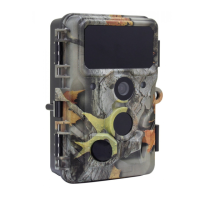
Overview of the wildlife and surveillance camera's purpose and sensor technology.
Lists 30MP photo, 4K video, WiFi, IP66 rating, and wide detection angle.
Instructions on how to open and close the camera body, including padlock fixing.
Steps for inserting 8 AA batteries into the camera's battery compartment.
Steps for inserting an SD/SDHC memory card into the camera's memory card slot.
Explanation of the OFF, SETUP, and ON modes for camera operation.
Details the functions of the camera's operating buttons in standby and replay modes.
Instructions on how to enter SETUP mode and navigate the menu system.
Configuring Mode, PIR Interval, PIR Sensitivity, and Time Lapse.
Options for Image Size, Resolution, Picture Number, Shutter Speed, Video Length.
Guide to installing the "Hunting Camera 4K" app and connecting via Bluetooth.
Steps to enable and connect to the camera's WiFi hotspot.
Explanation of icons and functions within the mobile application.
Details on photo resolution, screen, lens, triggering time, and video resolutions.
Specs for audio, WiFi, Bluetooth, night vision, power supply, and standby time.
Solutions for camera not turning on or showing "SD card Error".
Troubleshooting choppy videos and unclear images.
Resolving WiFi connection failures and forgotten passwords.
 General
| Weather Resistance | IP66 |
|---|---|
| Night Vision | Up to 30m |
| Power Supply | DC 12V |
| Operating Temperature | -20°C to 60°C |
| Storage | MicroSD card |
| Motion Detection | Yes |
| Connectivity | Wi-Fi |