5
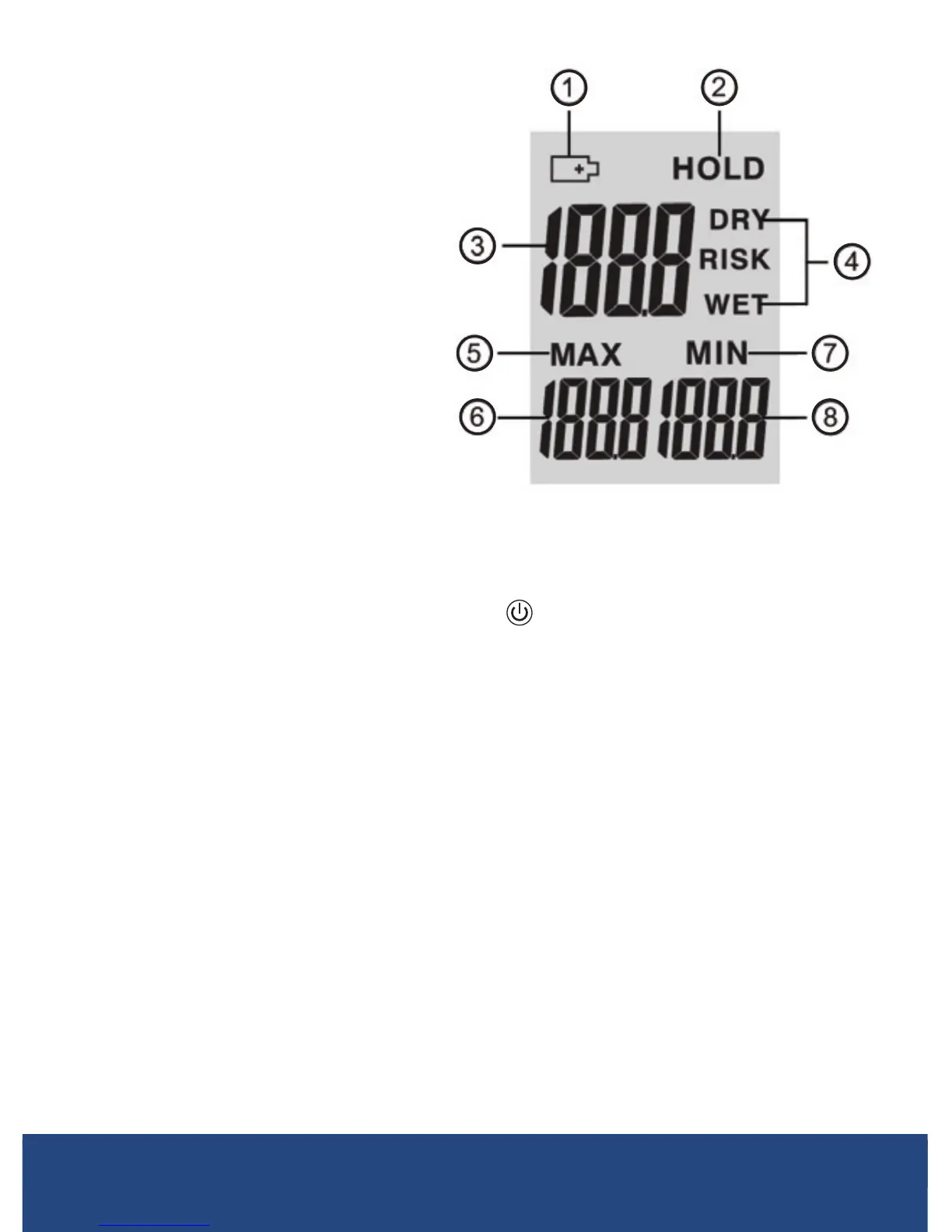
Display Description
1. LowBatteryIndicator
2. DataHoldIndicator
3. Current Moisture Value
4. Status Indicators
5. MAX Indicator
6. MAX Moisture Value
7. MIN Indicator
8. MIN Moisture Value
Operating Instructions
1. Turn the meter ON by pressing the button.
2. Please be advised that you must calibrate the meter before rst use.
3. To calibrate the meter, press the MEAS button while holding the
meter in an upright position so the ball sensor is in the air and at
least3to4"(8to10cm)awayfromanyobject.
4. "CAL"willdisplayontheLCDscreenwhiletheunitself-calibrates.
5. When calibration is complete, the beeping and ashing will stop, and
a measurement will be displayed. The measurement must be below
0.5%inordertotakeaccuratemeasurements.Ifnot,youmustturn
the meter off, move to a dry area and recalibrate by repeating steps 1
to 4.
NOTE: When you move from the location of your initial calibration you
must recalibrate the meter.
6. After the meter is calibrated it will automatically start to take readings.
continued...
REED Instruments
1-877-849-2127 | info@reedinstruments.com | www.reedinstruments.com



 To Next Page