64
5.9 Attach And Detach The Propellers
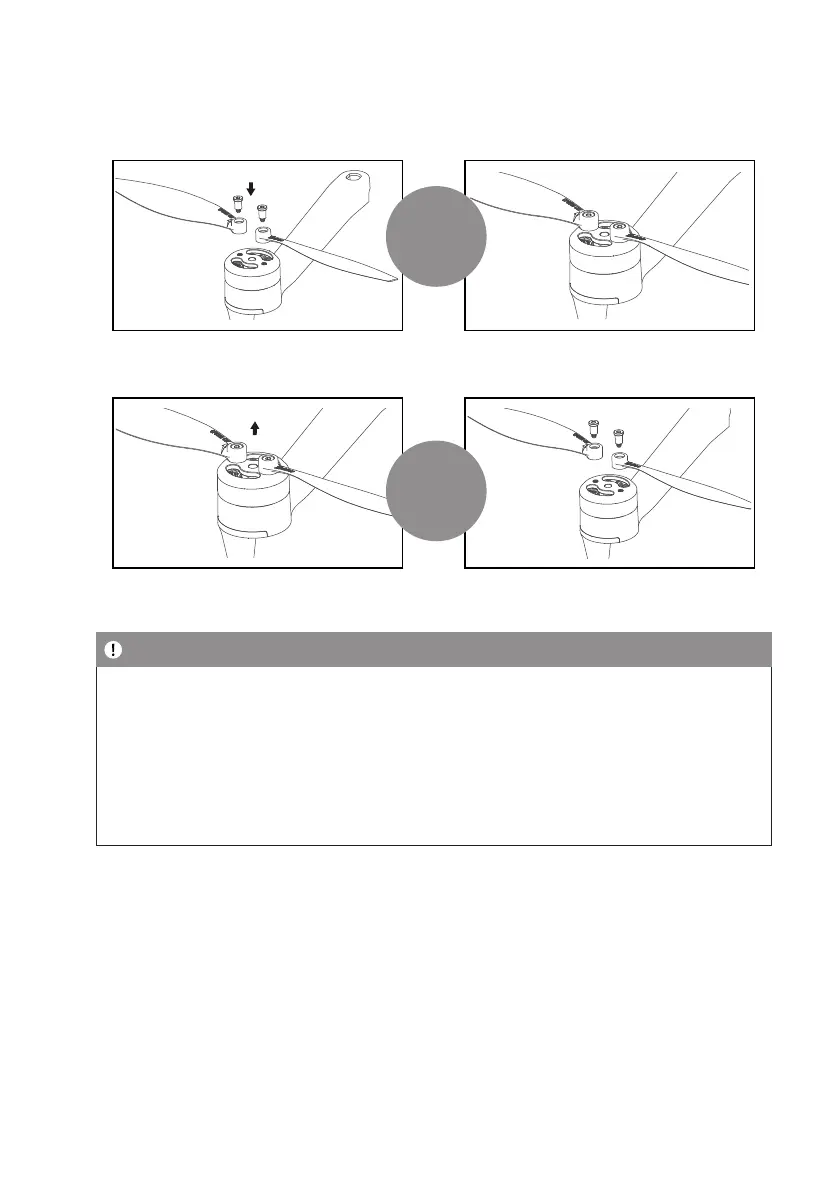
The propellers are pre-installed in the package. If the propeller is damaged during using, please replace the propellers
according to the following steps:
1. Use the screwdriver in the package to rotate
clockwise Twist in 2 screws
2. Attach complete
Detach
1. Use the screwdriver in the package to press
the screw counterclockwise Twist 2 screws out
2. Detach complete
Detach
Note
• If the propeller with the A-mark is to be disassembled, choose the propeller with the A-mark for installation. If the
propeller marked with B-mark is removed, Just choose the propeller with B-mark to install
• Make sure that the propeller A and propeller B are installed in the correct positions. The drone will fail to y
normally if the propellers are installed improperly.
• As the propellers are thin, be careful when installing them to prevent accidental scratches.
• Please use the ofcial dedicated propellers for replacement.
• Propellers are consumables. Please purchase the ofcial dedicated propellers if necessary.


 To Next Page