78
8.2 Photos And Videos Saving
• If a SD card is not installed, the video and photos will be saved to the mobile app. In this case, the video quality is
relatively poor (not recommended).
• If a SD card is installed in the drone, the videos and photos will be saved to the SD card. In this case, the video
quality is much better (recommended).
• The videos and photos on the SD card can be transferred to the mobile app.
• The FPV transmission quality and distance varies by different mobile phones and different environmental situations.
• Please y the drone in an open and undisturbed environment as possible for a better FPV transmission experience.
• The actual test indicates that the maximum FPV transmission distance approach 5000 meters in an interference-
free environment.
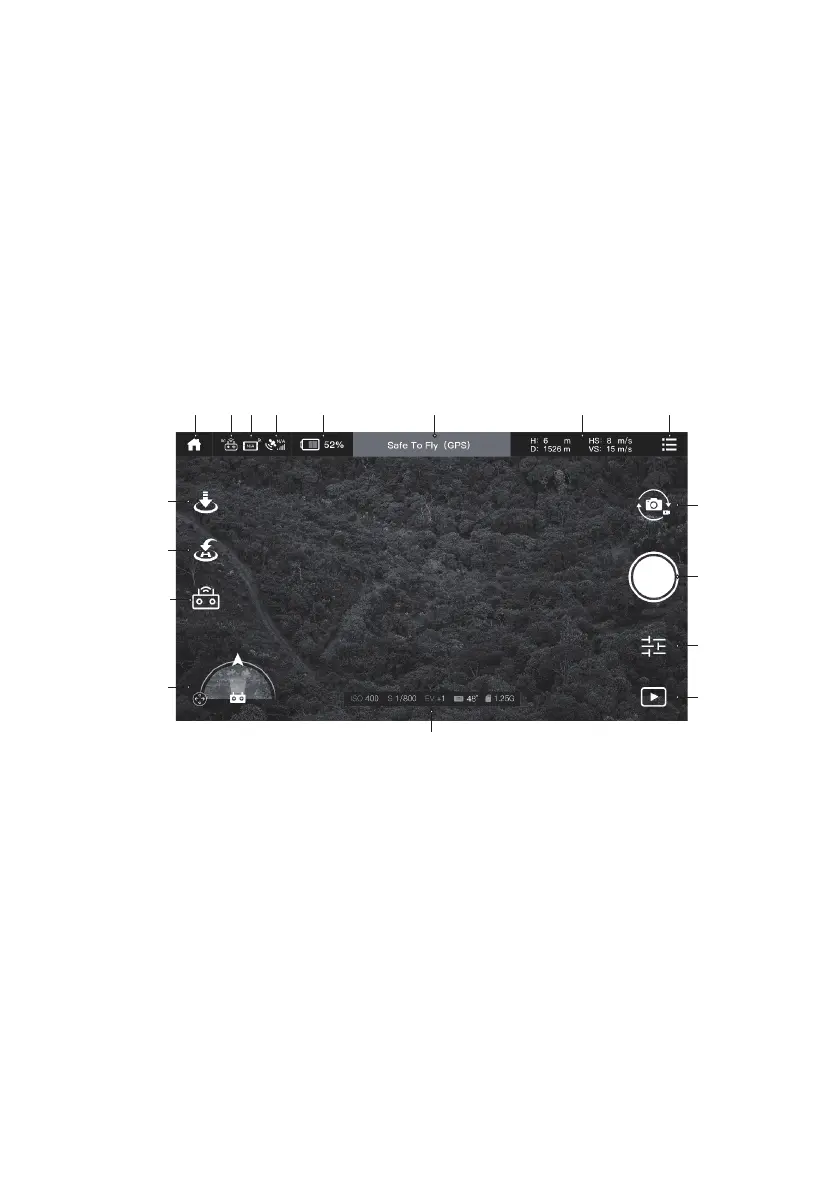
8.3 Interface description
a
i
j
k
l
b c d e f g h
m
n
o
p
q
Main interface
a Back to homepage Back to homepage
b Remote control signal Displays the signal strength of the current remote control.
c Mobile GPS accuracy Display GPS accuracy of mobile phone.
d GPS signal Show the number of GPS currently connected to the aircraft.
e Battery life Display the current battery life of the aircraft.
f Flight mode and status prompt Display the status and mode of the current aircraft


 To Next Page