74
Note
• After changing the ight site, make sure to calibrate the compass before the rst ight.
• If the aircraft indicator ashes blue and green alternately during ight, which means that the compass is
abnormal and need to calibrate.
• Stay away from the environment with magnetic interference when calibrating, otherwise the calibration may fail.
• Do not calibrate in areas with strong magnetic elds, such as magnetic mines, parking lots, and building areas
with underground reinforcement.
• Do not calibrate with carrying ferromagnetic materials such as keys, mobile phones, etc.
• Do not calibrate when large pieces of metal are nearby.
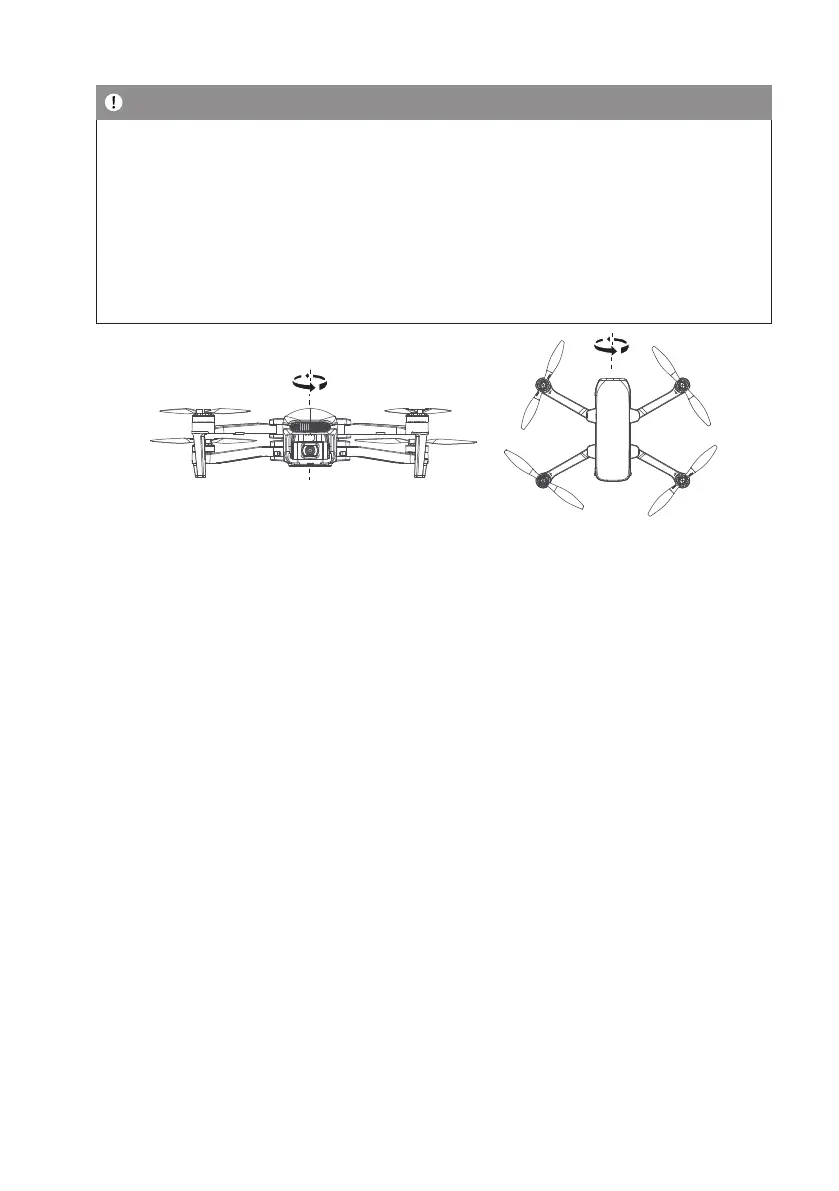
Horizontal calibration Vertical calibration
7.5 Basic Flight Operation Steps
1 Place the drone in a wide open area that its front is user’s front.
2 Turn on the drone and remote controller.
3 Connect the remote controller with the drone and then proceed drone self-diagnostic tests.
4 Connect the app with mobile device and enter into the FPV interface.
5 Unlock the drone after the app indicate: ready go.
6 Change the speed mode(calm node, Normal mode, Sport mode) before ight.
7 Pull up the throttle stick then the drone takes off, and control the drone ight by left/right stick.
8 Pull down the throttle stick to land the drone.
9 Pull down the throttle stick to the bottom position and keep for 3 seconds to lock the drone.
10 Pull out the battery from the drone and then turn off the remote controller
Video Suggestion and Tips:
1. Make sure components of the drone are normal before ight.
2. Choose sunny, windy weather for recording.
3. Perform test ights to establish ight routes and to preview scenes.
4. Push the control stick gently to keep the drone movement smooth and stable.
5. Choose appropriate gimbal shooting angle.


 To Next Page