73
7.4.4 Compass Calibration
The drone has a built-in compass that ensures that the drone maintains an accurate heading during intelligent ight.
The compass status must be checked before each ight. lf encounter the following situations, please recalibrate the
drone compass:
• Before the ight to a new ight site.
• When the drone status indicator shows that the compass has errors.
• When the app and the drone remind to calibrate the compass.
• When the drone experiences severe shifting during hovering or ying.
7.4.5 Compass Calibration via app
1. Enter calibration mode:
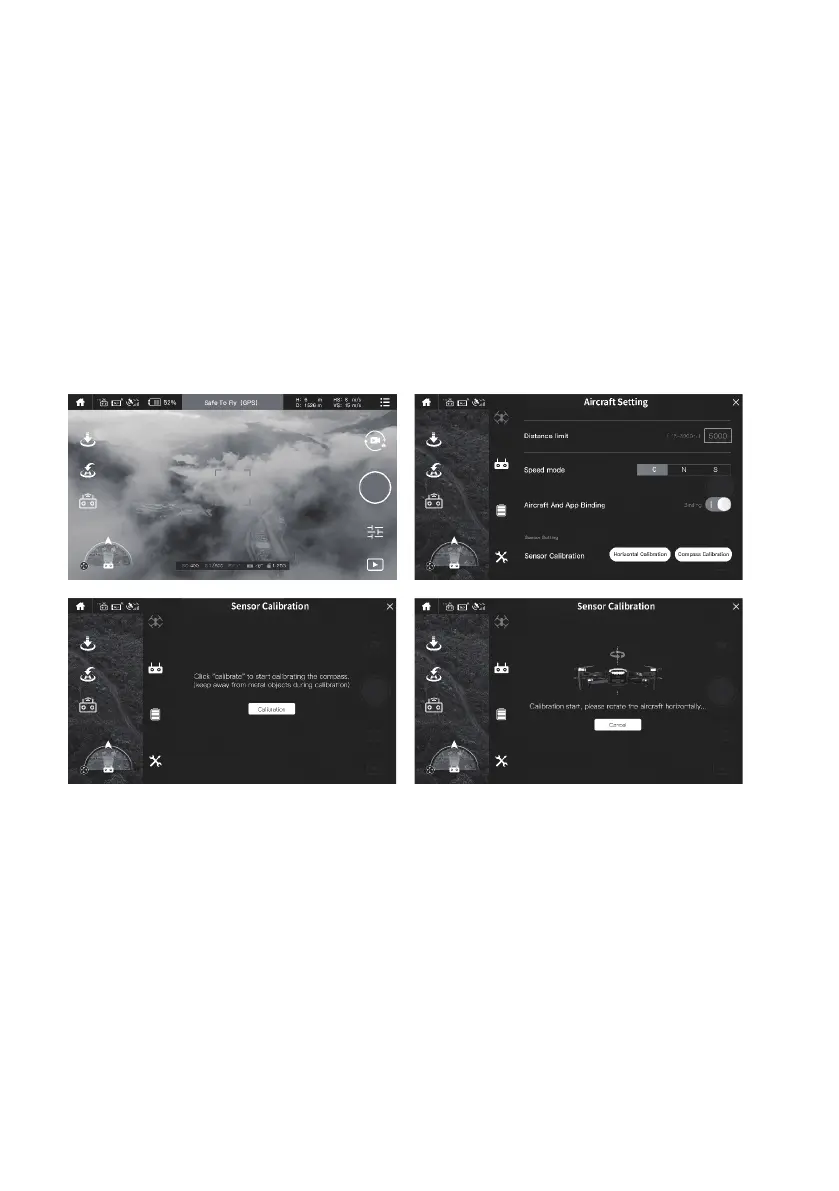
When aircraft and app connected, choose “Drone—operation interface—-setting—aircraft setting” click” Sensor
calibration- compass calibration”.
2. Compass Calibration
When the app pops up a prompt, check the current environment and keep away from metal objects as prompted. Then
tap the “Calibration” button, in this case, when the status indicator on the rear arm of the drone ashes blue and red
alternately, the compass calibration mode starts.
Horizontal Calibration : When the app prompts to rotate the drone horizontally, place the drone horizontally in the
hand, then turn the drone horizontally until the status indicator on the rear arm of the drone changes to an alternatively
ashing red and green light, which means that the horizontal calibration is successful.
Vertical Calibration : when the app prompts to place the drone’s head to be up and rotates, place the drone in the
hand and ensure that the drone body is perpendicular to the ground; then rotates the drone horizontally. When the
status indicator on the rear arm of the drone turns green (solid or ashing), the compass is successfully calibrated,
At this time, the app will prompt “Calibration Successful”, then tap “Finish” to end the calibration process, If the status
indicator turns to solid red light for about 6 seconds, The compass calibration fails. Please go to another location and
re-calibrate.


 To Next Page