72
7.4 Basic Flight
7.4.1 Beginner’s Mode
For beginners, please turn on the beginner’s mode. Once the mode is activated, the drone will locate its own position
by GPS before ready to takeoff. If the drone can not be controlled after takeoff, the RTH can be used to allow the
drone to return automatically.
7.4.2 Re-pair Remote Controller and Drone
The drone is pre-paired with the remote controller in the package, users can use it once turn it on.
However, if the remote controller is replaced or for other reasons that causes a failure in matching the drone and the
remote controller, please complete the binding as the following steps:
1. Turn on the aircraft and the remote control.
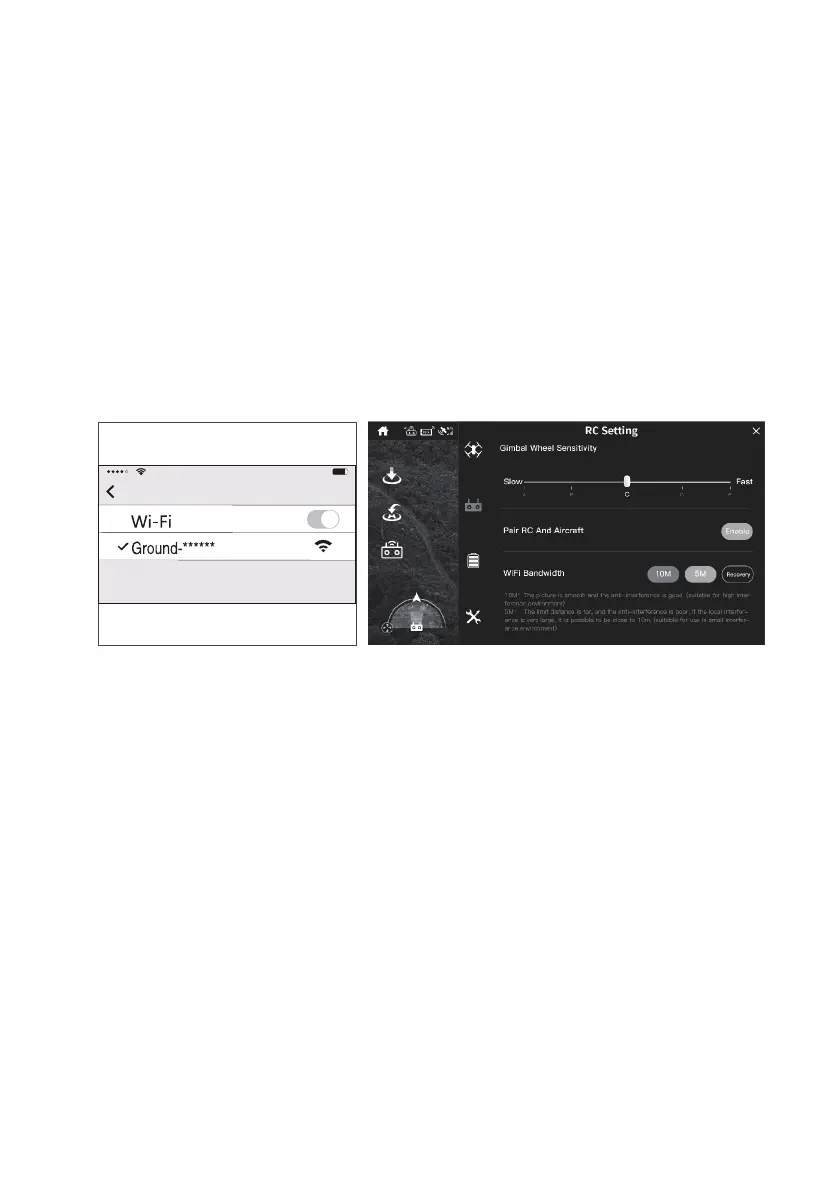
2. Open your phone and go to the Settings - WLAN menu to see the list of current Wi-Fi signal. User can see the
remote’s Wi-Fi signal: Ground-xxxxxx (xxxxxx is a serial number consisting of letters and Numbers).Please record
the serial number of the remote control for standby.
3. Select the Wi-Fi Signal of the remote control and connect it.
4. Open Gravitii app, choose “Drone—operation interface—setting—rc setting, click “pair RC and aircraft”.
5. The Wi-Fi name scanned will be displayed in the dialog, Please select the Wi-Fi of the aircraft, such as Drone-
xxxxxx and then click “OK”.
6. Enter the mobile phone “Settings” Wlan mean again and check the serial number of the remote control. If the serial
number has been changed, the binding has been completed, at this point, the rear arm indicator light of the aircraft
turns to green ashing or keeps on.
7.4.3 Drone Self-Diagnostic Tests
• Power on the aircraft, make sure that the aircraft is placed horizontally for more than 30 seconds to self-diagnostic.
• When the drone and Remote controller are connected successfully, the status indicator turns solid blue which
means that the drone enters the self-diagnostic tests procedure. At this time, please ensure that the drone is
statically placed on the horizontal ground.


 To Next Page