70
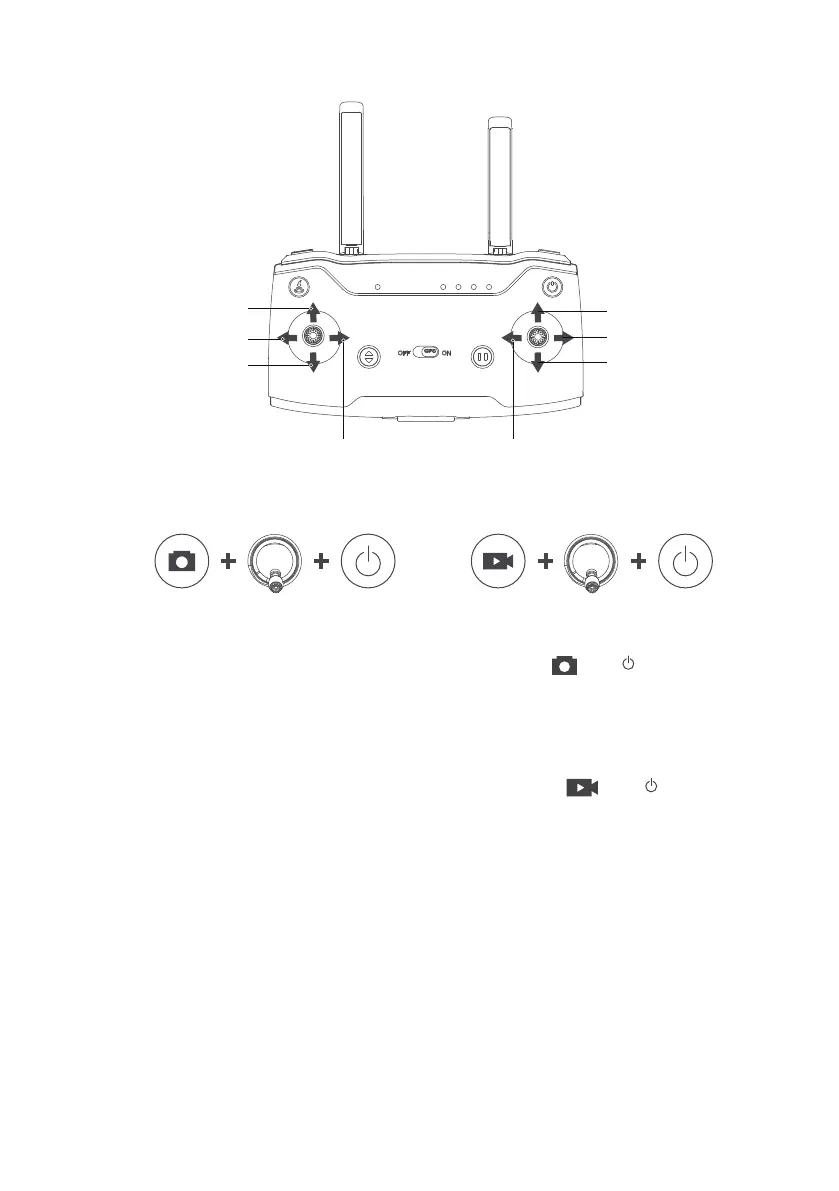
Mode 2 (Default setting)
Forward
Right
Backward
Ascend
Left rotation
Descend
Right rotation Left
Mode 2/ Mode 1 Switch
Mode 2 Mode 1
• Switch to Mode 2 (Default setting)
Before turning on, pull the left joystick to the lowest position, press the buttons ″
″ and ″ ″ at the same time, and
keep still, wait for the remote control to make a beep and the two green lights are on to complete successfully. Switch
to “mode 2 “,user can use it after restarting the remote controller.
• Switch to Mode 1
Before turning on, pull the right joystick to the lowest position, press the buttons ″
″ and ″ ″ at the same time,
and keep still, wait for the remote control to make a beep and the two green lights are on to complete successfully.
Switch to “mode 1 “,user can use it after restarting the remote controller.


 To Next Page