76
7.6.4 Operate the Drone Takeoff
• Method 1: Takeoff manually
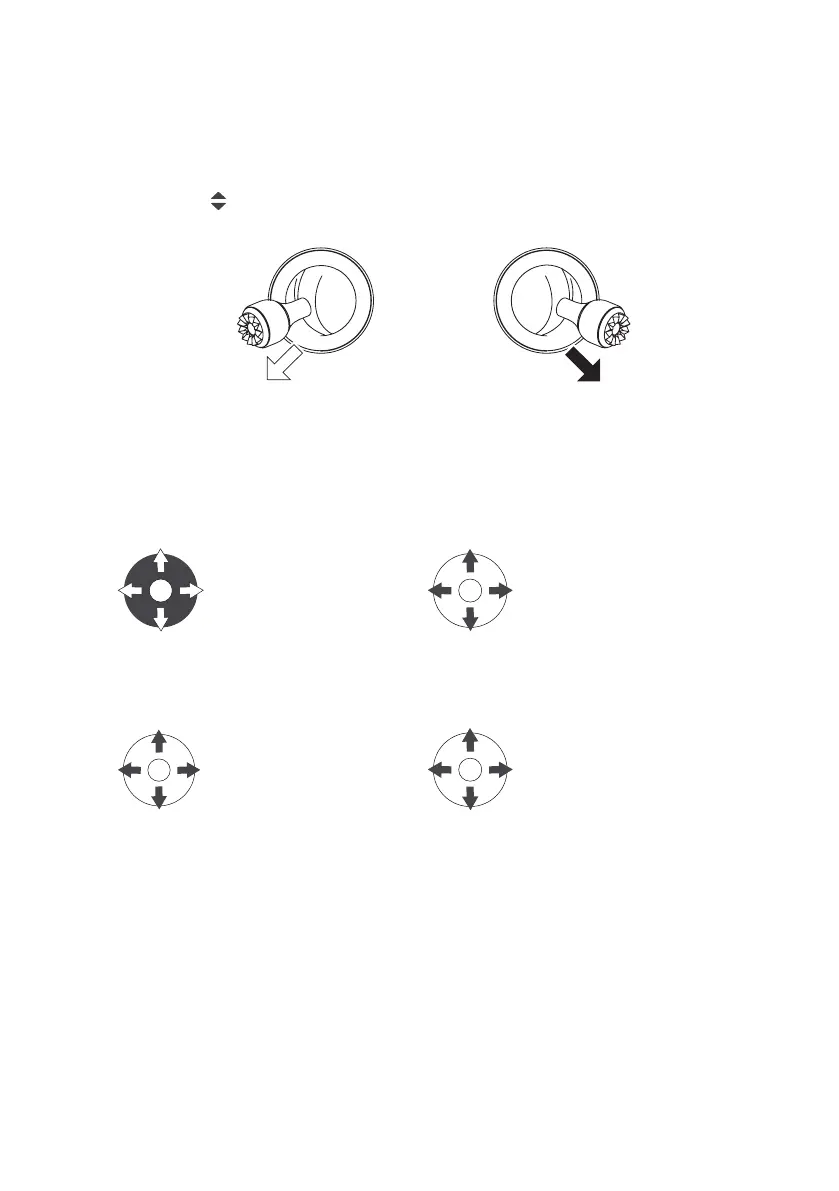
Toggle the left and right joysticks outward as to get the propellers started to rotate.
• Method 2: One-key takeoff
Long press the ″
″ button for 2 to 3 seconds. When the remote controller beeps steadily, the drone will automati-
cally take off and ascend to the altitude of 1.2 meters and hover.
Left joystick Right joystick
7.6.5 Flight Control by Remote Controller
After takeoff, control the ight of the drone as shown.
Mode 1
➂ ➃
Left joystick:
1. Forward
2. Backward
3. Left Rotation
4. Right Rotation
➆ ➇
Right joystick:
6 Ascend
7 Descend
8 Left
9 Right
Mode 2
➂ ➃
Left joystick:
1. Ascend
2. Descend
3. Left Rotation
4. Right Rotation
➆ ➇
Right joystick:
5. Forward
6. Backward
7. Left
8. Right
Landing
Please be aware to avoid the crowd and obstacles, and ensure that the drone is hovering over the landing site before
landing. Choose an open and at space as landing site.
Method 1 : Land manually
Slowly toggle the throttle joystick to control the drone to land. When the drone lands on the ground, continue to toggle
the joystick towards the lowest position until the propellers stop rotating.


 To Next Page