EasyManua.ls Logo

Reer Rigi Digital - User Manual

Reer Rigi Digital
104 pages
Go to English
Print Icon
To Next Page IconTo Next Page
Loading...
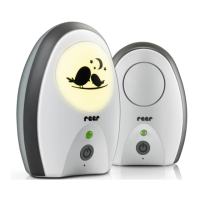
Babyphone Rigi Digital
Gebrauchsanleitung, Art.Nr.: 50070
Babyphone Rigi Digital
Manual de uso, N° d‘art.: 50070
Babyphone Rigi Digital
Notice d‘utilisation, Art. Núm.: 50070
Niania elektroniczna Rigi Digital
Instrukcja obsługi, Nr art.: 50070
Monitor za bebe Rigi Digital
Uputstvo za upotrebu,
Broj artikla: 50070
Babyphone Rigi Digital
Instructions for use, Art.no:: 50070
Babyphone Rigi Digital
Istruzioni per l‘uso, Art. Nr.: 50070
Babyfoon Rigi Digital
Gebruiksaanwijzing, Art. nr.: 50070
Dětská chůvička Rigi Digital
Návod kpoužití, Artikl č: 50070
Аппарат „Радионяня“ Rigi Digital
Руководство по применению,
нόмер: 50070
DE
ES
FR
PL
RS
GB
IT
NL
CZ
RU
50070 Taurus
NEO 200

Table of Contents

Question and Answer IconNeed help?

Do you have a question about the Reer Rigi Digital and is the answer not in the manual?

Summary

General Safety Instructions

Installation Safety Instructions

Technical Specifications

Scope of Delivery

Babyphone Description

Before First Use

Unit Status Indicators

Baby Unit Status LED

Explains the meaning of different LED statuses on the baby unit, indicating power and charging states.

Parent Unit Status LED

Details the various LED indicators on the parent unit, showing device status and connection information.

Battery Operation

Range Control and ECO Mode

Range Control System

Explains the system for monitoring signal strength and alerts when the maximum transmission range is exceeded.

ECO Mode Functionality

Details the energy-saving ECO mode, which reduces radiation emissions when the baby is quiet.

Volume Control (Parent Unit)

Unit Features and Maintenance

Night Light Operation

Instructions on how to operate the night light function on the baby unit.

Microphone Sensitivity Adjustment

Guides on adjusting the microphone sensitivity to detect various levels of baby noise.

Tips for Extending Range

Provides advice on factors affecting signal range and how to optimize reception.

Cleaning and Maintenance

Instructions for safely cleaning the baby monitor units without damage.

Warranty Information

Disposal Instructions

Troubleshooting Common Issues

Status LED Not Lighting Up

Steps to resolve issues where the status LED on the units fails to illuminate.

Status LED Flashes Orange

Guidance for when the parent unit's LED flashes orange, indicating received sounds.

Status LED Flashes Red

Troubleshooting steps for red flashing LEDs, indicating low battery or exceeded range.

No Sound Transmission

Solutions for when audio is not transmitted between the baby and parent units.

Troubleshooting Advanced Issues

Loud Whistling Tone (Feedback)

Addresses the issue of loud whistling or feedback noise occurring between the units.

Connection Loss or Noise

Solutions for intermittent connections, random noise, or complete loss of signal.

Summary

General Safety Instructions

Installation Safety Instructions

Technical Specifications

Scope of Delivery

Babyphone Description

Before First Use

Unit Status Indicators

Baby Unit Status LED

Explains the meaning of different LED statuses on the baby unit, indicating power and charging states.

Parent Unit Status LED

Details the various LED indicators on the parent unit, showing device status and connection information.

Battery Operation

Range Control and ECO Mode

Range Control System

Explains the system for monitoring signal strength and alerts when the maximum transmission range is exceeded.

ECO Mode Functionality

Details the energy-saving ECO mode, which reduces radiation emissions when the baby is quiet.

Volume Control (Parent Unit)

Unit Features and Maintenance

Night Light Operation

Instructions on how to operate the night light function on the baby unit.

Microphone Sensitivity Adjustment

Guides on adjusting the microphone sensitivity to detect various levels of baby noise.

Tips for Extending Range

Provides advice on factors affecting signal range and how to optimize reception.

Cleaning and Maintenance

Instructions for safely cleaning the baby monitor units without damage.

Warranty Information

Disposal Instructions

Troubleshooting Common Issues

Status LED Not Lighting Up

Steps to resolve issues where the status LED on the units fails to illuminate.

Status LED Flashes Orange

Guidance for when the parent unit's LED flashes orange, indicating received sounds.

Status LED Flashes Red

Troubleshooting steps for red flashing LEDs, indicating low battery or exceeded range.

No Sound Transmission

Solutions for when audio is not transmitted between the baby and parent units.

Troubleshooting Advanced Issues

Loud Whistling Tone (Feedback)

Addresses the issue of loud whistling or feedback noise occurring between the units.

Connection Loss or Noise

Solutions for intermittent connections, random noise, or complete loss of signal.

Reer Rigi Digital Specifications

General IconGeneral
TechnologyDECT
Range300 meters
Sound ActivationYes
Temperature MonitoringYes
Night LightYes
Two-Way CommunicationYes
Batteries RequiredYes
Batteries IncludedYes
TypeDigital
Channels120
Power SourceBattery / Mains

Related product manuals