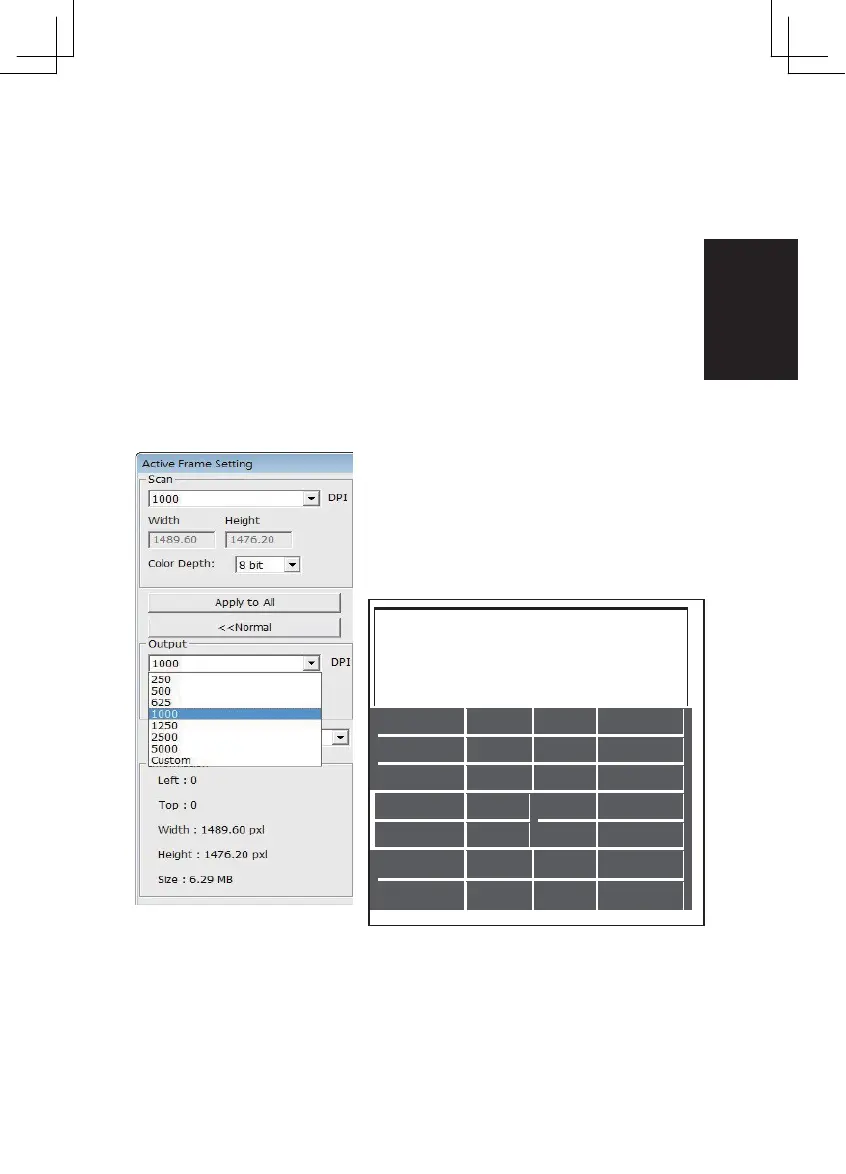
STEP 4 – Set Scan Settings
a. Resolution
The default scanning resolution is 1000dpi, additional resolution options
are listed below.
Notice:
Higher scanning resolutions result in greater scanning time and hard disk
space requirements.
b. Color Depth
Choose between 8 and 16bit. A higher color depth setting will result in
a larger range of colors in the final scanned image.
The Film Scanner color depth is 48 bit true color. The scanning software has the
capability of selecting 8 bit color mode or 16 bit color mode when scanning,
This will produce 24 or 48 bit color images, 8 bits or 16 bits per Red, Green and
Blue color channels.
Example:
8 bit mode = 8 Red, 8 Green, and 8 Blue for a total of 24 bit color
16 bit mode = 16 Red, 16 Green, and 16 Blue for a total of 48 bit color
NOTE: Make sure there is enough space available
on the computer when changing the Scanning
Resolution. A high scanning resolution results in
large files that may prove difficult to save.
Color image file size of different resolutions
and color depths:
Color
File Size TIFF
Scanning
Depth
Color (no
Resolution (by RGB
Mode
compres sio
Channel n)
24-bit
~370Kb
24-bit
~1.4MB
24-bit
~12.9MB
24-bit
~52MB
24-bit
~100MB
24-bit
~208MB
24-bit
~402MB
Scans include Auto Balance and Digital Noise
Reduction on:
Processor: AMD 9650 Quad-Core 2.3GHz
Memory: 2GB
System type: Vista 64 bit
Scan Mode – Normal mode produces a scan in jpeg format while Quality pro-
duces a non-compressed, “loss-less”TIFF image.
13















 To Next Page