18 19
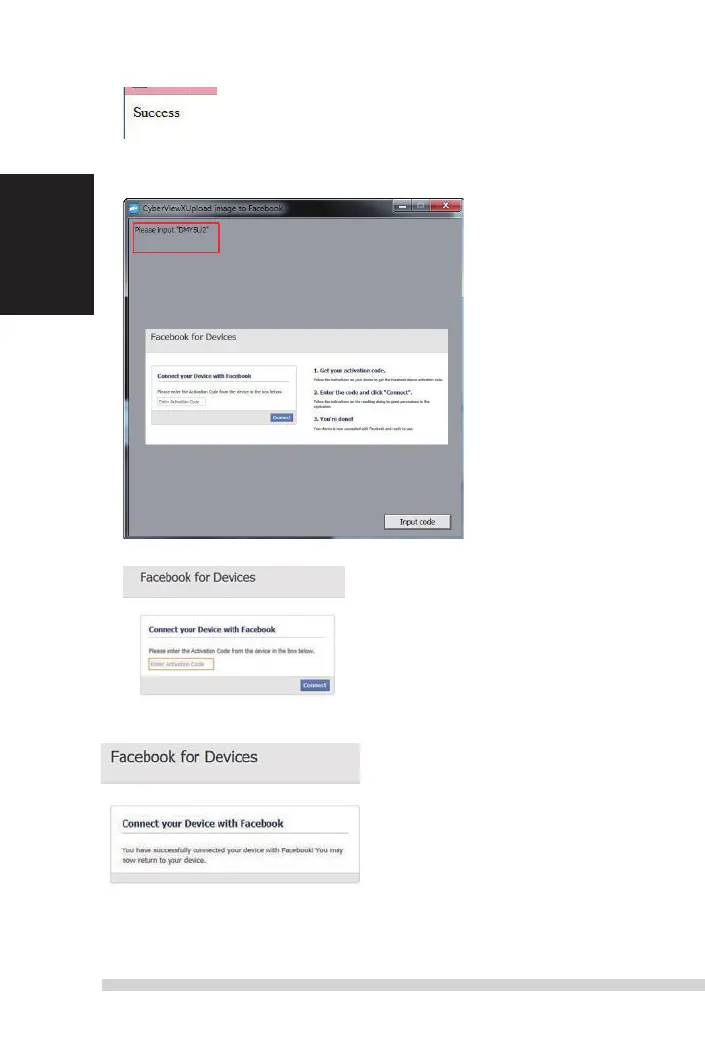
Minimize the browser window and on the next CyberView screen, not the Code number you
have
been given (this will be a different code every time, make a note of it, yo will need to enter it on
the
Facebook
website
English
Minimize this browser
window
Minimize the browser window and on the next CyberView screen,
4.
note the Code number you have been given (this will be a different code every time,
copy it down, you will need to enter it on the Facebook website
5. Enter the code you made a note of earlier, then click
Connect
6. Your scanner is now connected to
Facebook
English
To scan to , you must first go here:
https://www.dropbox.com/
and sign up for
an
account
and
download
and install their
software,
if you are not
currently
a
Dropbox
member
and would like to use this service.
Once you have created and
installed Dropbox application
you will now have a new folder on your
computer
that you may select to scan into for
automatic
sync
uploads
with your
Dropbox
account.
To scan into the
Dropbox
folder
1. Open
Cyberview
X5
2. Next select Scan –
Preference
– the film type you wish to scan
(Positive
or Negative)
3. In this scan settings
window
select the Sharing and
CloudStorage
tab
4.
Check the box beside CloudStorage to activate it
NOTE: When selecting the CloudStorage - Dropbox feature the software will automatically scan
to
the CyberviewX folder it creates in your Dropbox folder on your computer, ready for
synchronization
with your Dropbox
account.
5. Click OK to save
settings,
Once
configured
you are ready to scan.
6. All the files
scanned
will be saved into the
Dropbox
folder
Synchronization
will
automatically
occur with your online
account
when active.
(Active=Dropbox
is
running in the system tray)
Manual-RPS10M.indd 18 23.12.2016 10:00:32















 To Next Page