12
Chapter 5
MAIN AC PANEL METER/SWITCH
FUNCTIONS
REVERSE
POLARITY
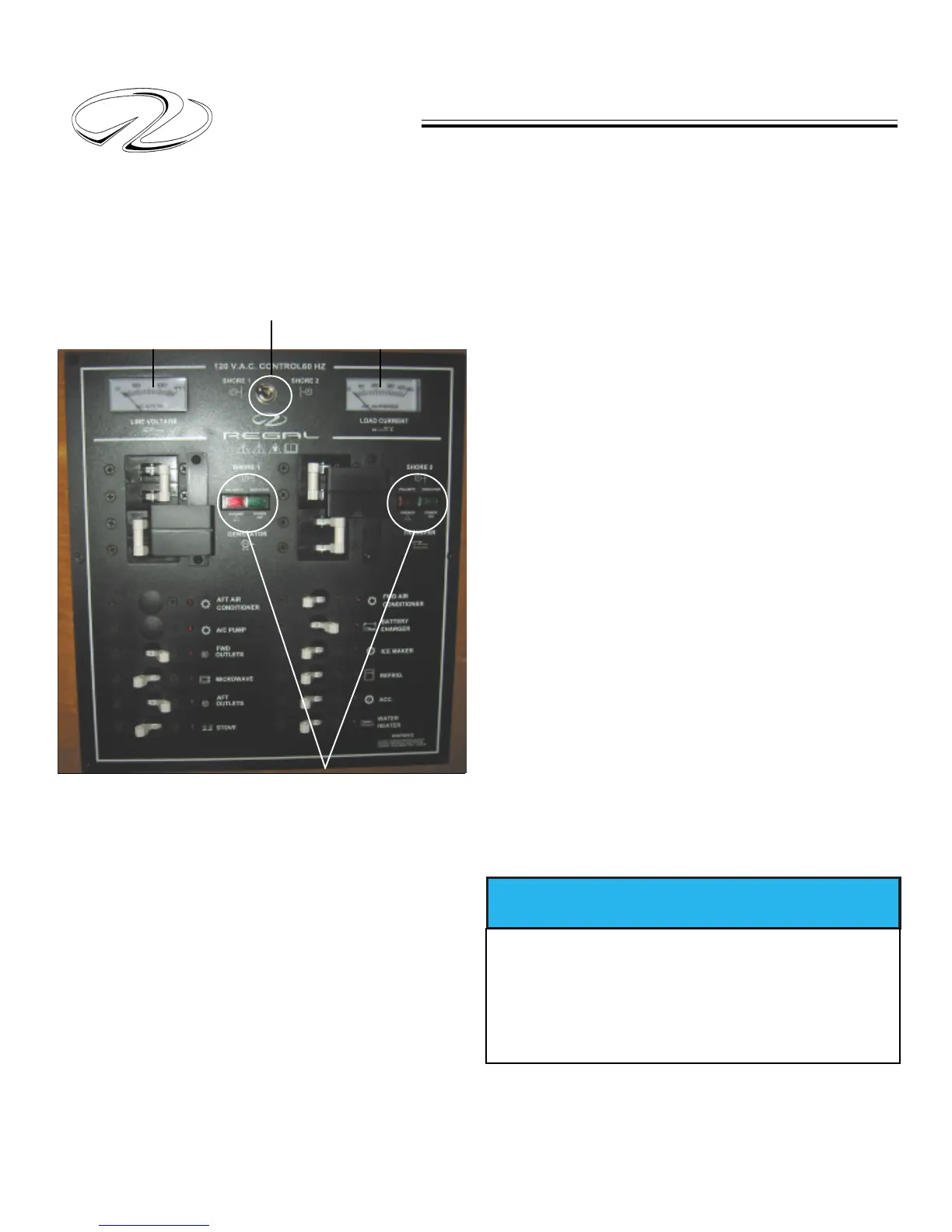
Load Current
This meter displays the amount of circuit load in amperes
as equipment is used. Current load (amps) changes
according to the type of device being used.
Shorepower Switch
This switch when activated to port displays all shore power
1 information in both the line voltage and load current
meters. In the starboard position shorepower 2 information
is displayed in a similar fashion.
Reverse Polarity
The reverse polarity icon on both shore 1 and shore 2
positions uses green and red indicator lights. With the shore
power cord in place and the shore 1 and/or 2 main breakers
in the “off” position the light will indicate green or red.
As with a traffic light green is go and on board the vessel it
means the power is connected properly. At this point the
main shore 1 or shore 2 breakers can be activated.
If the reverse polarity indicator on either shorepower
shows red the hot conductor wire is reversed with another
wire at some point. Do not attempt to energize either shore
line main breaker at this point. Disconnect the shore power
cords at the mooring dockside receptacle. There may be a
problem with the dockside wiring. For your safety, contact
the appropriate personnel.
Note: Reverse polarity indicators also exist on the transom
shore power locker AC inlet plugs.
Line Voltage
This meter displays the alternating line voltage as read by
the AC panel. Normal voltage should be around 120 volts.
Sometimes the voltage reads lower because of spikes in
the current or unusually long wire runs.
AC LINE VOLTAGE AC LOAD (AMPS)
SHORE POWER 1 & 2 SWITCH
REVERSED POLARITY INDICATORS
TO PREVENT POSSIBLE ELECTRICAL
SYSTEM DAMAGE OR FIRE DO NOT TRY TO
ACTIVATE THE SHORE POWER BREAKERS
IF THE REVERSE POLARITY LIGHT
IS DISPLAYED.
NOTICE



 To Next Page