EasyManua.ls Logo

Regin Optigo OP10 Series - User Manual

Regin Optigo OP10 Series
7 pages
Print Icon
To Next Page IconTo Next Page
Loading...
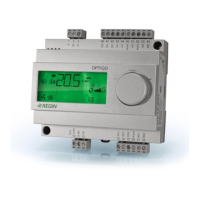
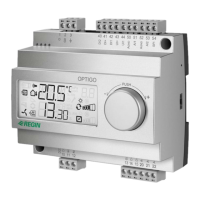
Optigo OP10
OP10
Pre-programmed, configurable controller for
simple applications
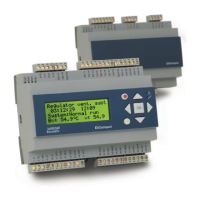
The Optigo OP10 range of controllers controls
temperature. They are intended for DIN-rail mounting.
Optigo OP10 is a pre-programmed controller that can
be used for control of temperature in air handling and
heating applications. It is a stand-alone controller for
simpler applications. Optigo is extremely easy to install,
commission and control.
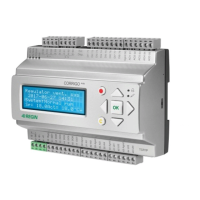
Optigo uses a display with an encoder knob, making
its built-in menu system very easy to use. Settings
are entered by turning the encoder knob to a desired
parameter/value. A value is then approved by pressing the
knob.
Models
The Optigo series comprises two different models, OP5U
and OP10.
OP5U has 5 in-/outputs and OP10 has 10 in-/outputs.
OP10 is available in two models:
OP10 with 24 V AC supply voltage
OP10-230 with 230 V AC supply voltage
Applications for OP10 and OP10-230
Optigo OP10 is pre-programmed with a choice of five
different control modes:
1. Supply air control
2. Supply air control with outdoor compensation
3. Cascaded room / extract air temperature control
4. Radiator circuit control
5. Domestic hot water control
Inputs and outputs
Optigo OP10 has:
2 analogue inputs, PT1000
1 SPI input for an external setpoint device
1 universal input, PT1000 or digital
2 digital inputs
3 digital outputs
2 analogue outputs, 0…10 V DC
Internal clock
Optigo OP10 has a built-in week-based real time clock
with a number of different scheduler alternatives.
Easy to install
Optigo is suitable for DIN-rail or cabinet mounting. Since
the terminals are detachable, all connections can be made
before Optigo is installed.
Optigo has been developed in accordance to our Ready-
Steady-Go concept, simplifying every step from installation to
management.
Language independent
Simple configuration via the backlit display
Input for external setpoint device
Pre-loaded with several application modes
24 V or 230 V AC supply voltage
Week-based clock / calendar function
revision
06 2017
Question and Answer IconNeed help?

Do you have a question about the Regin Optigo OP10 Series and is the answer not in the manual?

Summary

Optigo OP10 Controller Overview

Key Features and Capabilities

Highlights language independence, backlit display, external input, pre-loaded modes, voltage options, and installation ease.

Models and Applications

Details the OP5U and OP10 models, including their I/O counts, and lists the five available control modes for the OP10.

Technical Details: Inputs, Outputs, Clock, Installation

Covers the controller's inputs, outputs, internal clock functionality, and ease of DIN-rail or cabinet mounting.

Display and Encoder Knob Operation

User Interface and Navigation

Explains how to use the display and encoder knob for setting and configuration via a tree-like menu system.

Base Level Display Explained

Describes the default view shown during no operator activity, including current time and output levels.

Information Displayed on Screen

Details various indicators and symbols on the display, such as alarm status, control mode, and fan run.

Configuration and Function Overview

Configuration Menus

Explains access to configuration menus via a 10-second press of the encoder knob and menu dependency.

Selectable Control Functions

Lists the five primary control modes available for the Optigo OP10 controller.

Control Mode Capabilities

Details specific functions for Ventilation, Radiator Circuit Control, and Domestic Hot Water control modes.

Application Examples

Supply Air Control Modes

Illustrates supply air control, including with outdoor compensation, detailing sensor requirements and PI control loops.

Cascade Room;Extract Air Control

Explains cascaded room/extract air temperature control using PI and P loops, with setpoint adjustment.

Analogue and 3-Position Outputs

Details configurations for analogue outputs (AO1, AO2) and 3-position control via digital outputs (DO1, DO2).

Advanced Application Examples

Radiator Circuit Control with Outdoor Curve

Describes PI control for radiator circuits adjusted by outdoor temperature, with optional room sensor feedback.

Domestic Hot Water Control

Explains PID control for domestic hot water temperature, including overheating prevention and output signal.

3-Position Control for Outputs

Details the use of digital outputs DO1 and DO2 for 3-position control, noting limitations with alarm output.

Technical Data and Specifications

Electrical and Environmental Data

Lists supply voltage, consumption, temperature ranges, humidity, display type, and protection class (IP20).

Input and Output Terminals

Details the types and ranges of analog inputs (AI, SPI, UI) and digital inputs/outputs (DI, AO, DO).

Compliance and Standards

States compliance with Low Voltage Directive (LVD), EMC Directive, and RoHS directive.

Wiring, Dimensions, and Documentation

Terminal Wiring Configuration

Provides terminal designations and functions for both OP10 (24V AC) and OP10-230V (230V AC) models.

Physical Dimensions

Specifies the physical dimensions of the Optigo OP10 controller in millimeters.

Product Documentation Availability

Informs users about the availability of the Optigo OP10 manual and user manual on the Regin website.

Summary

Optigo OP10 Controller Overview

Key Features and Capabilities

Highlights language independence, backlit display, external input, pre-loaded modes, voltage options, and installation ease.

Models and Applications

Details the OP5U and OP10 models, including their I/O counts, and lists the five available control modes for the OP10.

Technical Details: Inputs, Outputs, Clock, Installation

Covers the controller's inputs, outputs, internal clock functionality, and ease of DIN-rail or cabinet mounting.

Display and Encoder Knob Operation

User Interface and Navigation

Explains how to use the display and encoder knob for setting and configuration via a tree-like menu system.

Base Level Display Explained

Describes the default view shown during no operator activity, including current time and output levels.

Information Displayed on Screen

Details various indicators and symbols on the display, such as alarm status, control mode, and fan run.

Configuration and Function Overview

Configuration Menus

Explains access to configuration menus via a 10-second press of the encoder knob and menu dependency.

Selectable Control Functions

Lists the five primary control modes available for the Optigo OP10 controller.

Control Mode Capabilities

Details specific functions for Ventilation, Radiator Circuit Control, and Domestic Hot Water control modes.

Application Examples

Supply Air Control Modes

Illustrates supply air control, including with outdoor compensation, detailing sensor requirements and PI control loops.

Cascade Room;Extract Air Control

Explains cascaded room/extract air temperature control using PI and P loops, with setpoint adjustment.

Analogue and 3-Position Outputs

Details configurations for analogue outputs (AO1, AO2) and 3-position control via digital outputs (DO1, DO2).

Advanced Application Examples

Radiator Circuit Control with Outdoor Curve

Describes PI control for radiator circuits adjusted by outdoor temperature, with optional room sensor feedback.

Domestic Hot Water Control

Explains PID control for domestic hot water temperature, including overheating prevention and output signal.

3-Position Control for Outputs

Details the use of digital outputs DO1 and DO2 for 3-position control, noting limitations with alarm output.

Technical Data and Specifications

Electrical and Environmental Data

Lists supply voltage, consumption, temperature ranges, humidity, display type, and protection class (IP20).

Input and Output Terminals

Details the types and ranges of analog inputs (AI, SPI, UI) and digital inputs/outputs (DI, AO, DO).

Compliance and Standards

States compliance with Low Voltage Directive (LVD), EMC Directive, and RoHS directive.

Wiring, Dimensions, and Documentation

Terminal Wiring Configuration

Provides terminal designations and functions for both OP10 (24V AC) and OP10-230V (230V AC) models.

Physical Dimensions

Specifies the physical dimensions of the Optigo OP10 controller in millimeters.

Product Documentation Availability

Informs users about the availability of the Optigo OP10 manual and user manual on the Regin website.

Regin Optigo OP10 Series Specifications

General IconGeneral
Operating Temperature0…50°C
MountingDIN rail
Protection ClassIP20
Number of Analog Inputs4
Number of Digital Inputs4
Number of Relay Outputs4
Supply Voltage24 V AC/DC
CommunicationBACnet
Analog Input TypePt1000
Digital Input TypeDry contact
Relative Humidity5…95% RH, non-condensing

Related product manuals