
 Need help?
Do you have a question about the REHM INVERTIG i 260 DC and is the answer not in the manual?
Introduction to the REHM inert gas welding system and thank you message.
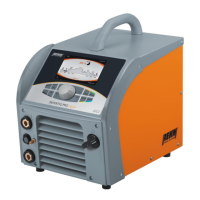
Overview of the INVERTIG i 260-450 welding system.
Explanation of how the TIG inert gas welding process works.
Defines the proper applications and usage restrictions for the welding system.
Explanation of typographic distinctions and symbols used in the manual.
Defines signal words and symbols used to indicate potential hazards.
Labelling of hazards and hazard sources directly on the welding system.
General notes on system development, safety equipment, and applicable regulations.
Visual overview of the INVERTIG i 450 i operating elements and main screen.
Details of the main screen, function buttons, and rotary encoder controls.
Procedure for starting the INVERTIG i 260-450 welding system.
Description of processor control features and automatic parameter saving.
Select TIG (tungsten inert gas) or MMA (manual arc welding) processes.
Choose between Two-cycle, Four-cycle, Spot, HYPER.SPOT, and interval modes.
Configure DC-, DC+, AC, and DUAL.WAVE polarity for welding.
Utilize Time pulses, HYPER.PULS, Automatic pulse, and Balling functions.
Store and recall current settings for quick job access.
Access and navigate through various system submenus for settings.
Adjust welding parameters like pre-flow time, ignition energy, and currents.
Manage jobs, system setup, and language settings through submenus.
Set required gas quantity at the pressure reducer without voltage.
Manage water recirculation for torch cooling and monitor flow rate.
Automatic shutdown if power component temperature is exceeded.
Unit designed for high operational reliability with optimal heat dissipation.
Demand-oriented fan and water pump control for reduced noise and wear.
Details on different unit versions and available accessories and wear parts.
Read operating instructions and safety guidelines before commissioning.
Guidelines for working under increased electrical hazard conditions.
Position unit for sufficient space and ensure stability during setup.
Connect power source according to VDE regulations and local mains.
Ensure air entry/exit ports are unobstructed for proper ventilation.
Check water level and use specified coolant for water-cooled torches.
Ensure tight, clean connections for optimal welding results.
Connect TIG welding torch to the designated socket.
Follow safety guidelines before commissioning and operating the welding source.
Verify system placement, connections, maintenance, and safety equipment.
Connect ground cable securely to workpiece for efficient welding.
Understand risks like fire, harmful substances, noise, optical radiation, and electrical hazards.
Information on weldable materials, inert gases, and welding techniques.
Switch off system immediately if a fault poses a hazard.
Identify and resolve issues like no display, temperature warnings, or current problems.
List of error numbers, descriptions, causes, and eliminations for system faults.
Perform maintenance only with trained personnel using original spare parts.
Recommended intervals for cleaning, checks, and system inspection.
Clean unit interior by blowing out or vacuuming at regular intervals.
Check water level, coolant status, and contamination for proper cooling.
Dispose of electrical appliances separately according to environmental regulations.
List of components and their part numbers for the welding system.
 General
| Brand | REHM |
|---|---|
| Model | INVERTIG i 260 DC |
| Category | Welding System |
| Language | English |



 To Next Page