44
symbol disappears
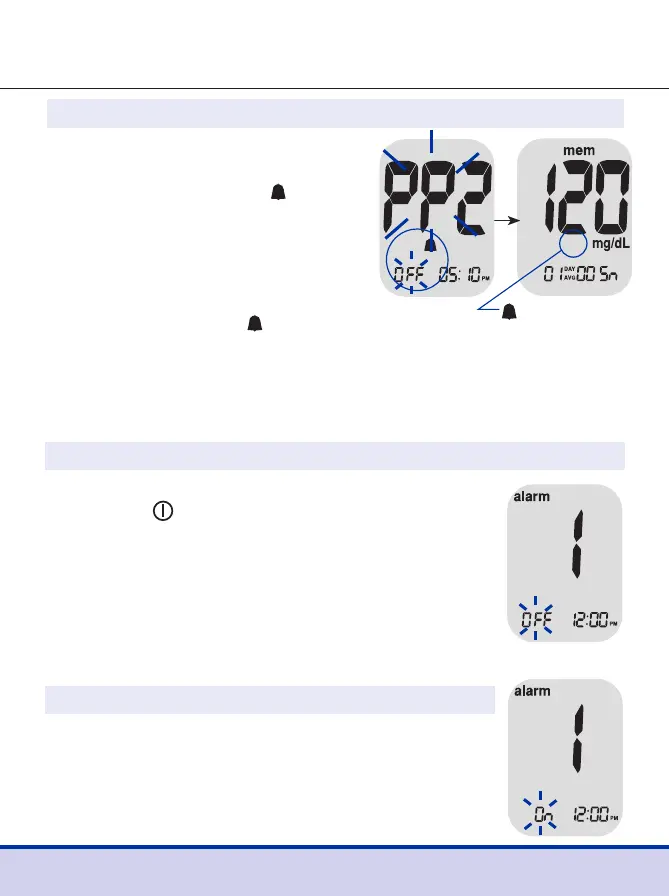
Step 2 Setting the PP2 Alarm OFF
To turn off the ‘PP2’ alarm,
press and hold the
<
button
for 3 seconds. ‘PP2,’ the
symbol and ‘OFF’ will appear
on the screen.
Then the screen will change
automatically to the memory
check mode without
symbol displayed.
Step 1
Without inserting a test strip, press and hold
the < and
buttons simultaneously for
3 seconds to enter the time alarm mode.
While ‘OFF’ blinks on the screen, alarm 1
will be displayed.
Setting the Time Alarms (Alarm 1–3)
Step 2
On pressing the
>
button again, alarm 1 is set
and ‘On’ is displayed on the screen.
Press the
>
button again to cancel alarm 1 and
‘OFF’ will blink on the screen.



 To Next Page