- 5 -
EN
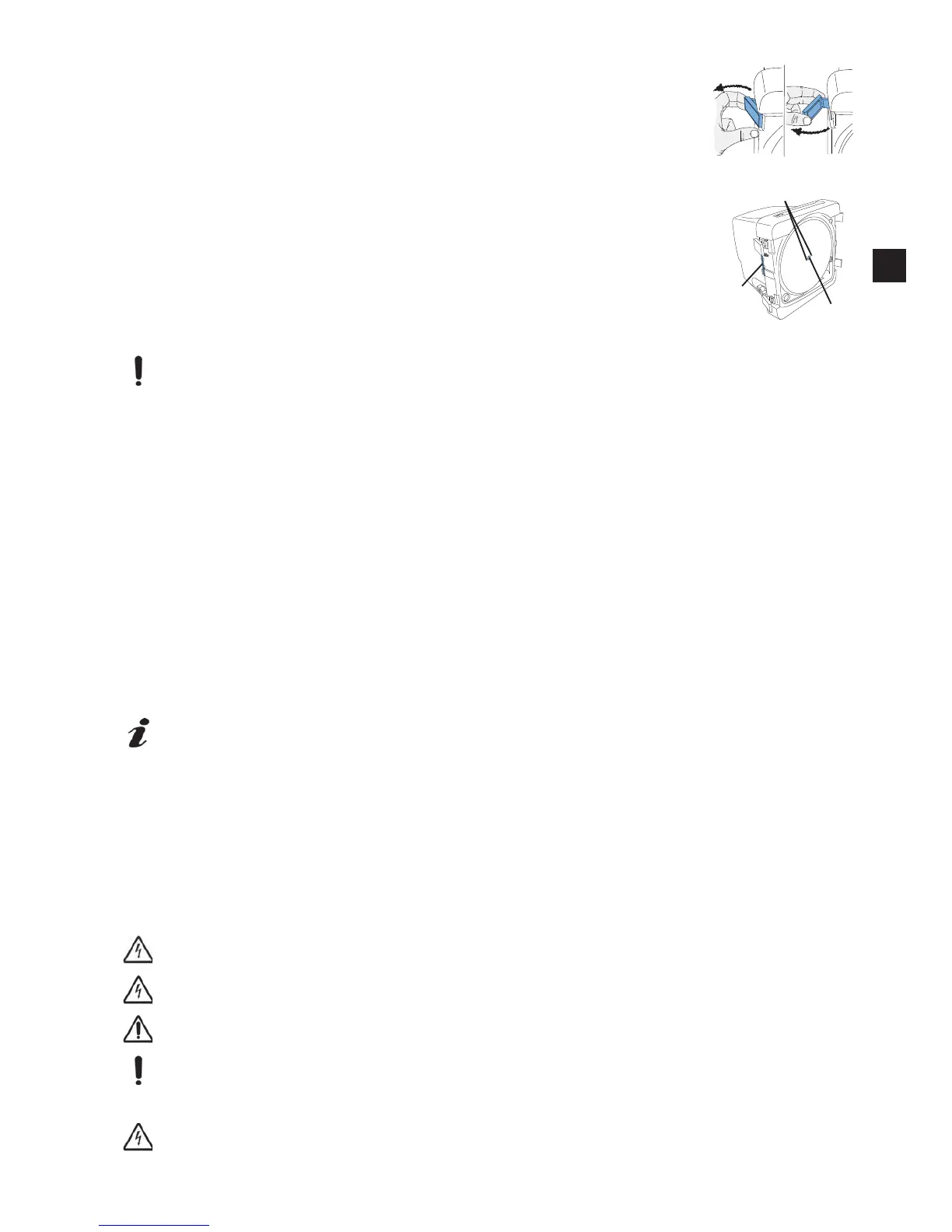
3.4 Trimmer Disc Replacement
Switch the unit off.
Disconnect from mains.
Close water supply shutoff tap.
Remove door and set aside.
Remove the Allen key (22) from its holder.
Remove cover (15).
Loosen the fastening screw (16), and remove the disc.
Place a new disc on the lock pin (17).
Retighten the fastening screw with the Allen key.
Place the cover back on the fastening screw.
Return the Allen key to its holder.
Put door back in postion and close the door latches.
Plug in at the mains plug.
Retighten the fastening screw (16) after several minutes of operation to guard against
possible settlement.
3.5 Loading monitoring
MT3 pro only
The control electronics monitors the loading of the trimmer motor. It gives a warning when the trimmer motor is loaded
in a way, that may cause an unacceptable motor temperature and a trigger of the motor thermal fuse
-
Loading will cause heating up the trimmer motor.
Î Reduce grinding pressure as soon as possible.
-
Loading limit exceeded, let trimmer motor cool down.
Î
-
trimmer still too hot.
Î
-
motor winding thermal protection switch has tripped.
Î
Once the disk has been blocked to a complete standstill, and the appliance has been turned off by the control
electronics, it need to be turned off at the ON/OFF-pushbutton also, before it can be turned on again.
3.6 Operation brake
MT3pro only
An electronical operation brake stops the trimmer disc within about 5 sec. after swichting the appliance off.
The operation brake is only operative with the door closed. Therefore, only open the door after the trimmer disc has
come to a complete standstill.
4. Cleaning and Maintenance
In order to maintain a fully functioning device, the trimmer must be cleaned in regular intervals (at least once a week)
and checked for damage.
Please removed damaged devices from operation immediately and send in for repair.
The device does not include parts which require maintenance.
It is not permitted to open the device!
Switch off and unplug the appliance before cleaning or servicing.
Do not clean the device using sharp edged objects, abrasive or solvent cleaning agents!
Use soft brush or cleaning cloth only!
4.1 Clean the housing
Do not steam clean the housing!
Fig. 9
1.
2.
15/16
22
17
Fig. 10
EN


 To Next Page