29
Wiring
12V Power Cable
+ -
CAN/RS485
TYPE-C
IN1 IN2OUT1 OUT2 IN3 OUT3
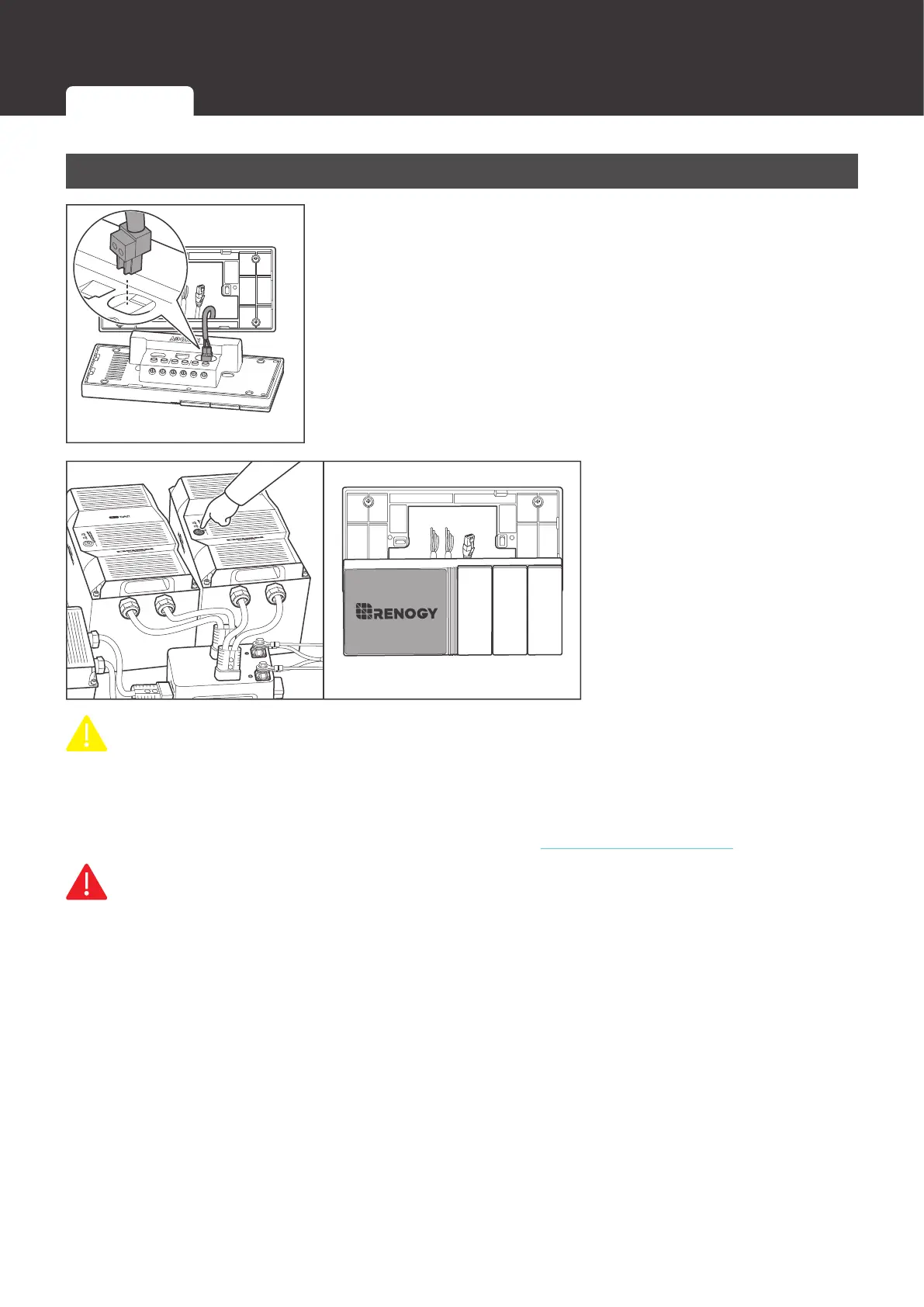
1. Insert the 12V power cable terminal block into Renogy ONE
power port.
2. Power on the DC power
supply and check if
Renogy ONE automatically
turns on with the LCD
lighting up. After the test
is complete, please power
off the power supply.
CAUTIO
z
After correct power cable connection and normal power-on of the DC power supply, Renogy
ONE is automatically powered on. Failed automatic power-on indicates a fault on Renogy
ONE. For troubleshooting, refer to Troubleshooting in this user manual. For additional
support, please contact our customer service through renogy.com/contact-us/.
WARNIN
z
Risk of electric shock! Please power off the DC power supply after the test on power-on of
Renogy ONE is completed.
Wiring
12V Power Cable Communication Cables External Load


 To Next Page