18 19
Microphone directionality
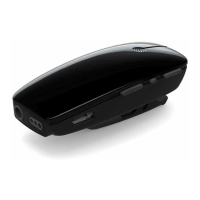
The Multi Mic can both be used for picking up the voice from one
speaker wearing the Multi Mic as well as a table microphone solu-
tion picking up the voices of multiple speakers.
Wearing the Multi Mic
Using the Multi Mic with one speaker
When the Multi Mic is used for listening to one speaker of inter-
est, it should be clipped onto the speaker’s shirt. Alternatively,
the Multi Mic can be hung around the speakers neck using the
lanyard supplied with the device.
Place the device within a range of 10-40cm (4-16 inches) from the
speaker’s mouth as shown on the next page. When using the clip,
make sure that the Multi Mic is mounted vertically with the Status
LED pointing towards the mouth.
When worn vertically, the Multi Mic automatically switches into a
mode minimizing background noise.
10 - 40 cm
4-16 inc hes
Using the Multi Mic as a table microphone
Place the Multi Mic horizontally on a level surface (e.g. a table) in
close proximity to the group of people you want to listen to. Plac-
ing the Multi Mic horizontally on a table automatically switches it
into a mode optimized for picking up the voices of multiple speak-
ers.


 To Next Page