6
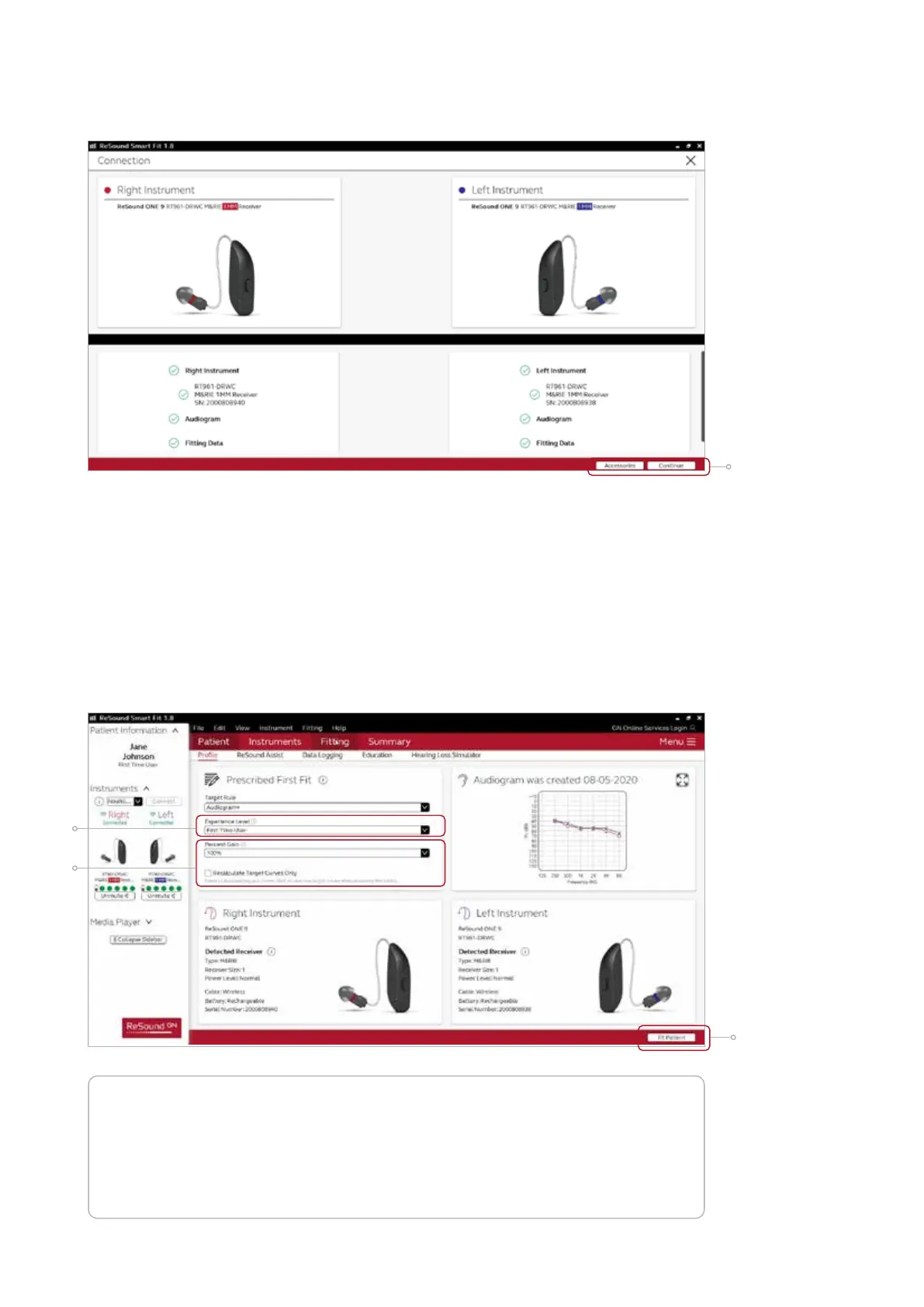
Patient profile screen
Located in the upper left corner of Patient Profile screen, Prescribed First Fit ensures an
immediate personalisation of a new set of hearing aids. Based on a user’s audiogram, the
selected target rule, gain level (%) and experience level; the ReSound Smart Fit software
will adjust the settings for Noise Tracker II, Impulse Noise Reduction and Expansion to
better fit the individual user.
1. Select the Patient Experience Level based on the amplification history.
2. Set Gain Level(%) for initial fit.
3. Click ‘Fit Patient’ button in the lower right corner to move to Fitting Screen.
Note the ReSound Assist feature tab in the lower level navigation under the red
upper navigation. The new remote services feature can be found and activated in the
‘Assist’ tab on the Patient screen.
If the user being fitted is a candidate for ReSound Assist the feature must be
activated during the fitting in order to be active in the hearing aid and appear in the
ReSound Smart 3D
TM
app.
4. Verify connected hearing aids. Click ‘Continue’ to proceed to the Patient Profile
screen or pair Accessories by clicking ‘Accessories’.
1
2
3
3









 To Next Page