EasyManua.ls Logo

Respironics Alice 5 - User Manual

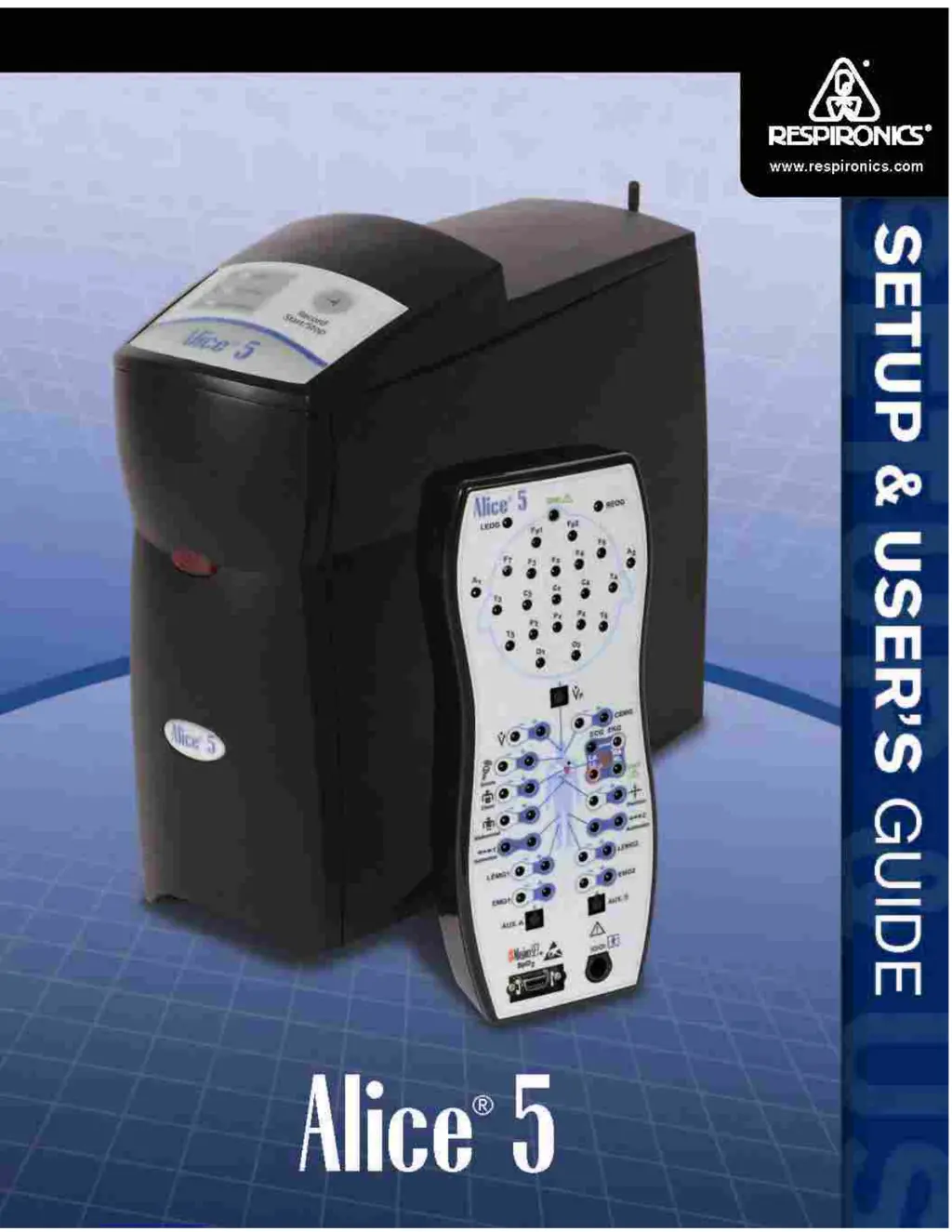
Respironics Alice 5
122 pages
Print Icon
To Next Page IconTo Next Page
Loading...

Table of Contents

Questions and Answers

  • B
    Brandon MerrittAug 16, 2025
    Why doesn't my Respironics Medical Equipment base station appear on the network in Alice Sleepware?
    • A
      amygallagherAug 16, 2025
      Several factors could prevent the base station from appearing on the network. Verify that your computer's network interface is active and that both the computer and base station are on the same network. Ensure the base station is plugged in, powered on, and the Ready LED is green. Check your network cabling, ensuring you're using the correct cable (CAT-5 Crossover or CAT-5 Patch) for your setup. If you're using a network router, confirm that the Alice 5 and the computer are on the same side of it during device addition. If these steps don't work, temporarily connect the base station directly to the computer to add the device, or manually enter the device's IP address in the Add Device wizard.
  • S
    Sharon GilesAug 19, 2025
    How to fix Respironics Medical Equipment software not installing?
    • M
      mathisrebeccaAug 19, 2025
      First, ensure your computer meets the minimum specifications required to run the Alice Sleepware software. Insufficient memory or an incompatible system can prevent proper installation. Check the Alice Sleepware CD packaging for a list of required specifications. Also, verify that you are logged into your computer as an administrator, as restricted users may not be able to install the software. Log in as an administrator, install the software, and then revert the privileges back to restricted, if needed.
  • M
    Michael PittmanAug 22, 2025
    What to do if my Respironics Medical Equipment can't communicate wirelessly?
    • J
      Julie PayneAug 22, 2025
      If your computer can't communicate with your wireless device, ensure all interfaces on your computer are active. Then, verify your device settings, including the IP address, channel, and encryption, match what you entered when adding the device in Sleepware. Mismatched settings will prevent communication.
  • S
    stevenclarkAug 25, 2025
    How to resolve 'The page cannot be displayed' error in Respironics Alice Sleepware?
    • T
      Timothy MillerAug 26, 2025
      If you encounter a 'The page cannot be displayed' error in Alice Sleepware, first ensure your network is active. If it is, check your computer's proxy settings. Disable the proxy server settings by navigating to Control Panel > Internet Options > Connections tab, clicking the LAN Settings button, and deselecting the Proxy server option.
  • K
    Katie LevineAug 28, 2025
    Why is the Ready LED on my Respironics Medical Equipment base station stuck on yellow?
    • C
      calvin62Aug 28, 2025
      When you first plug in the device, the Ready LED will light up as yellow, indicating power is supplied but the device isn't ready. Within 8 minutes, the light should turn green, signaling readiness. If it doesn't, the Alice 5 will automatically reboot and try again. Try unplugging the base station and plugging it back in. If the light remains yellow after 8 minutes, the device requires servicing.
  • D
    Denise MillerAug 30, 2025
    What does it mean when Alice 5 devices show no signal in the Respironics Starter Bar?
    • L
      Lynn ZhangAug 31, 2025
      If the Alice 5 devices in your Starter Bar indicate no signal, check all of the items mentioned in Troubleshooting Item #5. Also, check to see if any new firewall software has been added to the computer, as it may conflict with Alice Sleepware.
  • S
    Samuel BlackSep 3, 2025
    Why is the Add/Modify Device option grayed out in the Respironics Alice Starter Bar?
    • H
      hillkellySep 3, 2025
      If the Add/Modify Device option is grayed out, it's likely because you currently have an acquisition running. You cannot select this option while an acquisition is in progress. To add or modify a device, stop the running acquisition or wait for it to complete.
  • D
    Danny DuffySep 5, 2025
    How to troubleshoot a Respironics Medical Equipment base station when the Ready LED doesn't light up?
    • S
      smithbrandiSep 6, 2025
      First, check your power cord and power supply connections to ensure they are properly plugged in. If the problem persists, try plugging the device into a different wall outlet. If the LED still doesn't light, you may have a faulty power supply or power cord.
  • A
    Ashley GaySep 9, 2025
    Why isn't my Respironics Medical Equipment computer receiving patient data after acquisition?
    • J
      Jennifer LopezSep 9, 2025
      Verify that you specified the computer as the data recipient when you added the Alice 5 device. If not, access the Add/Modify Device wizard, and on the screen where you designate the data recipient, choose Option 1 to automatically send data to your computer.
  • J
    joan78Sep 12, 2025
    What to do if Sleepware shows video of the wrong room with Respironics Medical Equipment?
    • D
      Dr. Melinda MartinSep 12, 2025
      Check your Audio/Video settings in Alice Sleepware. Ensure the correct video camera port number is specified. Select the port number corresponding to the camera you want to view. Note that the Alice 5 system is compatible with the Axis 2420 camera (port 1) and the Axis 2400/2401 video server (ports 1-4, depending on the camera's connection).

Summary

Introduction to the Alice 5 System

Alice 5 System Contents and Components

Lists the hardware components included in the Alice 5 system package.

Important Safety Warnings and Intended Use

Provides essential safety warnings, cautions, and the intended application of the Alice 5 system.

Alice 5 Hardware Overview and Data Flow

Details the main hardware components, base station, headbox, and explains the system's data flow.

Alice 5 Symbol Key, Acronyms, and Support

Provides a symbol key, acronyms, definitions, and contact information for customer support.

Alice 5 Equipment Setup

Before You Begin and Network Setup

Key considerations before setup and instructions for setting up wired and wireless networks.

Alice 5 Network Setup Options

Details various network setup examples including point-to-point, wired, and infrastructure.

Connecting Alice 5 Hardware Components

Step-by-step instructions for connecting the various hardware components of the Alice 5.

Integrating Alice 3;4 Devices and Adding Accessories

Instructions for integrating older Alice devices and setting up accessories like video cameras.

Software Installation and Setup

Alice Sleepware Software Installation

Step-by-step guide for installing the Alice Sleepware software on a computer.

Adding Alice Devices to Sleepware

Instructions on how to add Alice 5 devices to the Alice Sleepware software.

Running Data Acquisitions

Overview of Data Acquisition Capabilities

Overview of Alice Sleepware's capabilities for viewing, scoring, and organizing data.

Patient Setup Procedures

Instructions for preparing the patient and attaching sensors for data acquisition.

Starting and Stopping Data Acquisitions

Steps for starting, stopping, and checking equipment performance during data acquisition.

Understanding Channels

Headbox Channels Description

Description of the channels available directly from the Alice 5 headbox.

Base Station Auxiliary Channels

Details on auxiliary channels connected via the base station's input ports.

Therapy Device and Derived Channels

Describes channels related to therapy devices and channels derived from other signals.

Cleaning and Maintenance

Cleaning Main System Components

Instructions for cleaning the base station, headbox, and patient cable.

Sensor Cleaning Procedures

Procedures for cleaning various types of sensors used with the Alice 5 system.

Troubleshooting Guide

Base Station and Computer Equipment Issues

Troubleshooting common problems related to the base station and computer connectivity.

Software Installation and Wizard Problems

Solutions for problems encountered during software installation and wizard setup.

Video Camera and Server Troubleshooting

Troubleshooting common problems with video cameras and video servers.

System Specifications

Device Size and Physical Dimensions

Provides the physical dimensions and weight of the base station and headbox.

Classifications, Ratings, and Power Requirements

Details the system's classifications, standards compliance, and power requirements.

System Disposal Guidelines

Guidance on proper disposal of system components according to regulations.

EMC Information

Electromagnetic Emissions Declaration

Information on the device's electromagnetic emissions and intended environment.

Electromagnetic Immunity Declaration

Details on the device's electromagnetic immunity and required environment.

Limited Warranty Information

Alice 5 System Limited Warranty Terms

Outlines the warranty terms and conditions for the Alice 5 system.

Respironics Alice 5 Specifications

General IconGeneral
BrandRespironics
ModelAlice 5
CategoryMedical Equipment
LanguageEnglish

Related product manuals