Part-Arm 2
This controls whether the zone is active when Part-
Arm 2 is armed.
Default setting: OFF
Scroll through the menu until ‘3-7 Z01 Part-Arm 2’ is
displayed. The current setting will also be displayed.
To change the setting press .
P
ress to enable the Zone in Part-Arm 2, or
Press to disable the Zone in Part-Arm 2.
Walk Through
Default setting: OFF
Scroll through the menu until ‘3-8 Z01 Walk Through’
is displayed. The current setting will also be displayed.
To change the setting press .
Scroll through available options, (Off, Master and
Slave), until the required setting is displayed.
Press to save and exit, or
Press to exit without saving.
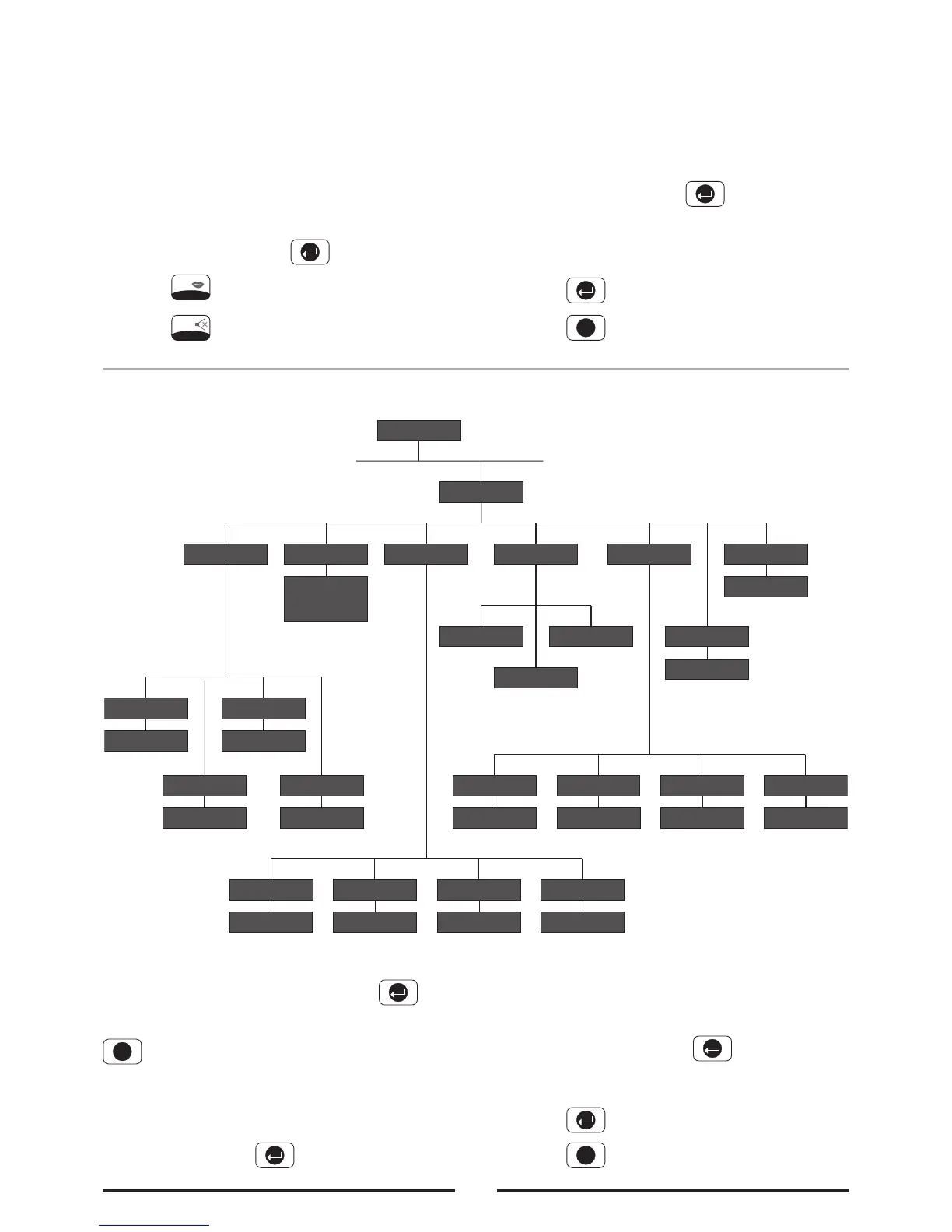
Voice Dialler Setup
Scroll through the programming menu until ‘4. VOICE
DIALLER SETUP’ is displayed and press .
Note: After completing the Voice Dialler Setup press
to return to the top level programming menu.
Telephone Numbers
Scroll through the menu until ‘4-1 PHONE NUMBERS’
is displayed and press .
Scroll through the menu until the required Telephone
number (1-4) is displayed. The current setting of
each telephone number will also be displayed.
To change the number press .
Enter the new telephone number (32 digits max)
Press to save and exit, or
Press to exit without saving.
28



 To Next Page