iBreeze CPAP Clinical Guide
7
The background breathing dynamic diagram.
The current therapy mode.
Please refer Chapter7 “Therapy Information” for more details.
Display the alarm messages.
Please refer Chapter7 “Therapy Information” for more details.
Humidity adjustment shortcut key and Humidity level.
Note:Only the humidity function is turned on for humidity level display
Comfort key, enter Clinical comfort setting interface.
The current therapy pressure.
The settings parameters of the corresponding mode.
Please refer Chapter7 “Therapy Information” for more details.
If blood oxygen saturation is present and connected, the monitored blood oxygen
saturation and pulse rate values are displayed in this area.
Ramp time dynamic diagram.
Note:Only Ramp function is turned on for Ramp time dynamic diagram.
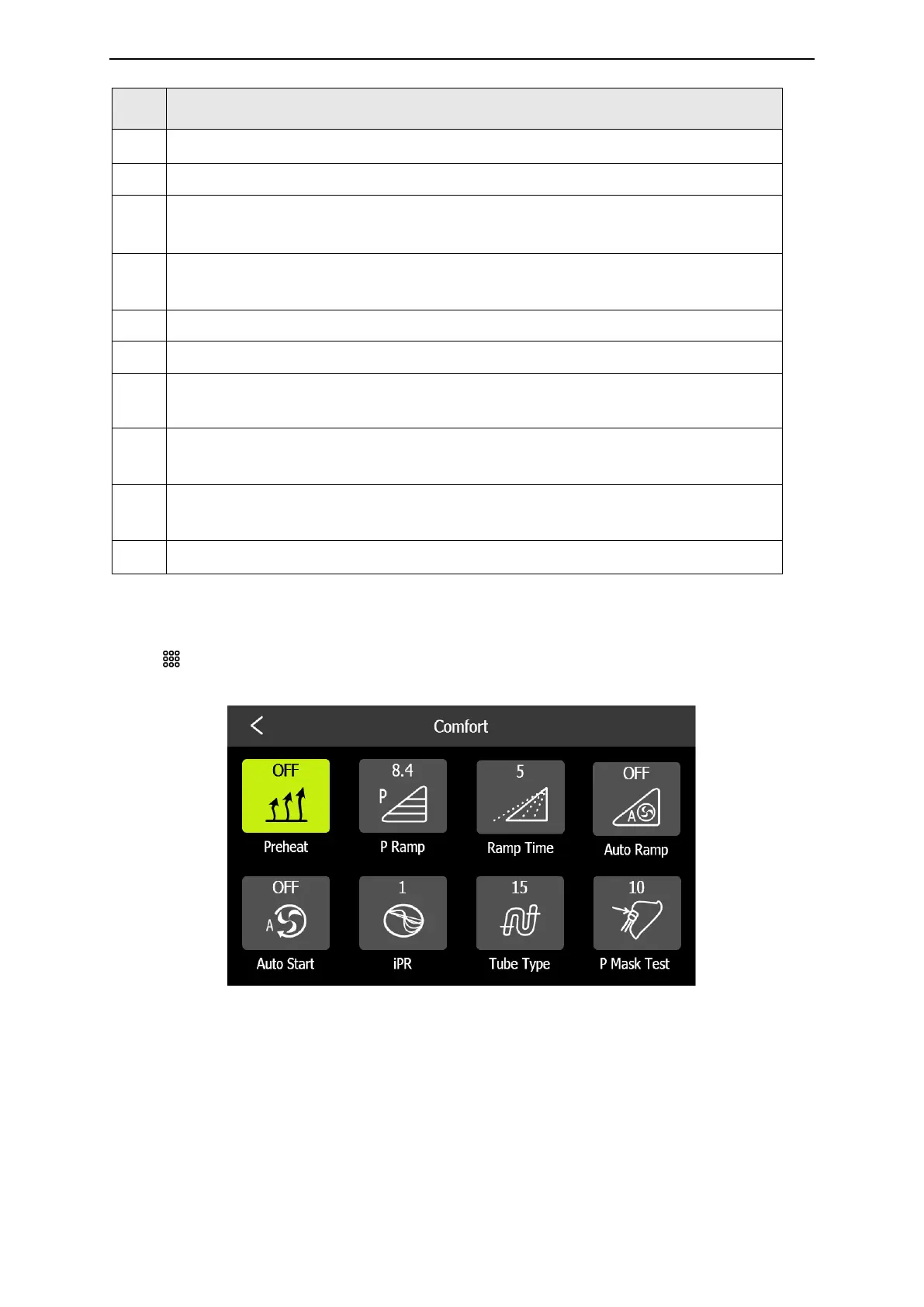
6.4 Clinical Comfort Settings
Press key in the clinical standby interface to enter clinical comfort settings interface.
Clinical Comfort Settings Interface



 To Next Page