6.Select operating band
You can change the default frequency bands for bands A and B.
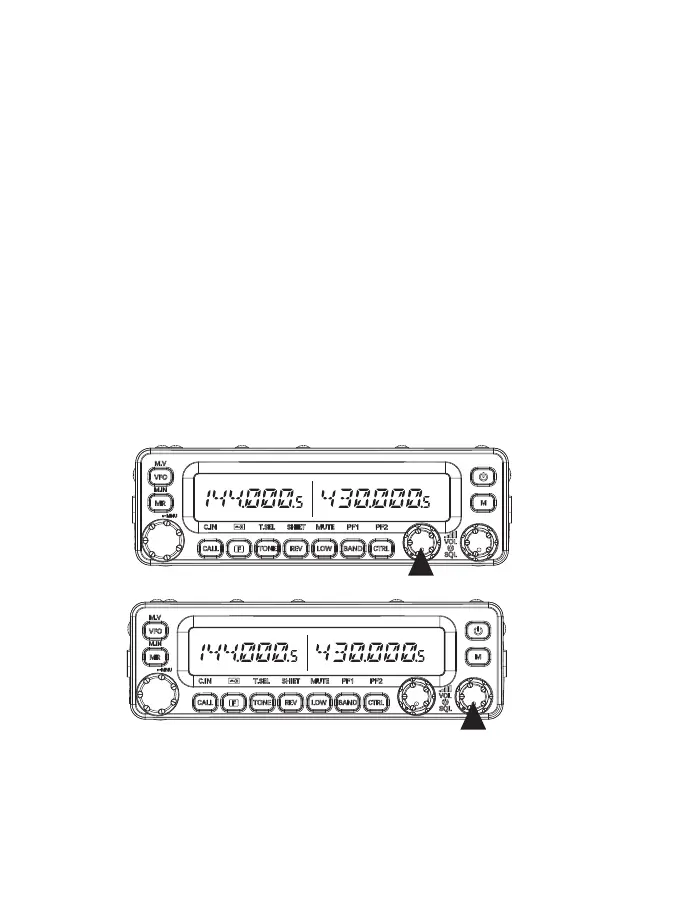
①Select band A or B by pressing the [BAND SEL] control button or [BAND] button.
②For the selected frequency BAND, each time you press [F], [BAND], you can switch the
next frequency band, and the default setting of the [BAND] key allows you to switch to the
next frequency band.
A Working frequency band: cyclic switching from 144 MHz > 430 MHz > 108MHz.
Rotate the BAND SEL (VOL) control clockwise for the selected band to increase the volume,
and counterclockwise to decrease the volume.
be careful:
①Adjusting the volume during a call will be more accurate.
②The volume adjustment of the left and right is independently and separately adjustable.
3.Adjust the squelch level
The squelch function is used to turn o the speaker volume when there is no signal. If the
squelch level is set correctly, you will only hear sound when the signal is actually received.
The higher the squelch level, the stronger the signal strength must be to hear the sound.
When there is no signal for the selected frequency band rotation [SQL] control knob, select
the static exposure level that can eectively eliminate surrounding noise.
be careful:
The squelch level of the left and right are also independently adjusted separately.
4.Band Select
Press the left [Band SEL] control knob to select Band A, and press the right [Band SEL]
control knob to select band B.
The [CTRL] icon appears above the band you are operating on, and the [PTT] icon appears
above the band you are currently setting to transmit.
5.Single Band or Dual Band Select
Press [Band SEL] can do the switch between the single band and dual band
11



 To Next Page