1312
Power on
With the camera is in its power-o state,
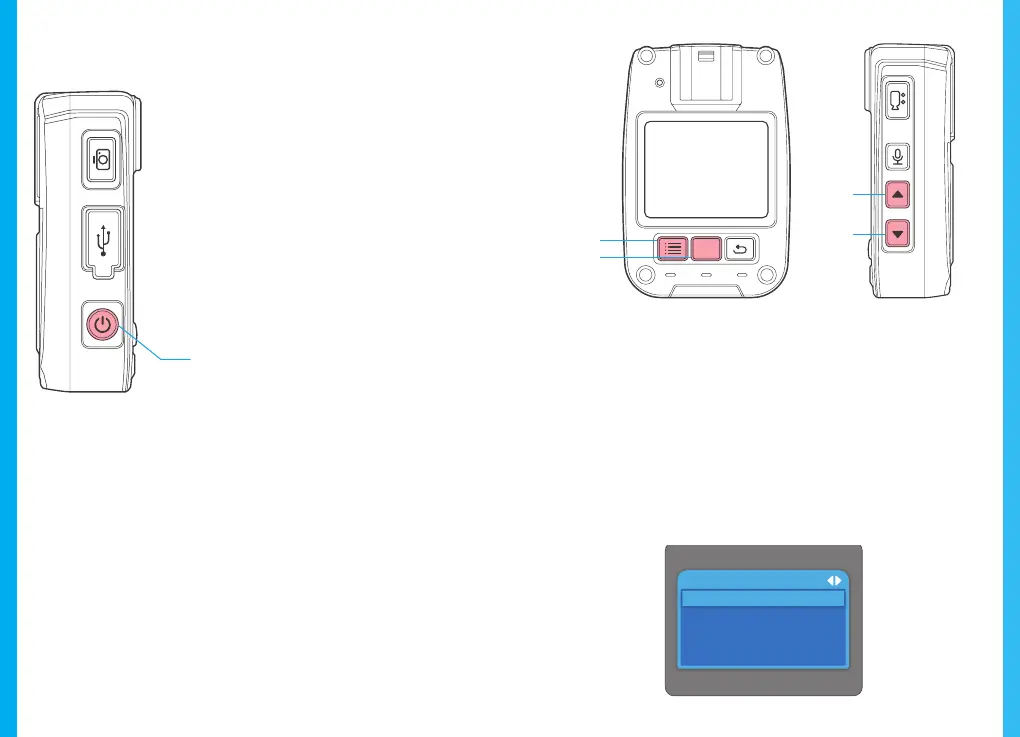
press the ON/OFF key to start the device.
The device displays a preview screen after
starting. The working indicator light turns
green. If no operation is performed within
60 seconds after starting, the device enters
screen saver mode as its default. The
device automatically enters screen saver
mode 60 seconds after it starts to shoot.
5. Basic Operation
Power off
With the camera in its power-on state, depress
the ON/OFF key to power o the device. All indicator
lights will extinguish. Press the ON/OFF key to enter
screen saver mode.
Standby
With the camera in its power-on state, if no operation is
performed within 60 seconds after starting, the device
automatically enters screen saver mode; in this mode,
the screen goes o and the working indicator light turns
green. Press any key to illuminate the screen.
Menu Setup
With the camera in its standby state, press the MENU
key to enter the MENU setup interface. Press the UP or
DOWN key to select the desired function. Press the OK
key to conrm your option. Use the UP or Down key to
change your option. Press the OK key again to conrm
your selection(s). The device automatically saves any
setup changes. Detailed system options are not described
hereinafter. The screen display is shown below:
ON/OFF
OK
MENU
Up
Down
Settings
Video Resolution
Photo Resolution
LED
Video Time
Sound Cue
RR
OK



 To Next Page