Getting Started
Quick Start
23
© 2019
REXING All Rights
Reserved.
Your device accepts memory cards with a maximum capacity of 256GB.
Depending on the memory card manufacturer and type, some cards may not be
compatible with your device. Using an incompatible card may damage the
device or the memory card, or corrupt the data stored on it.
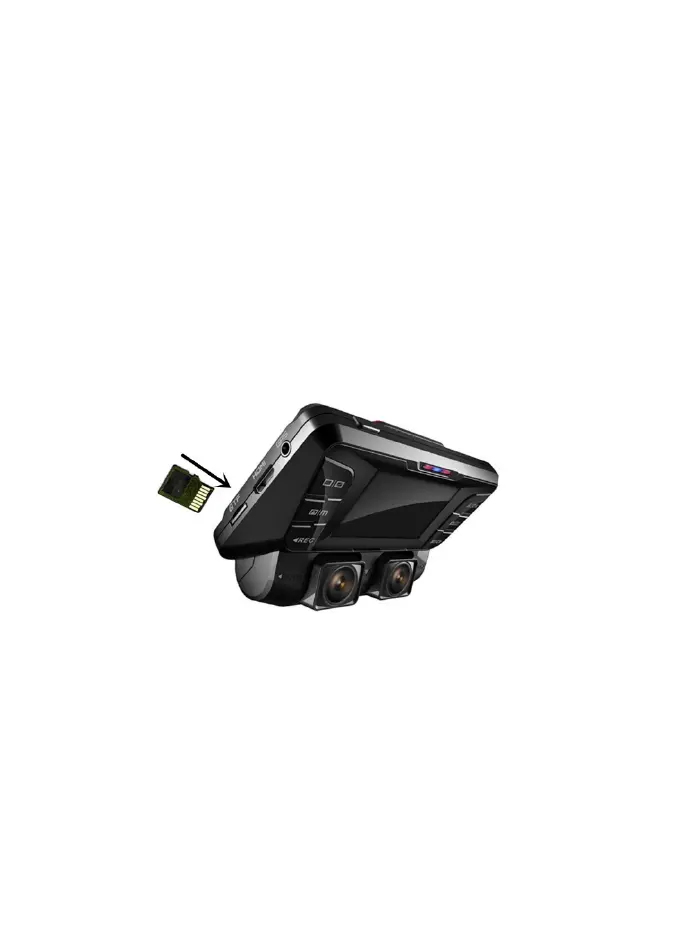
Use caution to insert the memory card right-side up as shown in the image
below.
• Insert memory card with the gold-colored contacts facing upwards.
• Push the memory card into the slot until it locks in place.
• Click sound when memory card locks in place.
• Using a coin or other tool push memory card will make it easier.
It is recommended that you reformat a memory card after every time that
images are transferred from it to a computer, or at least once a month.
Reformatting a memory card keeps important elements of data and file structure
clean, helping to prevent error messages and missing images. Reformatting
also restores the memory card, which can help prevent it from becoming
corrupted.



 To Next Page