18
Operating and installation instructions RF-KIT Power Amplifier RF2K-S
CAT
„CAT“ is short for „Computer Aided Transceiver“ and is a way to remotely
control a transceiver or receiver by a PC.
The operating system of the PA contains a huge list of common devices.
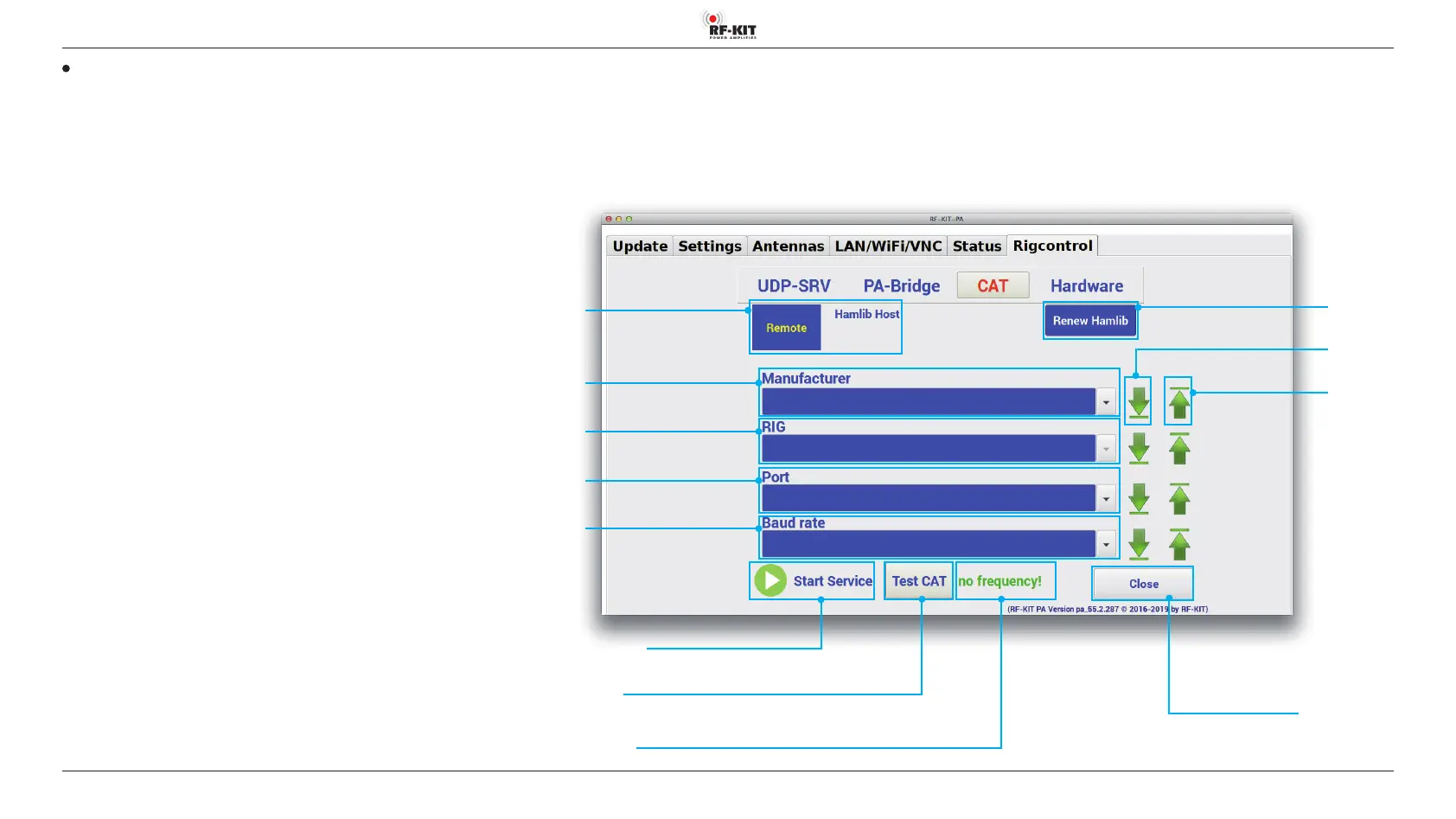
► Tap at switching area Renew Hamlib to download the most recent
list of relevant device conguration data.
To set up a CAT connection between the PA and exciter / transceiver, pro
-
ceed as follows:
► Select the manufacturer of the exciter / transceiver you are using
from pulldown menu Manufacturer.
► Select the model of the Exciter / Transceiver you are using
from pulldown menu RIG.
► Select the port the exciter / transceiver is connected to the PA from
pulldown menu Port.
► Select the transfer rate of the CAT connection from pulldown menu
Baud rate.
The switching areas End List and Start List to the right of each pulldown
menu get you immediately to the end/beginning of each list.
After setting up CAT connection:
► Tap at switching area Start Service to activate the CAT connection.
► Tap at switching area Test CAT to test the CAT connection.
If the connection is successful, the frequency set at the exciter / transceiver
is displayed in indication area CAT-Status.
In case of connection problems indication area CAT-Status shows „no
frequency!“.
Pulldown menu
Manufacturer
Switching area Close
Touching this switching area closes the user menu;
subsequently the main screen will be displayed
Switching area
End List
Switching area
Start List
Pulldown menu
RIG
Pulldown menu
Port
Pulldown menu
Baud rate
Switching area Start Service
Switching area Test CAT
Indication area CAT-Status
Switching area
Remote
Hamlib Host
Switching area
Renew Hamlib



 To Next Page