9
Operating and installation instructions RF-KIT Power Amplifier RF2K-S
5.2 User menu
► Touch the switching area Menu.
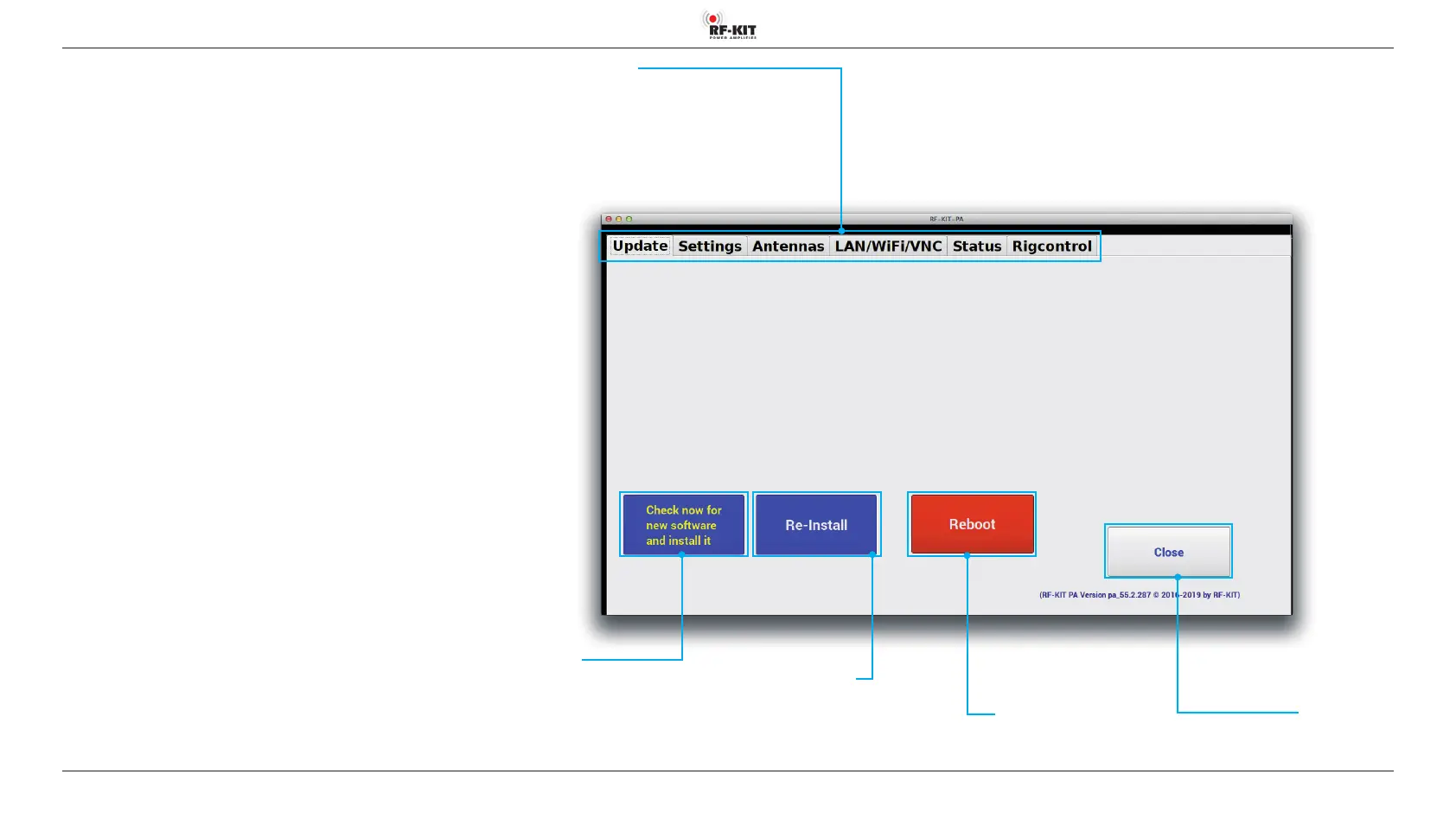
The Touchscreen (2) changes to the user menu and displays the screen
shown to the right. The following submenus can be selected:
5.2.1 Update
If the device is connected to the Internet, you can search for updates for
the operating system of the PA. If newer versions of the operating system
are available, they can be installed quickly and easily.
Submenus:
- Settings
- Antennas
- LAN/WiFi/VNC
- Status
- Rigcontrol
Switching area Submenus
(Update / Settings / Antennas / LAN/WiFi/VNC / Status / Rigcontrol)
Switching area Close
Touching this switching area closes the user menu;
subsequently the main screen will be displayed
Switching area Reboot
Touching this switching area
reboots the device.
Switching area
Check For New Software
After touching this switching area the device
checks the current version of the installed
operating system, downloads the latest version if
necessary and installs it automatically.
Switching area Re-Install
Touching this switching area
reinstalls the current operating
system.



 To Next Page