Normally Open
This wiring configuration should be used when connecting PGMs from third-party alarm panels:
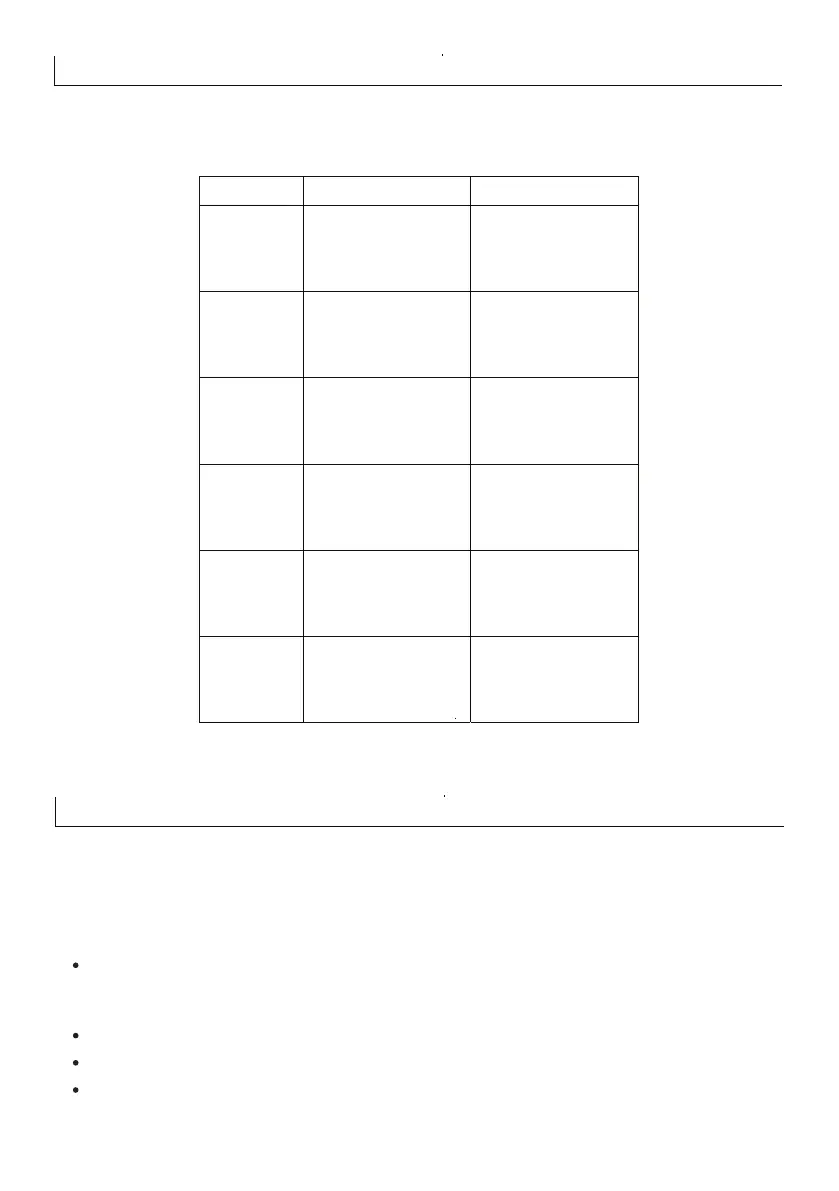
Dedicated Inputs
Input State Input Switch Closed Input Switch Open
Input #Z1
Contact ID R400
“Closed”
Contact ID E 400
“Open”
Input #Z2
Contact ID E 120
“Panic”
Input # Z3
Contact ID E 130-1
“Burglary Zone #1”
Input #Z4 Contact ID E 130-2
“Burglary Zone #2”
Input #Z5 Contact ID E110
“Fire Alarm”
Input #Z6
Contact ID E100
“Medical E mergency”
10
Once ALL connections have been made to the Rhino Panic Pack and power is ready to be applied,
you should read this section before continuing.
Commissioning
The Rhino Panic Pack leaves the factory programmed with default settings and when the system is
powered up for the first time the default settings are in use.
Connect the black battery lead to the negative (-) terminal of the standby battery and the red
battery lead to the positive (+) terminal of the standby battery. The 7-segment display will show PP
followed by the firmware version number e.g. r4 00
Program the system as described in the next section (Programming the Rhino Panic Pack).
Use the diagnostics page to check zones and outputs. See page 25.
Test the siren and strobe by pressing panic on a remote control learnt on the system and triggering
an alarm.



 To Next Page