3
I
II
I
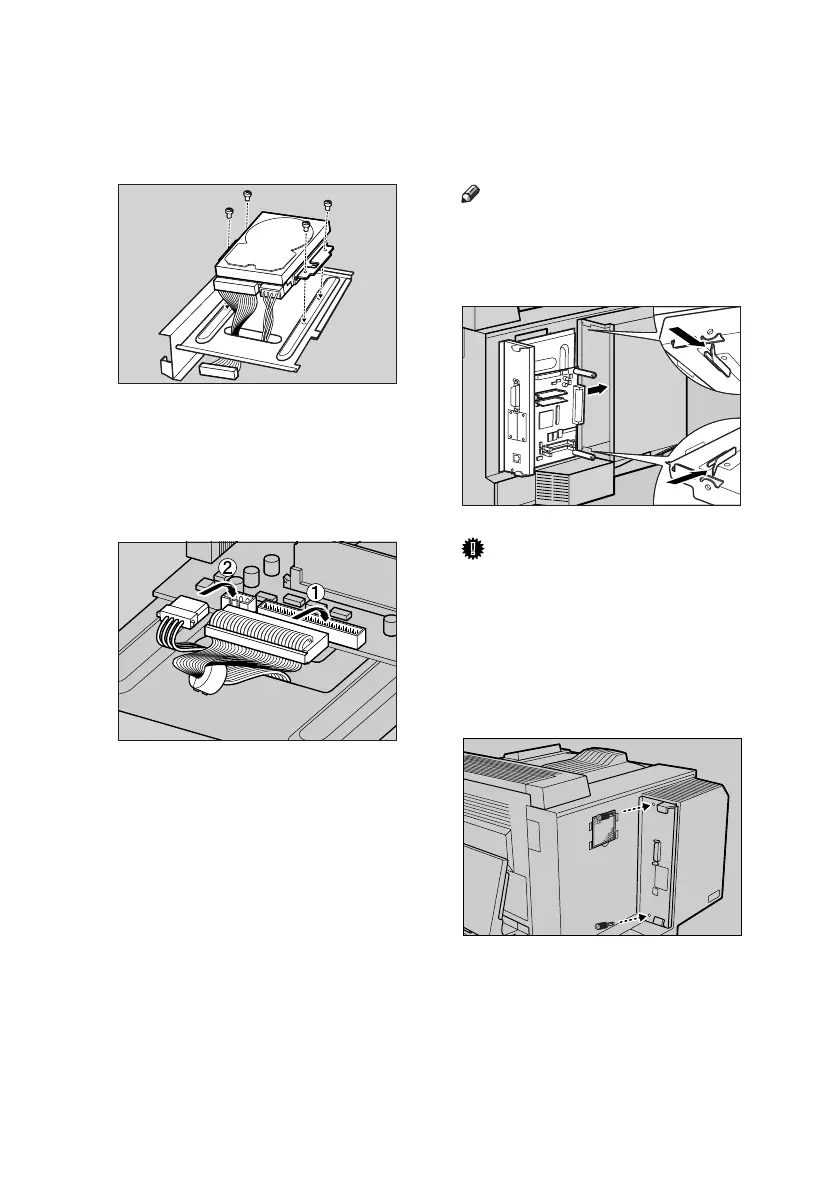
Fasten the printer hard disk onto
the back of the controller board
using the four screws.
Use a coin to fasten the screws
tightly.
J
JJ
J
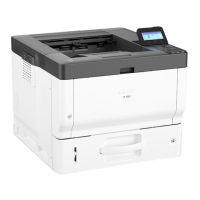
Turn the cables over, and then
connect them to the controller
board slots.
K
KK
K
Align the controller board with
the top and bottom rails, and then
slowly push it in until it stops.
Note
❒ When installing another option,
do not close the controller
board, but proceed to the steps
for installing that option.
Important
❒ The printer may not work prop-
erly if the controller board is not
properly configured.
L
LL
L
Tighten the two screws removed
in step
E
EE
E
to fasten the controller
board back into its original posi-
tion.
Use a coin to fasten the screws se-
curely.
ZESP998E
ZESP997E
ZESP030J
ZESH752J
HardDisk-2003-F_FM.book Page 3 Thursday, August 21, 2003 2:00 PM



 To Next Page