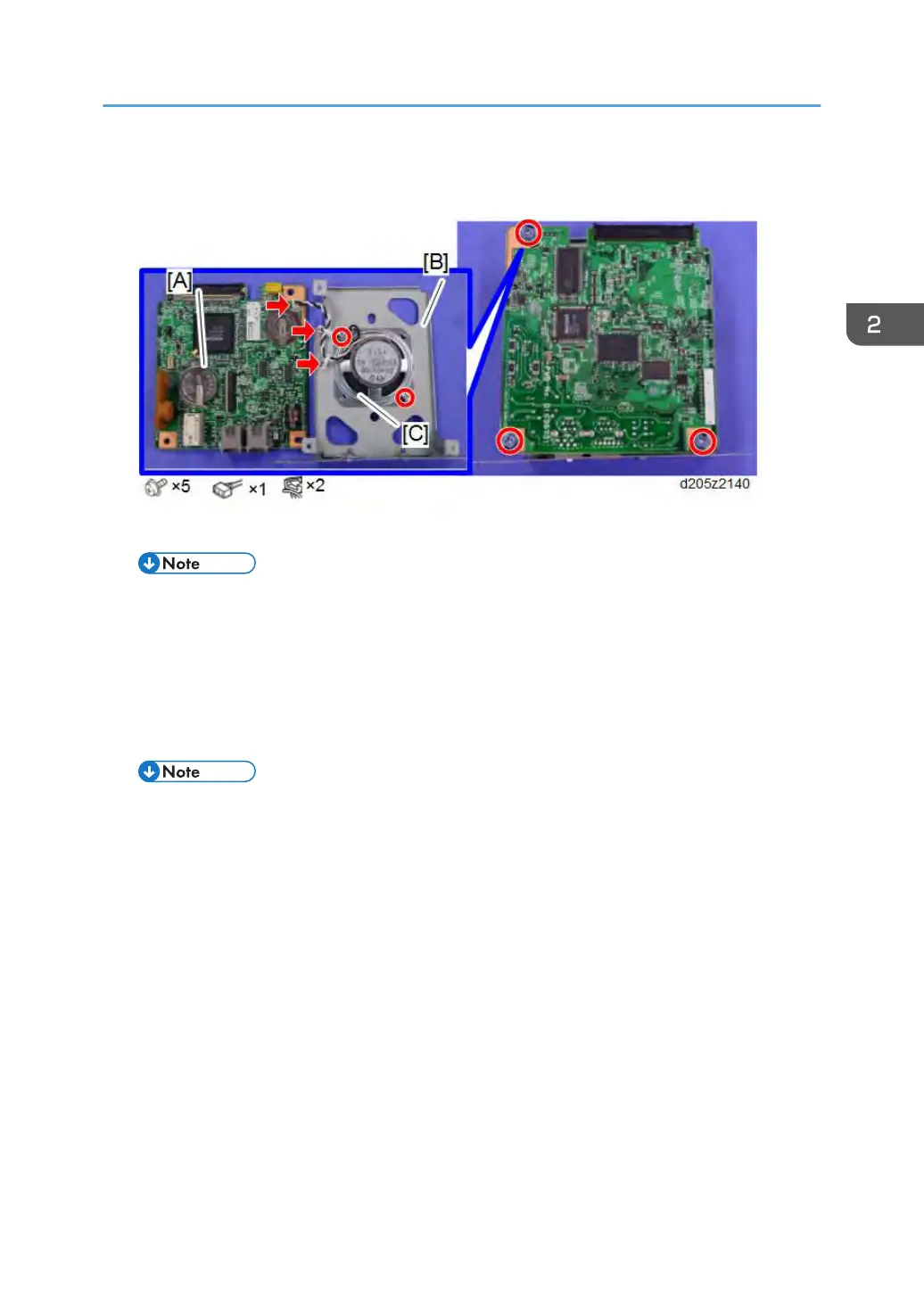
6. Separate the FCU board [A], FCU bracket [B], and the speaker [C]. Then replace the FCU
board with a new one.
7. Connect the flat flexible cable (a service part) to the old FCU board.
• When connecting the flat flexible cable, insert the connector straight.
8. Attach the jumper pin to the new FCU board, and connect the flat flexible cable to the
connector [A] of the old FCU board.
9. Turn on the main power switch.
10. SRAM data transmission starts. When the transmission is completed, you will hear a
beeper sound.
• The beeper sound is the same volume as the speaker sound.
•
The beeper sounds even if the sperker sound is turned off.
• If the beeper does not sound, turn the main power switch on and off repeatedly and do the
transmission procedure 2 or 3 times.
• If the beeper does not sound after turning the main switch on and off 3 times, you need to
input the settings stored in SRAM memory manually.
11. When “Ready” appears on the operation panel display, turn off the main power switch,
and then disconnect the flat flexible cable from the old FCU board.
12. Disconnect the flat flexible cable from the new FCU board.
13. Reassemble the machine.
FCU
23



 To Next Page