EasyManua.ls Logo

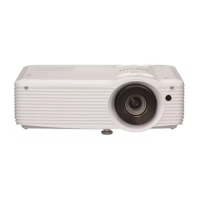
Ricoh PJ X4240N - User Manual

Ricoh PJ X4240N
160 pages
Print Icon
To Next Page IconTo Next Page
Loading...
For safe and correct use, be sure to read the Safety Information in
"Read This First" before using the machine.
Appendix
Maintenance
Troubleshooting
Changing the Projector Settings
Using the Projector via a Network
Projecting Images from a USB Memory
Device or Digital Camera
Projecting an Image
Preparations for Using the Projector
Operating
Instructions

Table of Contents

Other manuals for Ricoh PJ X4240N

Questions and Answers

  • S
    Shannon LopezSep 18, 2025
    How to troubleshoot image not projected normally on Ricoh PJ X4240N?
    • D
      Donna Michael DVMSep 18, 2025
      To troubleshoot an image that is not projected normally on your Ricoh Projector: * Make sure the input signal is compatible with the projector. * Check the status of the video tape or other video source. * Execute [Auto Set Signals] in [Image Adjustment]. * Check the settings of the computer's graphics driver.
  • S
    Steven JonesAug 25, 2025
    What does it mean if the lamp does not turn off and flashes every 2 seconds on Ricoh Projector?
    • E
      Ethan HallAug 25, 2025
      If the lamp on your Ricoh Projector does not turn off and flashes every 2 seconds, the projector has malfunctioned. Disconnect the power cord, wait a while, and then turn the projector on again. If the problem persists, contact your service representative.
  • J
    jenna54Aug 25, 2025
    How do I fix a dark image on my Ricoh PJ X4240N?
    • K
      Kathleen JonesAug 26, 2025
      To address a dark image on your Ricoh Projector: * Check the settings of [Brightness] and [Contrast] in [Image Adjustment]. * Make sure the lamp is not near the end of its service life. * Check the settings of [RGB Input Range] in [Image Adjustment]. * Make sure [3D Projection] in [Display Settings] is set to [Off].
  • S
    Sherry AbbottAug 26, 2025
    Why does my Ricoh PJ X4240N display a temperature error and shut off?
    • B
      Brittany RobertsAug 27, 2025
      If the Ricoh Projector displays a "Temperature Error" and turns off, it could be due to overheating or use in a high-temperature environment. Ensure that the projector's intake and exhaust vents are not blocked to allow proper ventilation. Then, disconnect the power cord, wait for a while, and turn the projector on again.
  • T
    Thomas SmithSep 22, 2025
    How do I fix a Ricoh Projector remote control that does not respond?
    • A
      Andrea FowlerSep 22, 2025
      If the remote control for your Ricoh Projector does not respond: * Make sure the ID assigned to the remote control and in the settings of [Remote Control ID] in [Default Settings 2] are the same. * Make sure the batteries in the remote control are not dead. * Make sure the batteries are correctly loaded into the remote control. * Make sure the remote control is inside its effective range. * Make sure there is nothing placed between the remote control and the projector. * Make sure the remote control receiver is not exposed to strong light.
  • V
    vgreenSep 23, 2025
    How to troubleshoot no images from USB devices on Ricoh PJ X4240N Projector?
    • S
      smithcrystalSep 23, 2025
      To troubleshoot why there are no images from USB devices on your Ricoh Projector: * Make sure the USB memory device is connected correctly. * Make sure the connected USB memory device is compatible with the projector. * Make sure there are JPEG or MPEG files saved on the USB memory device. * Make sure the compression format, file size, and other conditions are compatible with the projector.
  • C
    Connie TerrellSep 9, 2025
    What to do if my Ricoh PJ X4240N Projector turned off and the lamp flashes every 1 second?
    • J
      Jeremy LopezSep 9, 2025
      If your Ricoh Projector turned off during operation, or it does not turn on and flashes every 1 second, disconnect the power cord, and reinstall the lamp cover correctly.
  • B
    Brandy EllisSep 12, 2025
    Why does my Ricoh PJ X4240N Projector display 'Fan Error' and turn off?
    • M
      Melissa ScottSep 12, 2025
      If your Ricoh Projector displays a 'Fan Error' and turns off, the cooling fan in the projector has malfunctioned. Disconnect the power cord and contact your service representative.
  • C
    Christopher AdamsSep 3, 2025
    Why does my Ricoh Projector not turn on?
    • S
      Sheila HughesSep 3, 2025
      If your Ricoh Projector doesn't turn on, it may have malfunctioned. Disconnect the power cord and contact your service representative.
  • D
    Dr. Lisa AriasSep 1, 2025
    Why won't the lamp on my Ricoh PJ X4240N turn off and keeps flashing?
    • E
      Elizabeth WrightSep 1, 2025
      If the lamp on your Ricoh Projector does not turn off and flashes every 2 seconds, it means that the projector has malfunctioned. Disconnect the power cord, wait a while, and then turn on the projector again. If the problem persists, contact your service representative.

Summary

Preparations for Using the Projector

Main Functions

Describes key features like Auto eco, Quick on, Auto keystone, focus, AV Mute/Freeze, Magnify/Zoom, Timer, Wall color mode, and password settings.

Remote Control Operations

Covers control panel, remote functions, usage, battery loading, input, and computer operation.

Projecting an Image

Safety Precautions

Lists critical safety warnings before operating the projector to prevent hazards.

Using the Projector via a Network

Wired and Wireless Network Setup

Guides for connecting via Ethernet and setting up wireless LAN (Infrastructure/Ad Hoc).

Changing the Projector Settings

Image Adjustment Menu

Adjusts image quality (contrast, brightness, color levels, sharpness).

Display Settings Menu

Manages aspect ratio, auto keystone, zoom, and 3D projection settings.

Network;USB and Application Settings

Configures wired/wireless LAN, USB, and network applications like PJLink.

Troubleshooting

Indicator Status and Errors

Interprets projector indicator lights and error messages for troubleshooting.

Common Operational Problems

Provides solutions for frequent issues like no image, no sound, or connectivity problems.

Maintenance

Lamp Replacement and Management

Detailed steps for replacing the lamp and managing projector software utilities.

Appendix

Signal Compatibility Guide

Lists compatible video, Y/Pb/Pr, computer, and HDMI input signals and 3D formats.

Ricoh PJ X4240N Specifications

General IconGeneral
ResolutionXGA (1024 x 768)
Display TechnologyDLP
Throw Ratio1.96 - 2.15:1
Image Size30-300 inches
Speaker10 W
Brightness4200 ANSI Lumens
ConnectivityHDMI, VGA, USB
Zoom Ratio1.1x
Keystone CorrectionHorizontal ±30°
Input TerminalsHDMI, VGA, USB
Output TerminalsVGA
NetworkWired LAN
Lamp Life4, 000 hours (Normal mode), 5, 000 hours (Eco mode)
Projection LensF=2.5-2.7, f=22.5-24.75mm
Power Consumption350W (Normal mode), 280W (Eco mode)
Noise Level37 dB (Normal mode), 30 dB (Eco mode)

Related product manuals