© 2007 Buyers Laboratory Inc. WARNING: This material is copyrighted by Buyers Laboratory Inc. and is the sole property of Buyers Laboratory. Duplication of this proprietary report or excerpts from this report, in any man-
ner, whether printed or electronic (including, but not limited to, copying, faxing, scanning or use on a fax-back system), is illegal and strictly forbidden without written permission from Buyers Laboratory. Violators will be pros-
ecuted to the fullest extent of the law. To purchase reprints of any BLI reports or articles, contact BLI at (201) 488-0404. Buyers Laboratory Inc., 20 Railroad Avenue, Hackensack, NJ 07601. Contact us at info@buyerslab.com.
4
LAB TEST
Ricoh Aficio SP 4100N
Buyers LaBoratory Lab TesT RepoRT
© 2007 Buyers Laboratory Inc. WARNING: This material is copyrighted by Buyers Laboratory Inc. and is the sole property of Buyers Laboratory. Duplication of this proprietary report or excerpts from this report, in any man-
ner, whether printed or electronic (including, but not limited to, copying, faxing, scanning or use on a fax-back system), is illegal and strictly forbidden without written permission from Buyers Laboratory. Violators will be pros-
ecuted to the fullest extent of the law. To purchase reprints of any BLI reports or articles, contact BLI at (201) 488-0404. Buyers Laboratory Inc., 20 Railroad Avenue, Hackensack, NJ 07601. Contact us at info@buyerslab.com.
5
LAB TEST
Ricoh Aficio SP 4100N
Buyers LaBoratory Lab TesT RepoRT
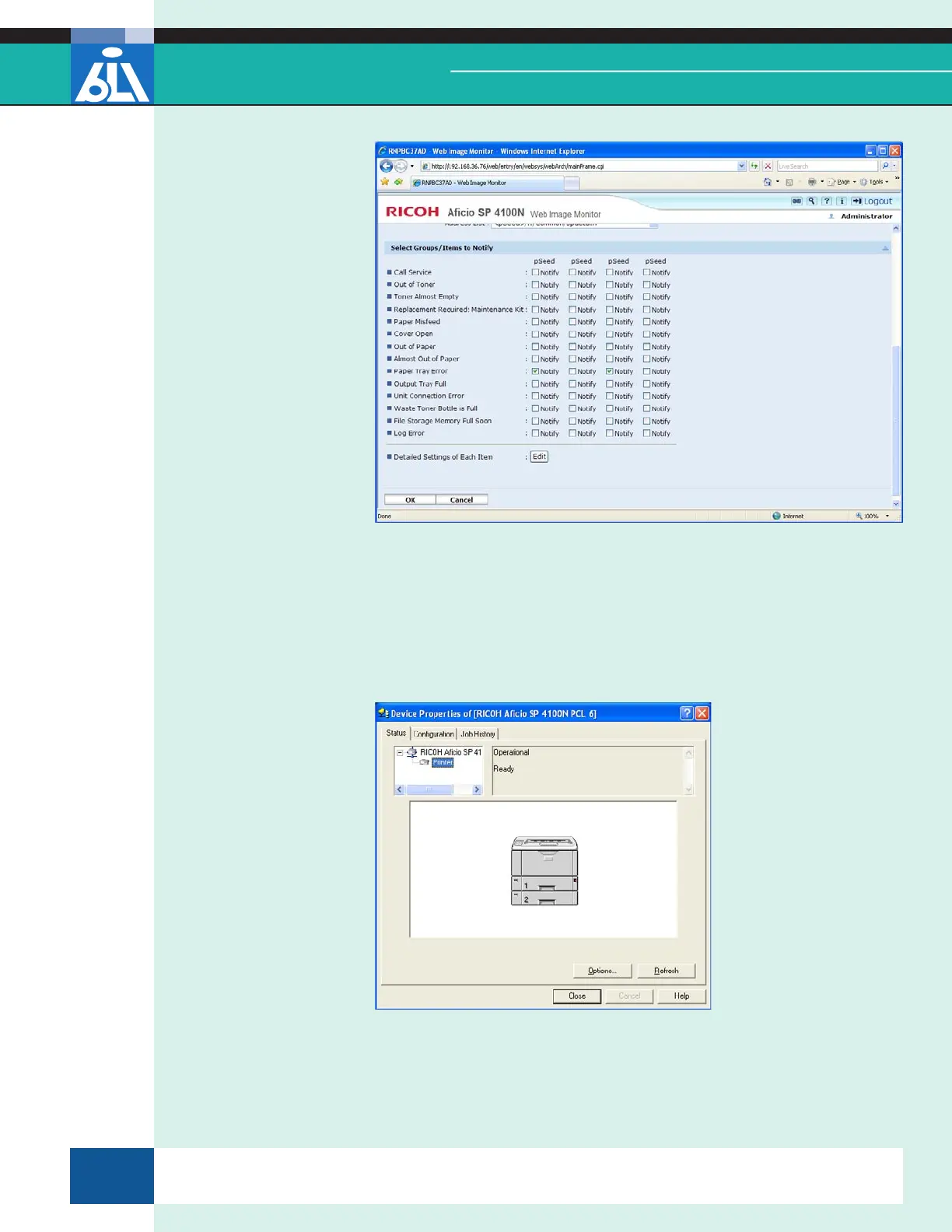
Web Image Monitor – E-Mail Alert Configuration Screen
Further information on device status is available if the user right-clicks on
the SmartDeviceMonitor icon on the taskbar tray (the menu shows each of
the drivers associated with SmartDeviceMonitor). If the user selects one of
the drivers, the Properties screen for that driver will open and display infor-
mation on device status, device conguration and job history.
SmartDeviceMonitor For Client
This report has been reproduced with the written permission of Buyers Laboratory Inc. Any duplication of this report, in whole or part, in any form or manner,
without the written permission of Buyers Laboratory, is unlawful and violators will be prosecuted. © 2007 Buyers Laboratory Inc. To purchase reprints,
contact BLI at (201) 488-0404 (x17) or at info@buyerslab.com.


 To Next Page