PAGE 18
CHANNEL SELECTION
Turn the RR50A on and the channel number will be displayed on the screen. Press the
“UP ARROW” or “DOWN ARROW“ to scroll to the desired channel.
Note: If there is blank channel between two channels, the radio will skip it and get to next channel.
For your reference a list of the available channels, corresponding frequencies and guidelines for
their use and selection can be found on page 15-16 of this instruction manual.
Channel input by keypad.
Under channel mode and FM Channel mode, type number of 3 digits (001-128) to switch to the
desired channel. If the input channel is not edited, transceiver would emit error prompt and back to
current channel. For example, if you type 001, then it gets channel No.1.
NOTE: Channels 05 and 35 are reserved for emergency use only.
TRANSMITTING
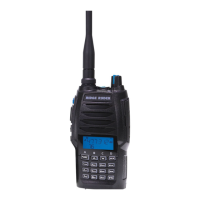
To transmit, press and hold the “(PTT) BUTTON” on the side of the radio. Hold the radio with the
microphone approximately 5-10cm from your face and speak. To complete transmission, release
the “(PTT) BUTTON”.
NOTE: Always ensure the channel is free before transmitting. See pg 21 for more information.
SCANNING
To scan, press and hold the “(FUNC) BUTTON”, the top left corner of the LCD Displays F icon and
then press (5SCAN) BUTTON” to begin frequency scan which will then scan through all 80 channels.
To stop scanning, press the “(ESC/M) BUTTON”. Channel scan can change scan direction by
pressing “UP ARROW” or “DOWN ARROW”.
Add/delete scan list.
This function is only accessible via using software.
RECEIVING
The LCD will display the signal strength icon when receiving a signal.
1. Press and hold [PF1] button till the transceiver emits “a tone”, and then release it to enter into
background operation.
2. Press “UP ARROW” or “DOWN ARROW” button to choose No.16 function item. It shows
“RESET” on LCD.
3. Press “(FUNC) BUTTON” to enter into function menu setup.
4. Press “UP ARROW” or “DOWN ARROW”, words OFF, INIT OR FACT appear on LCD. OFF: To
turn off (No operation). INIT: Restore all functions settings to factory default. (The channel information
will not reset). FACT: Restore all settings, including channels and functions setting, to factory default.
5.Press “(
*
ENT) BUTTON” on the very bottom right side of the key pad, this will reset to factory
settings and to conrm and exit..
FACTORY RESET


 To Next Page