PAGE 7
Battery pack:
Match the battery pack with the corresponding guides on the back of the transceiver, and push it
upwards till it is fully locked by the battery latch. To remove the battery lift locking battery latch up
(see arrow direction). Note: If the battery needs to be stored, keep it in status of 50% discharged.
Belt clip:
Place the belt clip to the corresponding grooves on the back of the transceiver, and then screw it
clockwise with screws provided.
The battery pack is not charged at the factory; please charge it before use. Charging the battery pack
for the rst time after purchase or extended storage (more than 2 months) may not bring the battery
pack to its normal operating capacity. After fully charging/ discharging cycle for two or three times,
the operating capacity will reach its best performance. The battery pack life is over when its operating
time decreases even though it is fully and correctly charged. Change to a new battery pack.
Note: Batteries are only covered by a 1 year warranty.
Charger Applied
Please use the specic charger appointed by our company. Other models may cause explosion and
personal injury. After installing the battery pack, if the radio displays low battery with red ashing
lamp or voice prompt, please charge the battery.
▲ Always switch OFF the transceiver equipped with a battery pack before charging. Otherwise, it will
interfere with correct charging.
▲ To avoid interference with charging, please do not cut off the power or take out the battery during
charging.
▲ Do not recharge the battery pack if it is already fully charged. This may shorten the life of the
battery pack or damage the battery pack.
▲ Do not charge the battery or transceiver if it is damp. Dry it before charging to avoid danger.
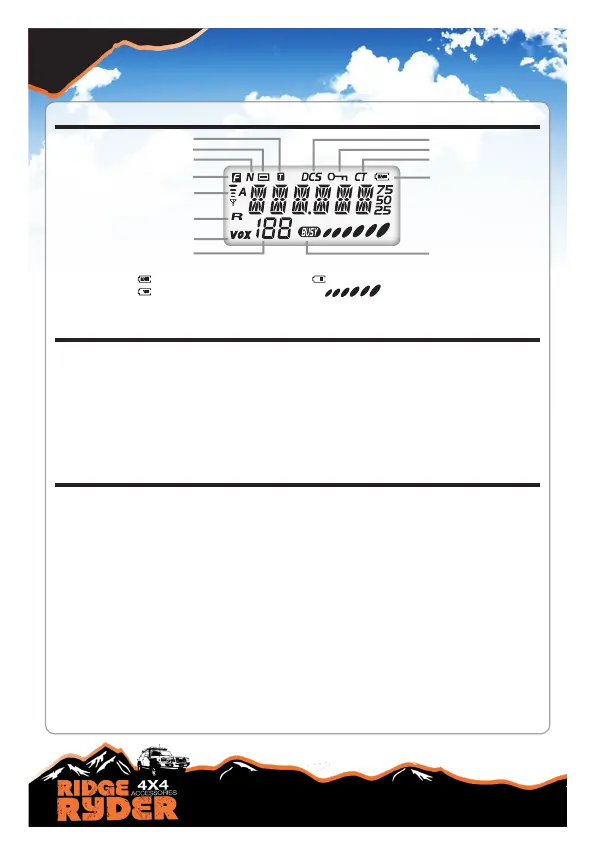
LCD DISPLAY
INSTALLING THE BATTERY & BELT CLIP
Talk around
Negative offset frequency
Narrow band
Func
Signal
Frequency Reverse
VOX Function
CTCSS
Keypad Lockout
DCS
Battery indicator
Busy Channel
Channel serial number/
FUNC menu s/no
NOTE:
Battery capacity indicator(full) No power,replace battery pack or charge battery
Battery capacity remnant Real time display receiving signal
strength/Power Indicator
CHARGING & BATTERY MAINTENANCE


 To Next Page