EasyManua.ls Logo

Riello MultiCOM 392 - User Manual

Riello MultiCOM 392
36 pages
Print Icon
To Next Page IconTo Next Page
Loading...
Question and Answer IconNeed help?

Do you have a question about the Riello MultiCOM 392 and is the answer not in the manual?

Summary

Introduction

Symbols Used in Manual

Describes symbols for Danger, Warning, and Information, indicating their meaning.

Safety and Precautions

General Safety Guidelines

Details crucial safety measures and precautions that must be followed when operating the device.

Environmental and Disposal Information

Environmental Protection Measures

Outlines the company's commitment to analyzing environmental aspects in product development.

Product Disposal Instructions

Provides guidance on the proper disposal of the device and its toxic internal materials.

Device Overview

Description and Compatibility

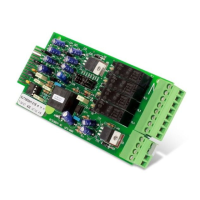
Describes the MultiCOM 392 and lists the compatible UPS series.

Input;Output Specifications

Details the functionality and characteristics of the device's inputs and outputs.

Output Ratings

Lists the maximum load current, AC voltage, and DC voltage for each output.

SERIES MST; MSM; MCT; MCM

Jumper Settings on UPS Interface Board

Instructions for configuring jumpers on the UPS interface board for compatibility.

Safety Tests

Procedures and requirements for performing essential safety tests on the device.

Jumper Settings and Installation

Steps for setting jumpers and physically installing the MultiCOM 392 into the UPS.

Configuration

Guide on how to configure the MultiCOM 392 using the UPS configuration software.

Output Configuration Details

Details the default configuration settings for the output contacts of the device.

Output Configuration Examples

Illustrative examples demonstrating different output contact behaviors based on configuration.

SERIES C1 T; C1 M

Jumper Settings and Installation

Steps for setting jumpers and physically installing the MultiCOM 392 into the UPS.

Configuration

Guide on how to configure the MultiCOM 392 using the CSS configuration software.

Output Configuration Details

Details the default configuration settings for the output contacts of the device.

Output Configuration Examples

Illustrative examples demonstrating different output contact behaviors based on configuration.

SERIES GMI

Jumper Settings and Installation

Steps for setting jumpers and physically installing the MultiCOM 392 into the UPS.

Configuration

Guide on how to configure the MultiCOM 392 using the UPS configuration software.

Output Configuration Details

Details the default configuration settings for the output contacts of the device.

Output Configuration Examples

Illustrative examples demonstrating different output contact behaviors based on configuration.

SERIES S3 T; S3 M; S3 U

Jumper Settings and Installation

Steps for setting jumpers and physically installing the MultiCOM 392 into the UPS.

Configuration

Guide on how to configure the MultiCOM 392 using the UPS configuration software.

Input Configuration

Details on configuring the device's inputs and their associated functions.

Output Configuration Details

Details the default configuration settings for the output contacts of the device.

Output Configuration Examples

Illustrative examples demonstrating different output contact behaviors based on configuration.

SERIES MPW; MPX

Jumper Settings and Installation

Steps for setting jumpers and physically installing the MultiCOM 392 into the UPS.

Configuration

Guide on how to configure the MultiCOM 392 using the MPW configuration software.

Output Configuration Details

Details the default configuration settings for the output contacts of the device.

Output Configuration Examples

Illustrative examples demonstrating different output contact behaviors based on configuration.

Summary

Introduction

Symbols Used in Manual

Describes symbols for Danger, Warning, and Information, indicating their meaning.

Safety and Precautions

General Safety Guidelines

Details crucial safety measures and precautions that must be followed when operating the device.

Environmental and Disposal Information

Environmental Protection Measures

Outlines the company's commitment to analyzing environmental aspects in product development.

Product Disposal Instructions

Provides guidance on the proper disposal of the device and its toxic internal materials.

Device Overview

Description and Compatibility

Describes the MultiCOM 392 and lists the compatible UPS series.

Input;Output Specifications

Details the functionality and characteristics of the device's inputs and outputs.

Output Ratings

Lists the maximum load current, AC voltage, and DC voltage for each output.

SERIES MST; MSM; MCT; MCM

Jumper Settings on UPS Interface Board

Instructions for configuring jumpers on the UPS interface board for compatibility.

Safety Tests

Procedures and requirements for performing essential safety tests on the device.

Jumper Settings and Installation

Steps for setting jumpers and physically installing the MultiCOM 392 into the UPS.

Configuration

Guide on how to configure the MultiCOM 392 using the UPS configuration software.

Output Configuration Details

Details the default configuration settings for the output contacts of the device.

Output Configuration Examples

Illustrative examples demonstrating different output contact behaviors based on configuration.

SERIES C1 T; C1 M

Jumper Settings and Installation

Steps for setting jumpers and physically installing the MultiCOM 392 into the UPS.

Configuration

Guide on how to configure the MultiCOM 392 using the CSS configuration software.

Output Configuration Details

Details the default configuration settings for the output contacts of the device.

Output Configuration Examples

Illustrative examples demonstrating different output contact behaviors based on configuration.

SERIES GMI

Jumper Settings and Installation

Steps for setting jumpers and physically installing the MultiCOM 392 into the UPS.

Configuration

Guide on how to configure the MultiCOM 392 using the UPS configuration software.

Output Configuration Details

Details the default configuration settings for the output contacts of the device.

Output Configuration Examples

Illustrative examples demonstrating different output contact behaviors based on configuration.

SERIES S3 T; S3 M; S3 U

Jumper Settings and Installation

Steps for setting jumpers and physically installing the MultiCOM 392 into the UPS.

Configuration

Guide on how to configure the MultiCOM 392 using the UPS configuration software.

Input Configuration

Details on configuring the device's inputs and their associated functions.

Output Configuration Details

Details the default configuration settings for the output contacts of the device.

Output Configuration Examples

Illustrative examples demonstrating different output contact behaviors based on configuration.

SERIES MPW; MPX

Jumper Settings and Installation

Steps for setting jumpers and physically installing the MultiCOM 392 into the UPS.

Configuration

Guide on how to configure the MultiCOM 392 using the MPW configuration software.

Output Configuration Details

Details the default configuration settings for the output contacts of the device.

Output Configuration Examples

Illustrative examples demonstrating different output contact behaviors based on configuration.

Riello MultiCOM 392 Specifications

General IconGeneral
Remote ManagementYes
Weight0.1 kg
CompatibilityRiello UPS
InterfaceRS232, USB
ProtocolsModbus, SNMP
TypeCommunication module
Communication InterfaceRS232, USB
Operating Temperature0°C to 40°C