MerCruiser Thunderbolt V Ignition
Page 53
Identifying the Thunderbolt V Version
Before using your TechMate Pro scan tool to extract information from the
underbolt V module you will rst need to determine which version of the
underbolt V is installed on the engine you are servicing.
e 1st and 2nd generation underbolt V modules are mounted on a brack-
et that is attached to the engine’s distributor as shown in Figure 25. On some
MerCruiser engines a Knock Sensor (KS) module is also mounted on the same
bracket. e 3rd generation underbolt V modules are mounted on the engine’s
exhaust elbow and may also have a Knock Sensor module mounted above it (see
Figure 26).
Be careful not to confuse the underbolt V module with the Knock Sensor
module that may be mounted adjacent to it.
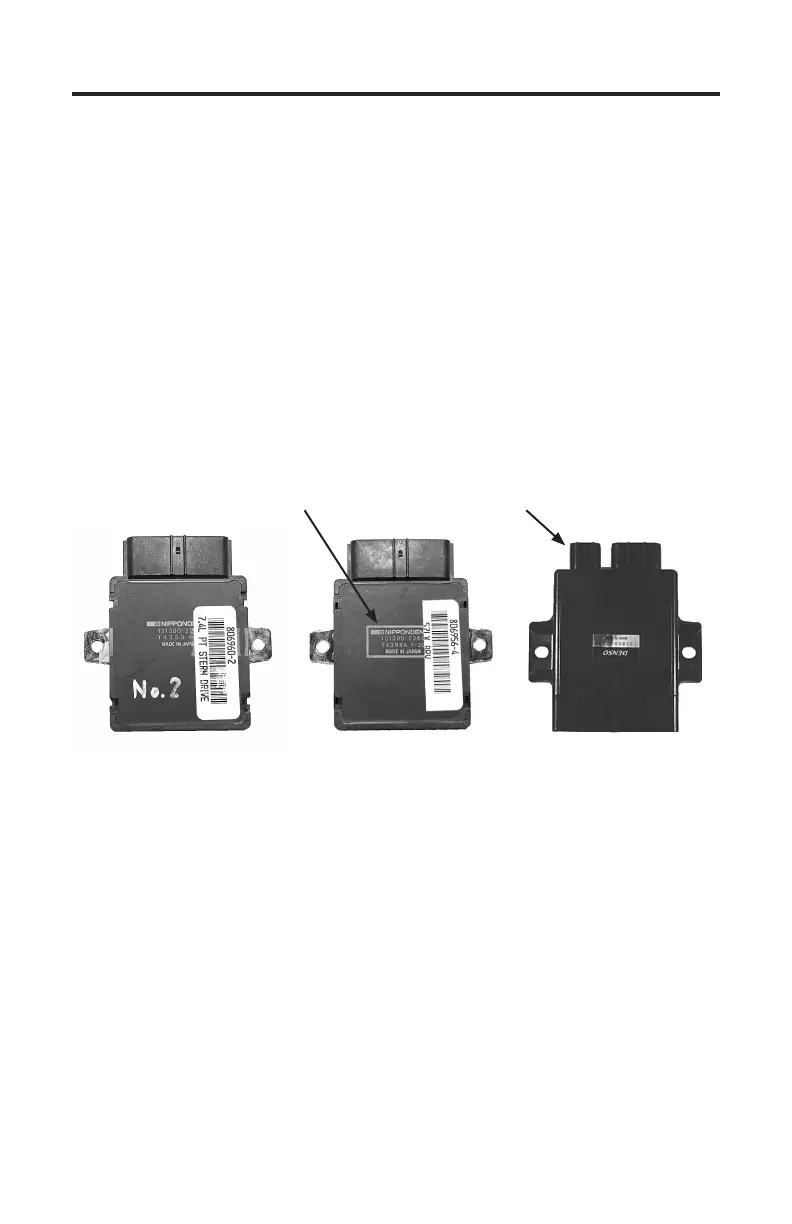
1st Generation
Thunderbolt V Module
2nd Generation
Thunderbolt V Module
3rd Generation
Thunderbolt V Module
White outline
around text
New Data
Connector
Referring to the images shown above you will notice that both the 1st and 2nd
generation underbolt V modules are physically identical. e telltale indicator
that identies the 2nd generation module is the white box that surrounds the
printed information on the module’s cover. underbolt V modules displaying
this white outline around their printed text are the 2nd generation modules
which are capable of providing engine operating data to the TechMate Pro scan
tool. Modules that do not display this white outline will NOT communicate with
the scan tool.
e 3rd generation underbolt V module has a redesigned case as shown above.
All 3rd generation modules are capable of providing data to the TechMate Pro
scan tool.


 To Next Page