MerCruiser Thunderbolt V Ignition
Page 54
Connecting to the 2nd Generation (1996-up) Thunderbolt V Module
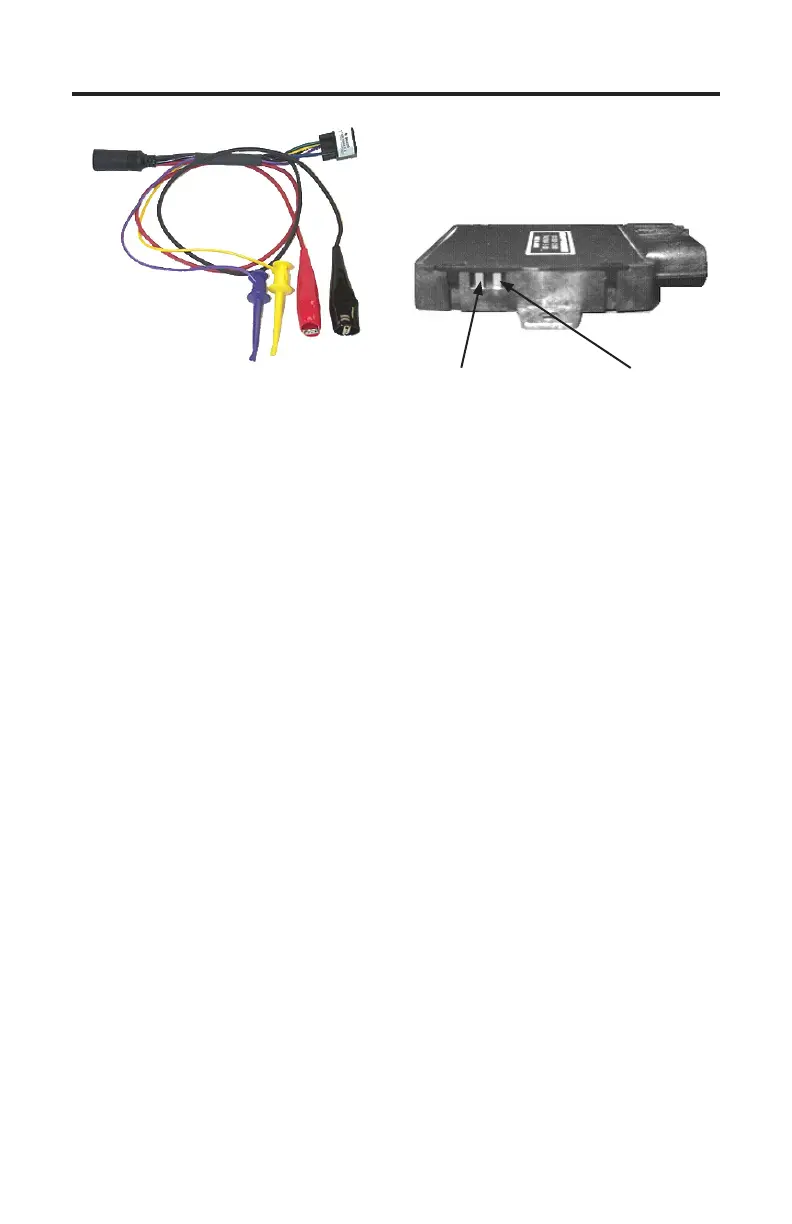
Connection of the TechMate Pro scan tool to the underbolt V module requires
scan tool adapter #94020 shown above. e adapter has 4 leads protruding from
it. Two leads are used for communicating with the 2nd generation underbolt
V module and 2 leads are used for battery power. To properly to the module,
carefully proceed through the following steps:
1) Before connecting the TechMate Pro scan tool to the underbolt V module
be sure the Engine’s Ignition Switch is in the OFF position.
2) Referring to the image above, locate the underbolt V data communication
terminals. ese terminals are normally covered at the factory by a small
amount of silicone rubber. Use a small jeweler’s screwdriver or a pair of
needle-nose pliers to carefully remove this material. is removal process will
expose the underbolt V’s two data communication terminals.
Note, the communication terminals should be recovered with silicone rubber
(GE RTV silicone or equivalent) when you have nished acquiring the
underbolt V’s data.
3) Referring to Figure 27 and Figure 28, connect the YELLOW and VIOLET
“mini-grabber” test clips to the underbolt V’s communication terminals
as shown. e “mini-grabber” clips are designed to hook underneath the
terminal pins. Pay careful attention, since the module’s pins do not have any
markings, to ensure connecting the colored leads to the proper terminals.
Additionally, be sure the test clips form a good electrical connection with the
underbolt V’s terminal pins.
Thunderbolt V Adapter
Rinda Tech P/N 94020
Data Terminal #1
Connect Yellow Lead
Here
Data Terminal #2
Connect Violet Lead
Here
Figure 29
2nd Generation Thunderbolt V
Data Terminals


 To Next Page