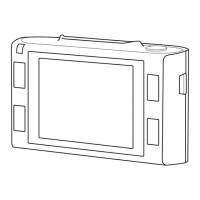
1.Modeicon–displaysvideoorphotomode
2.Filename–Displaysthecurrentlenameandletype
3.VideoorPhotopreview
4.Videolength
5.VideoorPhotodate&me
6.MoveUp
7.Pagenumber
8.MoveDown
Eachmode(Video,PhotoandPlayback)hasamenutoaccessvariousoponsandsengs.
MENU -AccessmenuforthecurrentlyselectedMode
s t -Selectrequiredopon
OK -Conrmselecon
MovieMode Setsresoluonofvideorecording FHD30P
MovieQuality Setsqualityofvideorecording SHQ
MovieClipTime Setslengthofeachvideorecording 3minutes
MovieOTime Setsdelaybeforecameraswitchesoaerpowerisremoved 0seconds
SoundRecord Turnsaudioon/o On
MICSensivity Setssensivityofmicrophone Low
Scene Setsmostsuitablescenedependingonlocaon Auto
Exposure Adjustsexposurefordierentlighngcondions 0EV
WhiteBalance Adjuststhelightbalancefordierentlighngcondions Auto
ISOSensivity AdjuststheISOfordierentlighngcondions ISOAuto
Colour Adjuststhecolourlevel Natural
Eect Setsthevideoeect Normal



 To Next Page