Need help?
Do you have a question about the ring Smart Dash Cam 3000 and is the answer not in the manual?
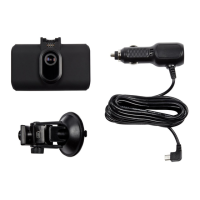
Lists and illustrates the various items included in the package for the dashcam.
Instructions on placing the dash cam behind the rear-view mirror for optimal viewing.
Steps to download the app and pair the dash cam with your mobile device via Wi-Fi.
Adherence to country-specific laws regarding recording duration, data transfer, and dash cam usage.
Ensuring the dash cam does not obstruct the driver's view and avoiding operation while driving.
Using the correct power adapter, cleaning procedures, and avoiding exposure to moisture.
Download the RINGconnect app from the App Store or Google Play and follow setup prompts.
Setting up the dash cam within the app by following on-screen instructions and enabling necessary settings.
Steps for cleaning the glass, warming the adhesive pad, and attaching the mount securely.
Connecting the power cable to the mount and routing it neatly within the vehicle interior to the 12V socket.
Steps to enable the dash cam's Wi-Fi hotspot and connect your phone for configuration and access.
Explanation of the Power, Menu, Up, Down, and Rec buttons for device operation and navigation.
How to enter and use Photo Mode, and navigate and view recorded content in Playback Mode.
Accessing and using the menu system to adjust settings and options.
Step-by-step guide for inserting and removing the memory card, including important warnings.
How the dash cam turns on with vehicle ignition and manual power on/off procedures.
Using the Up/Down and Rec buttons to select and play video files or view photos.
Steps to delete individual files or all files, including precautions for locked files and warnings.
Adjusting video resolution, loop recording length, G-sensor sensitivity, night vision, audio, and date stamp.
Managing Wi-Fi, Date/Time, Language, Plate Number, Screen Saver, Button Sound, and Parking Monitor settings.
Accessing firmware version information and resetting the camera to its original configuration.
Resolving issues related to failing to photograph or record video, or recording stopping unexpectedly.
Addressing blurred images by checking the lens for dirt or stickers and using appropriate cleaning methods.
How to reboot the device using the RESET button if it hangs or does not respond.
Steps to format the MicroSD card if it is not recognized by the dash cam.
Details on input voltage, charging voltage, and connection type for powering the device.
Information on the recommended temperature ranges for device operation and storage.
 General
| Brand | ring |
|---|---|
| Model | Smart Dash Cam 3000 |
| Category | Dash Cameras |
| Language | English |

 To Next Page