1.Turn on the Power
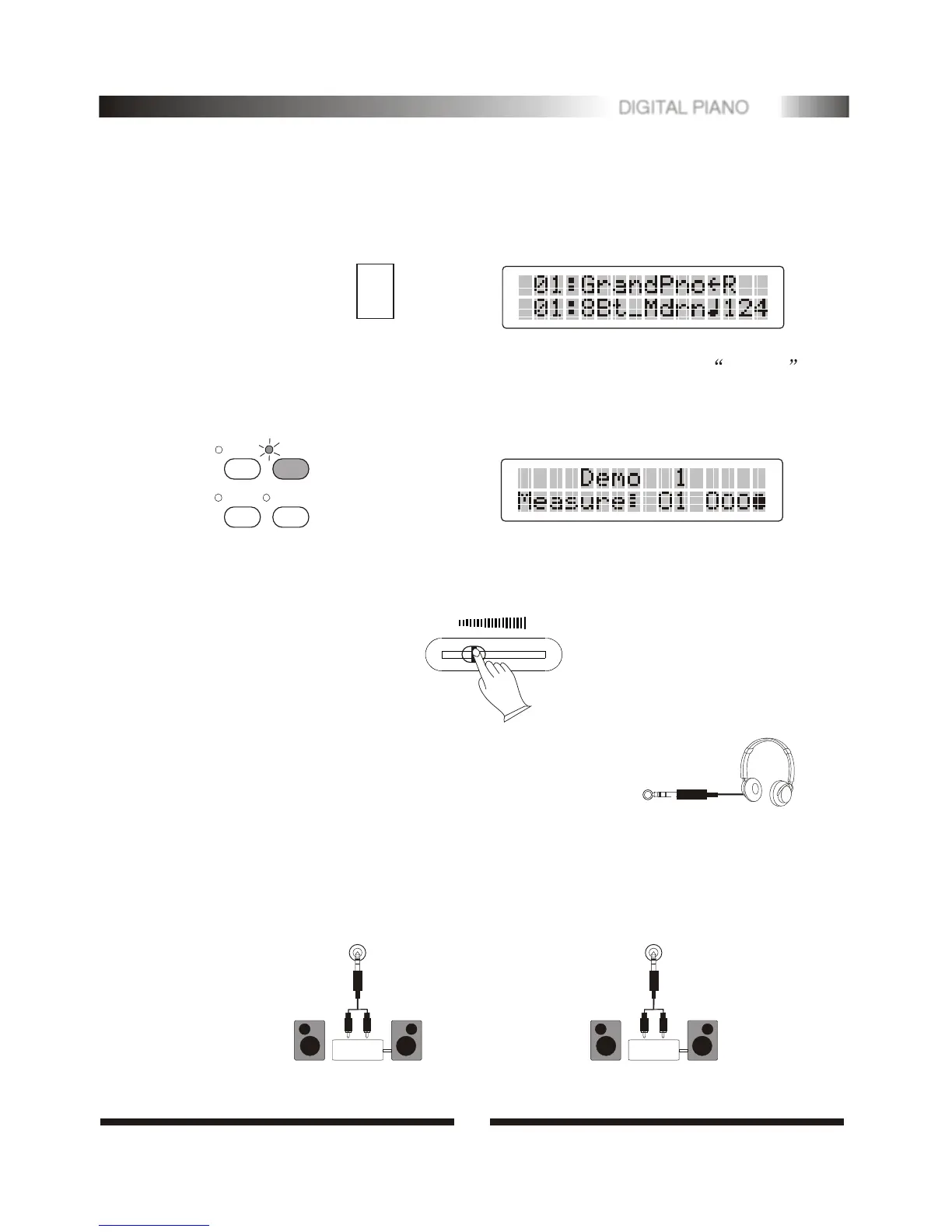
Turn on the power by pressing the POWER switch before playing. The pannel LCD
will light.
Play the Piano
ON
OFF
POWER
MULTI DISPLAY
2.Demo
The digital piano has 10 demo songs, press [DEMO] to start. LCD shows: Demo 1 .
All demonstrations will be played in sequence repeatedly. You can select one of the
demonstration by using [+/-] buttons.
CHORUS
DEMO
TRACK-3
TRACK-4
MASTER VOLUME MASTER VOLUME
MIN MIN MAX MAX
PHONES
3.Set the Volume
Initially set the MASTER VOLUME at the middle between the"MIN" and "MAX" .
You can adjust the volume to accommodate your playing.
4. Using Headphone
For private practicing and playing without disturbing others.
Connect a set of stereo headphones to the phones jack. Sound
from the built-in speaker system is automatically cut off
when you insert a headphone plug into this jack.
5. Using External Sound System
The Line Out jack can be used to deliver the output of the piano to a keyboard
amplifier, stereo sound system, mixing console or tape recorder and used the
Line In jack you can also play the piano through an external amplifier/speaker
system.
LINE OUT
Stereo
System
LINE IN
Stereo
System
4
4
DIGITAL PIANO


 To Next Page