12
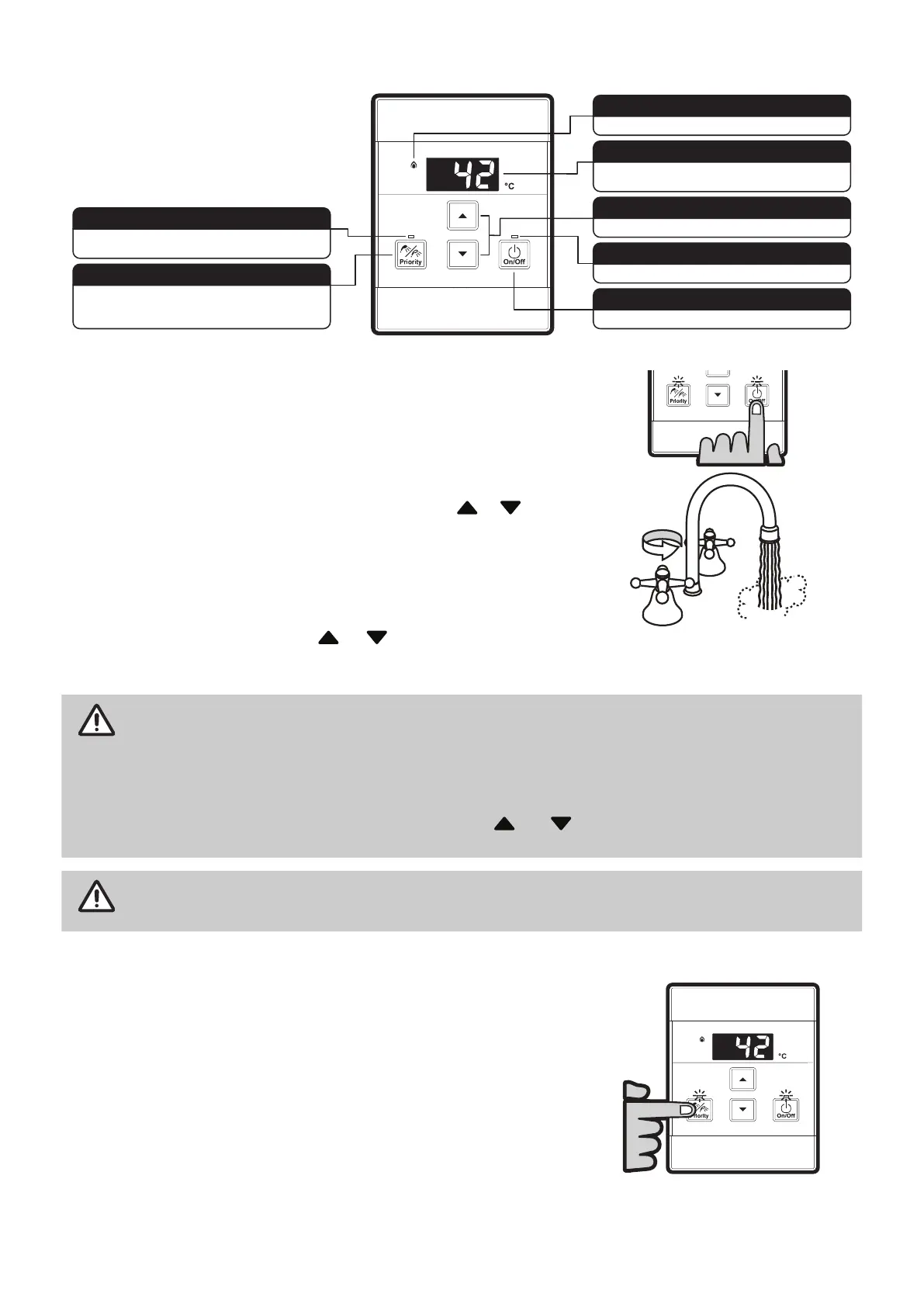
1.3.5 UNIVERSAL WATER CONTROLLER (MC-601) OPERATION
Indicates the temperature selected.
Error messages flash in event of a fault.
DIGITAL MONITOR
Used to select water temperature.
TEMPERATURE CONTROL BUTTONS
Indicates that the hot water heater is on.
WATER HEATER ON INDICATOR
Used to switch the water heater on and off.
ON/OFF BUTTON
Indicates if this water controller is in control of water
delivery temperature.
CONTROLLER PRIORITY INDICATOR
Used to transfer control priority between water
controllers. The water controller with priority has
command of the hot water delivery temperature.
PRIORITY TRANSFER BUTTON
Indicates that a water heater is delivering hot water.
WATER HEATER 'IN USE' INDICATOR
Turning on
If the water controller is switched off (no digits displayed in the digital
monitor window) press the On/Off button once. The ON indicator will
illuminate, indicating that the hot water unit will be ready to supply hot
water once a hot water tap is opened.
Adjusting temperature
Select the desired temperature using the Hot water temp
or buttons
until the required temperature is displayed on the digital monitor.
To operate the hot water unit, open any hot water tap. This will
automatically light the burner providing hot water. The water heater ‘In Use’
indicator will illuminate on the water controller(s).
Once the hot water is running, if the set temperature is either too hot
or cold press the Hot water temp or buttons until the desired
temperature is reached.
NOTE
Whilst hot water outlets are open, the set temperature may be lowered to a minimum of 37°C. For
safety, it cannot then be raised above 43°C until all hot water taps are closed.
Temperatures higher than 50ºC must not be able to be selected on controllers installed in
bathrooms, ensuites or toilets. This is to help reduce the risk of burns from hot water. If this is
not the case, the controllers have been incorrectly installed. Contact your installer.
The 'beep' sound can be muted by pressing the
and buttons simultaneously for more than
3 seconds. To cancel sound muting, simply repeat the process.
CAUTION
Always check outlet water temperature before use. The parent/carer
MUST
check the
temperature before placing dependants in contact with hot water.
Transferring priority
To control the water delivery temperatures when using two or more water
controllers it is necessary to have priority transferred to the water controller
you wish to use. Transferring of priority will
NOT
be possible if the ‘In Use’
indicator is currently illuminated, as this indicates hot water is flowing and
that another water controller already has priority.
An illuminated priority indicator confirms that the desired water controller
is in control of the water delivery temperature. If the priority indicator is not
illuminated press the priority transfer button once. The priority indicator
will illuminate, indicating that hot water temperature control has been
transferred and that the hot water unit will be ready to supply hot water
once a hot water tap is opened.
HOTHOT
COLDCOLD
ON!ON!



 To Next Page