Installation and Programming Manual
3-70
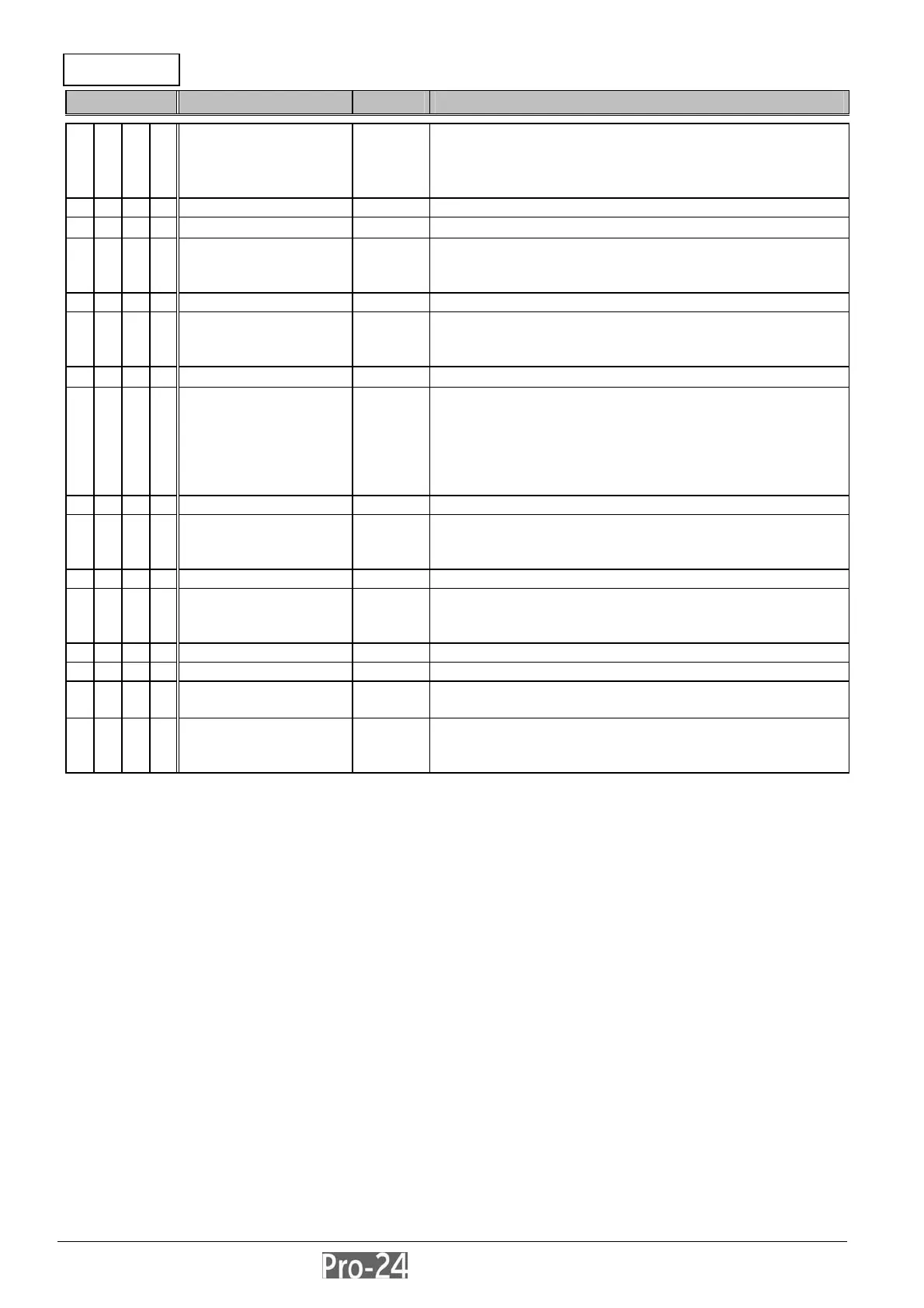
REPORT CODES: ARM (CLOSING) CODES
Quick Key Item Default Explanation
6 6
ARM (CLOSING)
CODES
---
• used to report the Closing Signals generated
when the system is ARMED (closed)–under a
variety of conditions)
• press [ENTER] to begin
ARM ---
User Armed --- press [ENTER]
6 6 1
00 enter the 2-digit User Code (e.g. 03) and the 2-digit
report code representing a system arming (closing)
event by a particular user
Keyswitch Armed * --- press [ENTER]
6 6 2
00 enter the 2-digit report code used when the system is
armed via a keyswitch
note that no specific user identification is possible
Auto Armed --- press [ENTER]
6 6 3
00 report code used when the system is Auto-Armed as
a result of a previously-scheduled user-determined
event
note that no specific user identification is possible–
see the Pro-24 User’s Manual for additional
information
Remote Armed --- press [ENTER]
6 6 4
00 report code used when the system is Remotely-
Armed as a result of actions performed by the Alarm
Company using its Upload/Download software
Quick Armed --- press [ENTER]
6 6 5
00 enter the 2-digit report code used when the system is
Quick-Armed
note that no specific user identification is possible
Force Armed * --- press [ENTER]
6 6 6 00 report code used when the system is Force-Armed
“Wireless Button”
Armed *
--- press [ENTER]
6 6 7
00 enter the 2-digit Wireless Button I.D. (e.g. 02) and the
2-digit report code to be generated when the system
is armed with this device
*
Not for UL Installations
INSTALLER PROG:
6)REPORT CODES
↓



 To Next Page