5
LED Indication
LED Description
LED1: POWER The power LED indicates the sounder operation
On: 13.8VDC is applied to the sounder.
Off: No power supply to the sounder.
Flash: Indicates a trouble in the sounder.
LED2 Status LED indication. (Stand-alone mode)
On: The LED terminal block input is connected to COM (0V).
Off: No connection to the LED terminal input.
NOTE:
In BUS configuration, the LED operation will be defined from the ProSYS control panel.
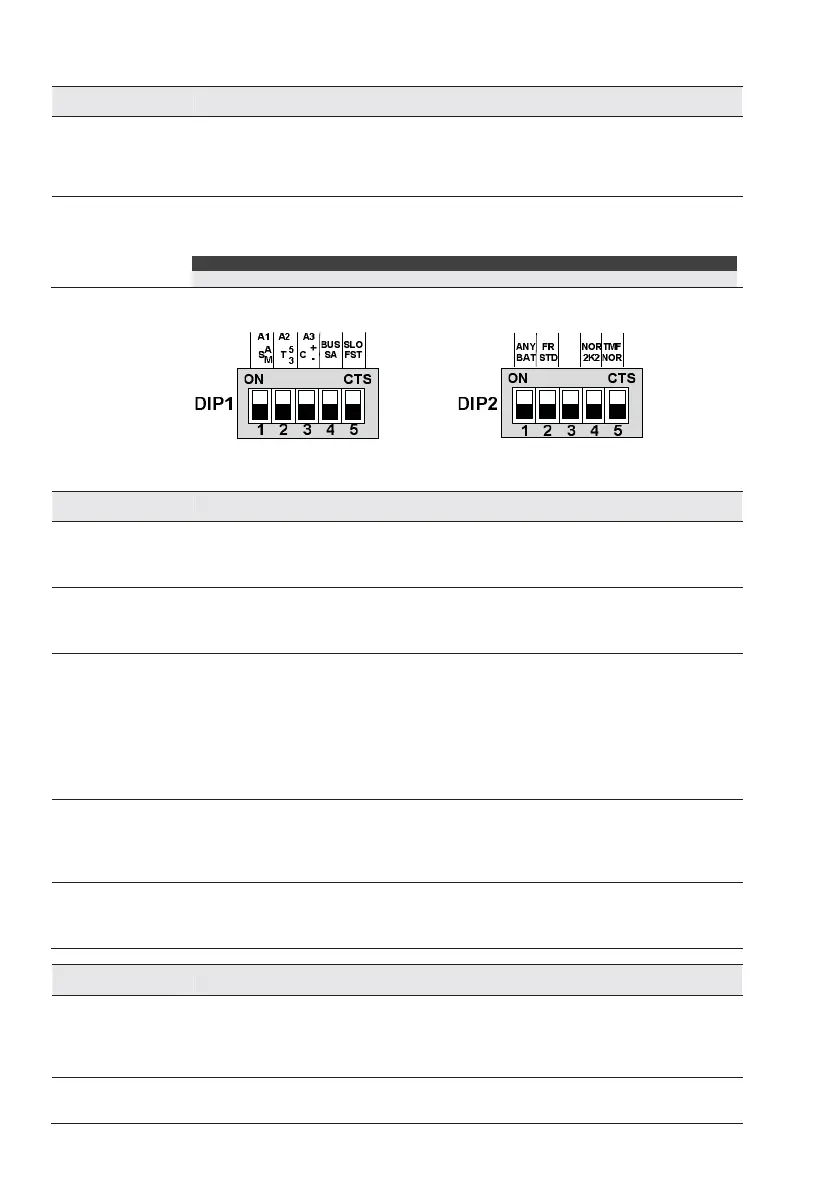
DIP-switch Settings
Stan d-Alone Mode
DIP1 Description
SW1 - STROB
(Default:
ST Trigger)
Defines the strobe operation mode.
On (SA - Automatic): The strobe will follow the sounder activation (C+/-)
Off (SM – Manual): The strobe will follow the triggering of the STB input
SW2
(Default:
3 minutes)
Defines the duration time of the sounder activation (Stand Alone mode only).
On (T5) : Bell Time 5 min
Off (T3) : Bell Time 3 min
SW3
(Default:
Default: C-)
Select the triggering command that will activate the sounder.
On: C+ Mode:
Terminal C+/- to positive; , sounder is silent.
Terminal C+/- open, sounder is activated
.Off: C- Mode:
Terminal C+/- to negative; , sounder is silent.
Terminal C+/- open, sounder is activated
SW4
(Default:
Stand Alone)
Defines the operation mode of the sounder.
On (BUS): BUS mode configuration. Use this option for connection to the RISCO
BUS.
Off (SA): Stand Alone configuration. Use this option for connection to any panel.
SW5
(Default: Fast)
Defines the siren sweep sound
On (SLO): Slow
Off (FST) : Fast
DIP2 Description
SW1
(Default:
Battery Trouble)
Defines the triggering of the TRBL output as follows:
On (ANY): Follow any trouble in the sounder (low battery, input voltage, speaker
fault)
Off (BAT): Follow battery troubles only (Low voltage or fail in battery load test)
SW2
(Default: Standard)
Sounder's sound
On (FR): Sound is adjusted to French standard NFA2P


 To Next Page