9
Ordering Information
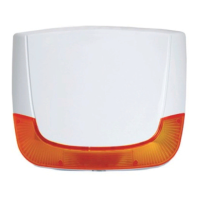
ProSound 200P
Outdoor polycarbonate sounder, amber lens cover, with anti-approach protection
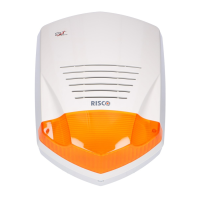
ProSound 200 Outdoor polycarbonate sounder, amber lens cover
External Sounder – ProSYS Programming Instructions
Introduction
The following section describes the additional dedicated ProSound software programming options, added to the
ProSYS software. Up to 8 sounders can be added to the system and each can be assigned to any partition.
We recommend reading and fully understanding the ProSYS Installation and User Manual, before programming the
ProSound. It is also recommended to read the ProSound Installation section.
NOTE:
For programming Prosound with the LightSYS, refer to the LightSYS installation manual.
NOTE:
The ProSound is compatible with the ProSYS software Version 4.0 and above.
The ProSound can be programmed via the U/D Software from Version 2.0 and above
For maximum operation stability, it is best NOT to exceed a total of 300 meters (1000 feet) of wiring
between the ProSYS and the ProSound.
Adding / Deleting the ProSound
1. From the installer menu enter the Add/Delete menu: Quick Key [7][1].
2. Press [9][4] for Sounder Expander.
3. Use the
/ key to choose either NONE or SIRN (Sounder).
4. Press
/ .
5. Assign Sounder 1 to the selected partitions using the [1 to 8] keys and press
/ .
6. Use the
/ key to choose if the sounder will be audible [Y] or not [N] and press
/ .
7. Use the
/ key to choose if the squawk sound will be audible [Y] or not [N] and press /
.
8. Use the
/ key to choose if the squawk strobe is enabled [Y] or not [N] and press / .
9. Repeat the process for the other sounders in the system (up to 8) or press
to return to the previous
programming level.
Installer Menu: Configuring the ProSound Parameters
Configuring the sounder parameters is performed from the miscellaneous menu.
1. From the installer menu access the Miscellaneous menu, Quick Key [8].
2. Press [2] to access the Siren menu options.
3. Enter the digit of the sounder that you want to program and then press
/ . You can now program the sounder parameters as follows.
Miscellaneous: Siren
Quick Keys Parameter
[8][2][1]
Strobe Control
Defines the Strobe operation mode
[8][2][1][1]
Always Off
The strobe is deactivated.
[8][2][1][2]
Follow Bell (Default)
The strobe is activated when the sounder bell is triggered.
[8][2][1][3]
Follow Alarm
The strobe is activated when an alarm occurs in the selected sounder’s partitions.


 To Next Page