21
Headphone socket
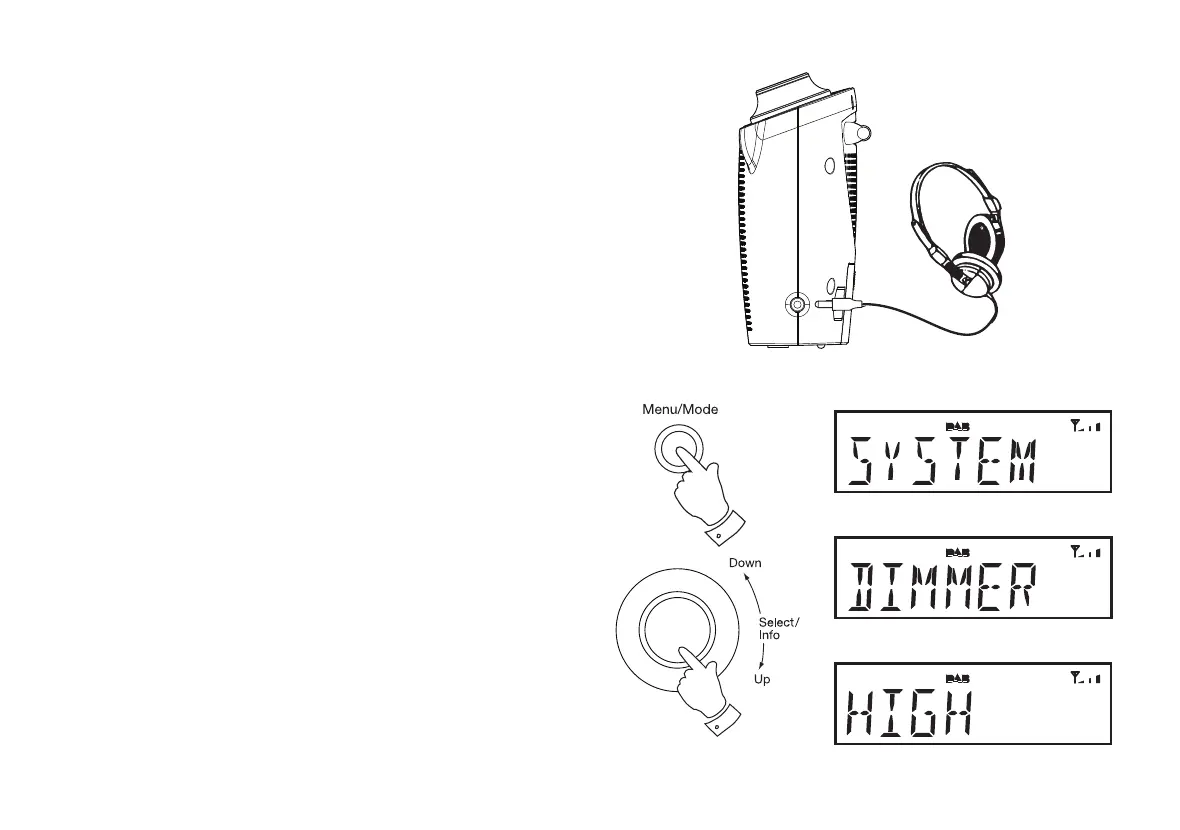
A 3.5mm Headphone Socket located on the right hand side of your radio
is provided for use with either headphones or an earpiece. Inserting a plug
automatically mutes the internal loudspeaker.
IMPORTANT: Excessive sound pressure from earphones and headphones
can cause hearing loss.
The headphone socket is compatible with stereo and mono headphones
but the audio will always be heard as mono.
Dimmer function
The brightness of the display can be adjusted. If you use the unit in a
bedroom, you may prefer a lower brightness level than the standard setting.
The dimmer can be set to Low or a High setting.
1. Press and release the On/Standby button to switch on the radio.
2. Press and release the Menu button. The main menu will show on the
display.
3. Rotate the Tuning/Select control until 'SYSTEM' appears on the
display. Press and release the Tuning/Select control.
4. Rotate the Tuning/Select control until 'DIMMER' shows on the display.
Press and release the Tuning/Select control to enter the dimmer
settings.
5. To adjust the brightness rotate the Tuning/Select control and choose
either the Low or High setting. Press and release the Tuning/Select
control to set the desired level. The backlight will change at this time.
3-5
2













 To Next Page