Pre-setting stations
You may store up to 10 different stations on each of the three wavebands
giving a total of 30 preset stations.
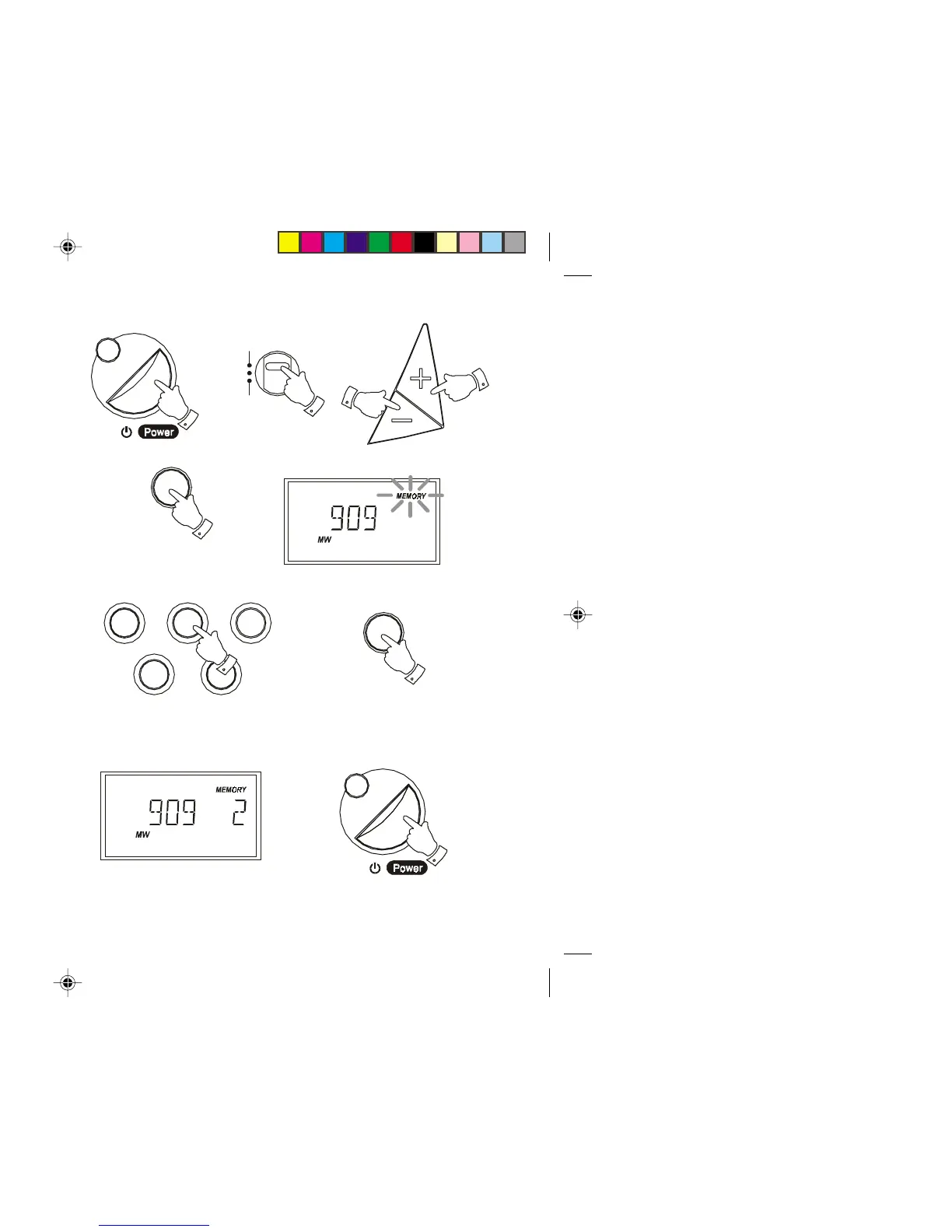
1. Switch on your radio using the Power button.
2. Select the desired waveband using the Waveband switch.
3. Tune into the required station using one of the tuning methods
previously described.
4. Press and release the Memo button, the word 'Memory' will flash in
the display.
5. Whilst 'Memory' is flashing press one of the Preset buttons under
which you wish to store the station. Presets 6 to 10 are obtained by
pressing the Preset button twice.
6. Press the Memo button to store the station. The preset number will
now appear under 'Memory' in the display.
7. Repeat the above procedure for the remaining presets
7. Press the Power button to turn off your radio.
Note: Pre-setting of stations can only be carried out whilst 'Memory' is
flashing in the display (5 seconds).
FM
MW
LW
Memo
Tuning
Memo
Display
7
9
8
123
45
6
10
Display
13
R9906 Instruction Book.pm6 24/10/99, 14:2214



 To Next Page