Tuning
Setting the clock automatically
The clock time and day of week can be set automatically when receiving
an RDS station that transmits clock time (CT). The CT information is
transmitted once every minute. If the station has sufficient signal strength
the clock will set within one or two minutes.
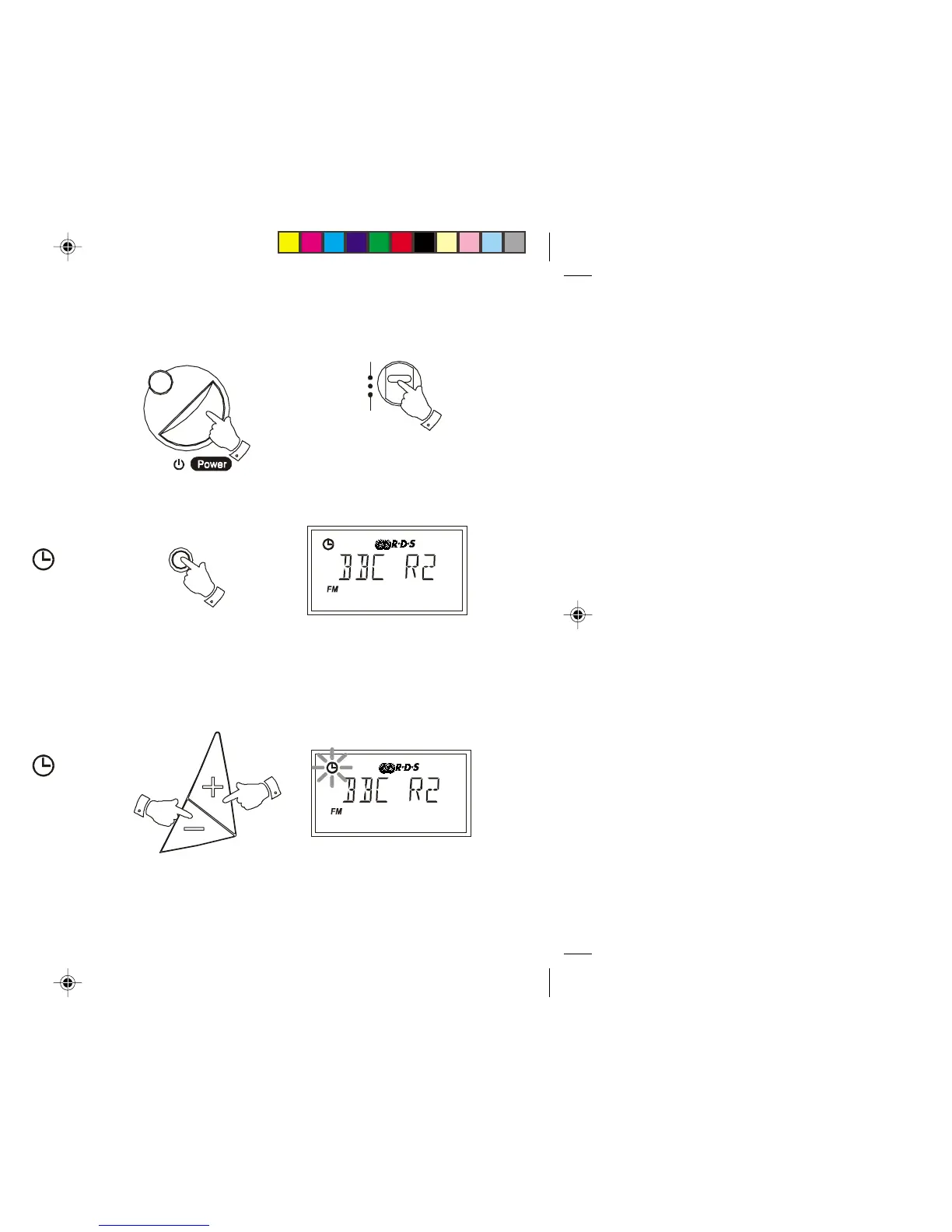
1. Switch on the radio with the Power button.
2. Select the FM waveband using the Waveband switch.
3. Fully extend the Telescopic aerial.
5. Repeatedly press the Time button until the auto time symbol
appears in the display.
6. Press and hold down the Tuning + or - buttons until the frequency in
the display begins to change rapidly, release the button.
7. The radio will now start to search the FM waveband and will stop when
it finds a station of sufficient strength. If the station is of sufficient
strength the symbol will light up in the liquid crystal display.
8. The auto time indicator will flash in the liquid crystal display
indicating that the radio is waiting for the RDS time signal. The
indicator will stop flashing when the time is set.
If the clock does not set within three to four minutes, the radio station
may not be transmitting clock time (CT) information - try another radio
station.
The clock time and day of week are updated each time the radio is
switched on and whilst listening to an RDS station transmitting clock
time (CT) information.
Display
FM
MW
LW
Tim e
7
R9906 Instruction Book.pm6 24/10/99, 14:228



 To Next Page